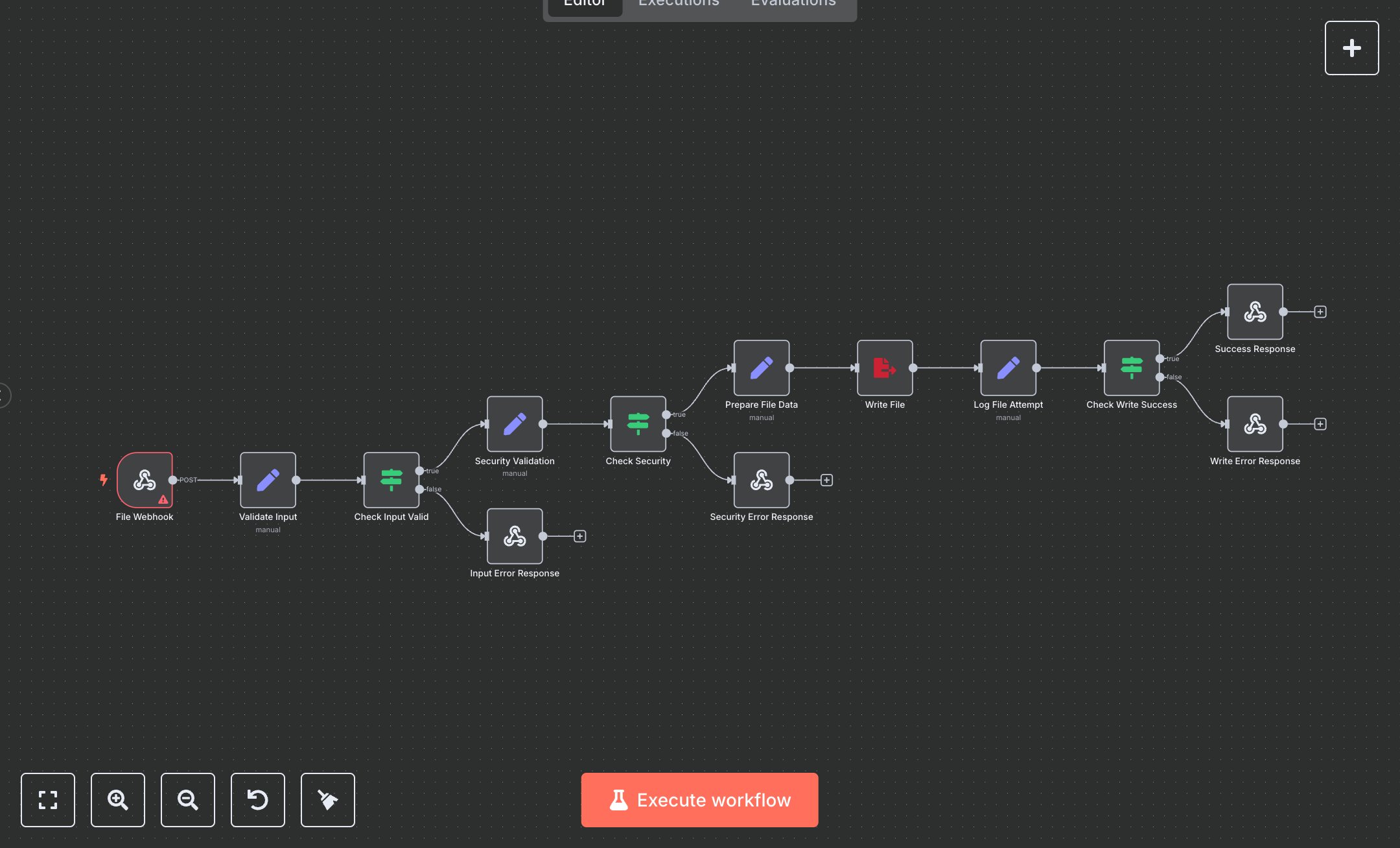
File Writer Automation Service
This workflow automates writing files to a server via webhook requests. Key nodes include File Webhook (receives requests), Validate Input (checks file name/data), Check Input Valid (ensures valid inputs), Security Validation (sanitizes inputs), Check Security (enforces size limits), Prepare File Data (formats content), Create Binary Data (prepares file), Write File (saves to disk), Log File Attempt (records activity), Check Write Success (validates result), Success Response (returns output), Input Error Response (handles missing inputs), Security Error Response (blocks unsafe files), and Write Error Response (manages failures). No external API is used.\n\nSetup Requirements: Install n8n from n8n.io or sign up at cloud.n8n.io. Import the JSON into n8n’s workflow editor. No external API credentials are needed. Set up File Webhook with path write-file and header authentication (e.g., Bearer YOUR_TOKEN). Configure your app to send POST requests with fileName, data (string or object), and optional format (json, txt, csv, log) and outputDirectory (/tmp). Ensure files are under 1MB. Handle errors like missing file name (400: Invalid input data) or oversized files (413: Security validation failed). Set header auth in n8n (Credentials > HTTP Header Auth).\n\nTesting and Deployment: Import the JSON into n8n. Send a POST request to the webhook URL with JSON: {"fileName": "test.json", "data": {"key": "value"}, "format": "json", "outputDirectory": "/tmp"} and valid auth header. Verify Validate Input checks inputs, Security Validation sanitizes file name, and Write File saves to /tmp. Confirm Success Response returns status 200 with file.path. Test with missing file name ({"fileName": ""}) to trigger Input Error Response (400: FileName required). Test with oversized data (>1MB) to trigger Security Error Response (413: File exceeds 1MB). Test an invalid directory to trigger Write Error Response (500: Unable to write file). Monitor logs for rate limits. If writing fails, verify directory permissions and file size. Activate the workflow in n8n and ensure the webhook is live. Deploy for secure file writing with error handling and response validation.
$5.49
Workflow steps: 13
Integrated apps: webhook, set, if