WordPress CRUD Operations
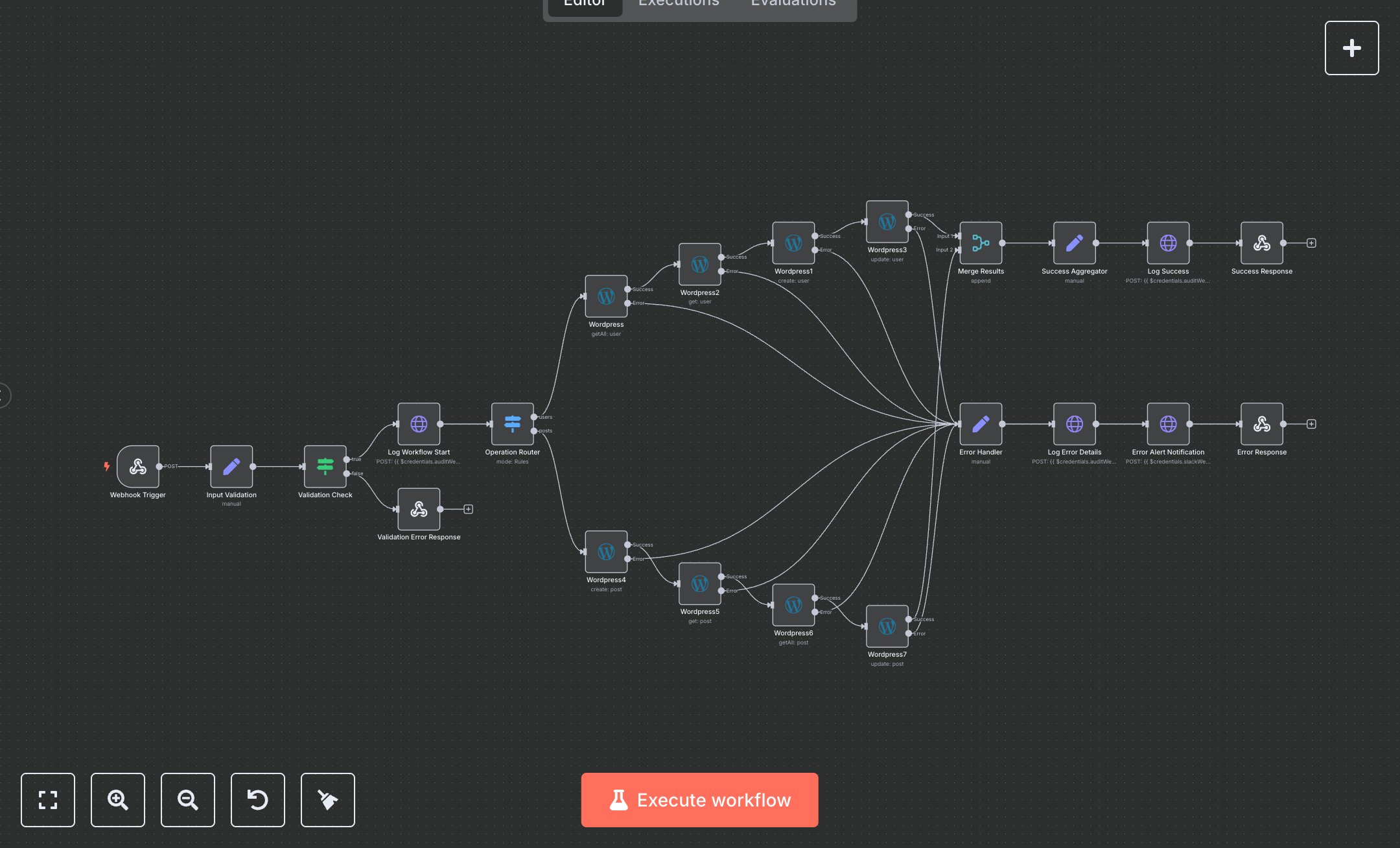
This workflow performs WordPress CRUD operations (create, read, update) for users and posts with logging. Key nodes include Webhook Trigger (receives requests), Input Validation (sets operation/URL), Validation Check (ensures valid input), Log Workflow Start (logs start), Operation Router (routes to user/post operations), Wordpress nodes (user/post CRUD), Merge Results (combines outputs), Success Aggregator (formats response), Log Success (logs completion), Success Response (returns success), and error-handling nodes (Validation Error Response, Error Handler, Log Error Details, Error Alert Notification). It uses WordPress and Slack APIs.\n\nSetup Requirements: Install n8n from n8n.io or sign up at cloud.n8n.io. Import the JSON into n8n’s workflow editor. Set up a WordPress site with REST API enabled (install WP REST API plugin if needed). Create an application password in WordPress (Users > Profile > Application Passwords, generate one). In n8n, configure WordPress credentials (Base URL, Username, Application Password). Set up a Slack webhook at api.slack.com (Apps > Incoming Webhooks, create webhook for #wordpress-alerts). Configure Webhook Trigger path (wordpress-crud) and integrate with your app to send POST requests with operation (demo, user_only, post_only, full_crud) and baseUrl. Optionally, set an audit webhook URL (e.g., https://your-logging-endpoint.com/api/wordpress-operations). Handle errors like invalid credentials (401: Unauthorized) or invalid operation (400: validation_failed).\n\nTesting and Deployment: Import the JSON into n8n. Send a POST request to the webhook URL (from Webhook Trigger) with JSON: {"operation": "full_crud", "baseUrl": "https://your-wordpress-site.com"}. Verify the Input Validation sets operation and URL, and the Validation Check passes. Confirm WordPress nodes create/read/update users/posts, and Success Response returns status 200 with operation details. Check Slack for error notifications. Test with an invalid operation to trigger Validation Error Response (400: Invalid operation). Use incorrect WordPress credentials to trigger Error Handler (wordpress_operation_failed). Monitor logs for rate limits (429: Too many requests). If operations fail, verify WordPress API settings and credentials. Activate the workflow in n8n and ensure the webhook is live. Deploy for automated WordPress content management with logging.
$6.99
Workflow steps: 22
Integrated apps: webhook, set, if