Mattermost Startup Alerts for n8n with Error Recovery and Logging
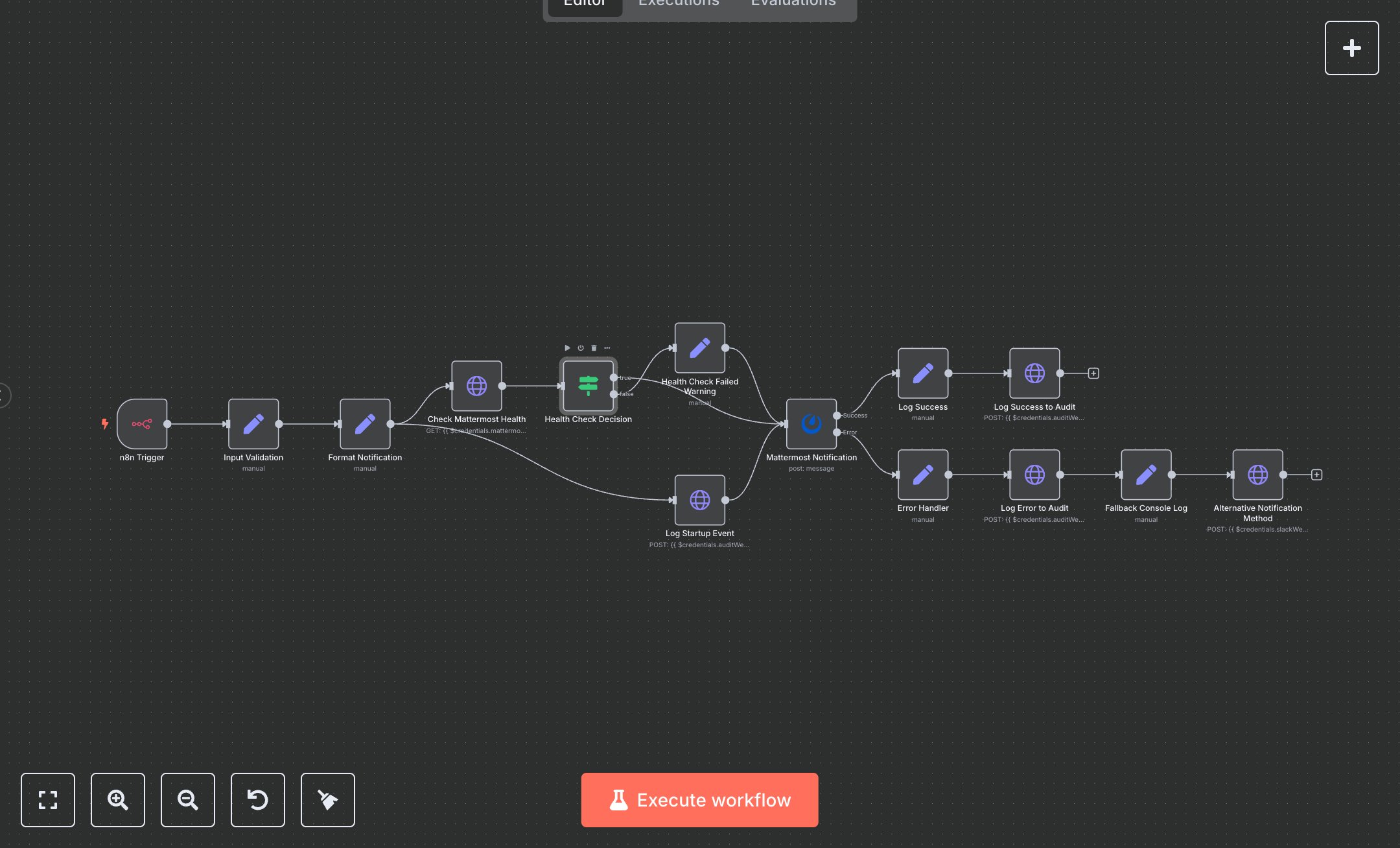
This workflow sends a Mattermost notification when an n8n instance starts, with logging and health checks. Key nodes include n8n Trigger (detects startup), Input Validation (sets instance details), Format Notification (creates message), Check Mattermost Health (verifies API), Health Check Decision (routes based on status), Mattermost Notification (sends message), Log Startup Event (logs start), Log Success (logs success), Log Success to Audit (logs completion), Error Handler (captures errors), Log Error to Audit (logs errors), Fallback Console Log (logs fallback), and Alternative Notification Method (sends Slack fallback). It uses Mattermost and Slack APIs.\n\nSetup Requirements: Install n8n from n8n.io or sign up at cloud.n8n.io. Import the JSON into n8n’s workflow editor. Get a Mattermost API token from your Mattermost instance (User Settings > Personal Access Tokens, create token). Set up a Slack webhook at api.slack.com (Apps > Incoming Webhooks, create webhook for #alerts). In n8n, configure credentials: Mattermost (Base URL, Access Token), Slack (Webhook URL). Optionally, set an audit webhook URL for logging (e.g., https://your-logging-endpoint.com/api/logs). No webhook trigger is used, so no external POST requests are needed. Handle errors like invalid Mattermost tokens (401: Unauthorized) or missing channel ID (400: Invalid input).\n\nTesting and Deployment: Import the JSON into n8n. Test by restarting n8n to trigger n8n Trigger. Verify Input Validation sets instanceId, version, and channelId. Confirm Format Notification creates a formatted message, and Check Mattermost Health returns OK. Ensure Mattermost Notification posts to the specified channel and Log Success to the Audit logs completion. Check the Alternative Notification Method sends a Slack message if Mattermost fails. Test with an invalid Mattermost token to trigger Error Handler and Log Error to Audit (error: mattermost_notification_failed). Monitor logs for rate limits (429: Too many requests) or health check failures (warning: mattermost_health_check_failed). If notifications fail, verify Mattermost credentials and server URL. Activate the workflow in n8n to run on startup. Deploy for automated startup notifications with error logging.
$6.99
Workflow steps: 14
Integrated apps: n8nTrigger, set, httpRequest