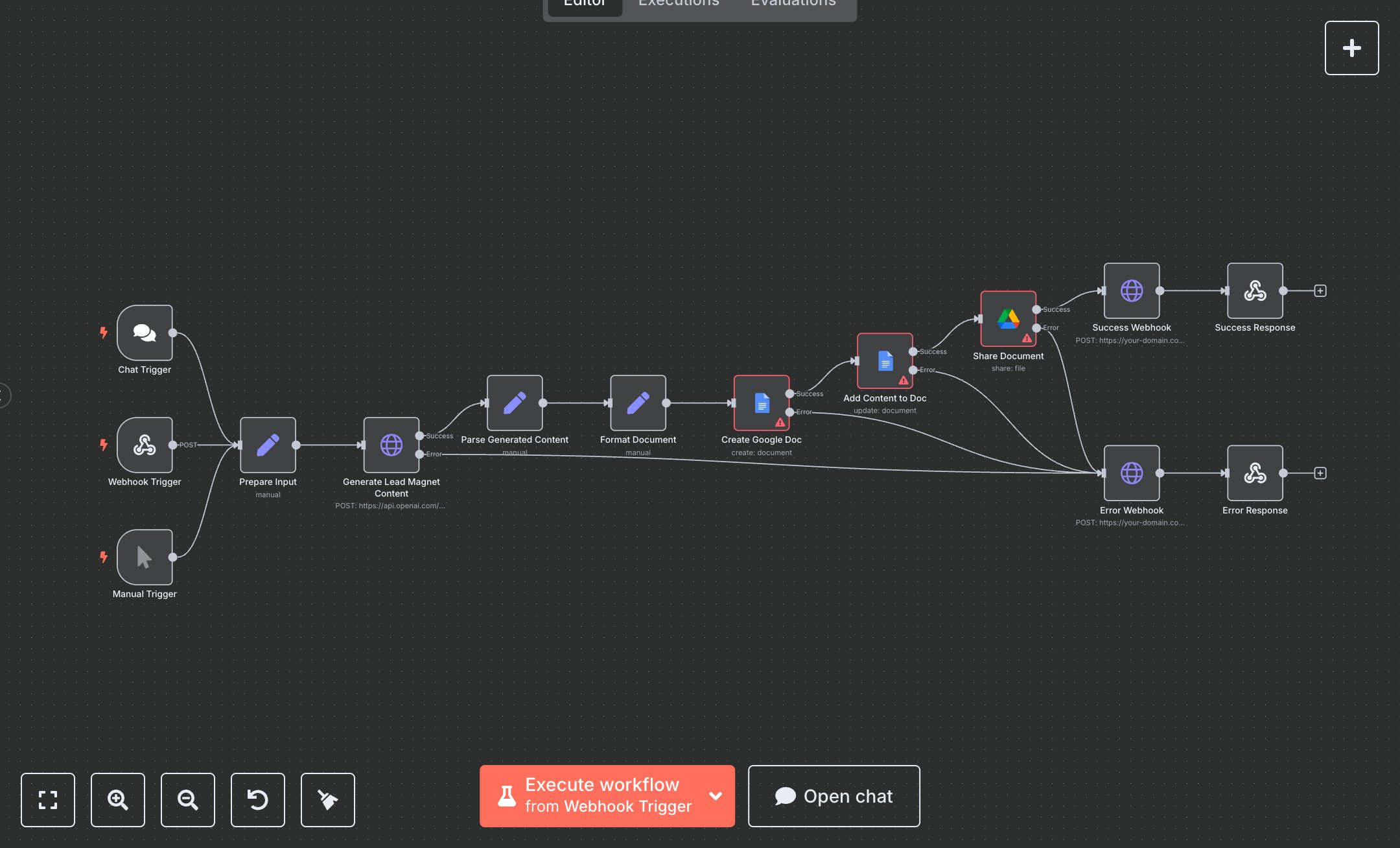
Lead Magnet Generator
This workflow creates lead magnet content using OpenAI and saves it as a Google Doc. Key nodes include Chat Trigger (initiates via chat), Webhook Trigger (receives requests), Manual Trigger (manual runs), Prepare Input (sets topic, company, author), Generate Lead Magnet Content (uses OpenAI to create content), Parse Generated Content (extracts JSON), Format Document (creates markdown), Create Google Doc (generates document), Add Content to Doc (adds content), Share Document (sets permissions), and Success/Error Response (returns outcomes). It uses OpenAI, Google Docs, and Google Drive APIs.\n\nSetup Requirements: Install n8n from n8n.io or sign up at cloud.n8n.io. Import the JSON into n8n’s workflow editor. Get an OpenAI API key from platform.openai.com (Account > API Keys). Set up Google Docs and Google Drive OAuth2 credentials via Google Cloud Console (enable Docs and Drive APIs, create OAuth client). In n8n, configure credentials: OpenAI (API Key), Google Docs (OAuth2), Google Drive (OAuth2). Set the webhook path in Webhook Trigger (e.g., lead-magnet). Configure your application to send POST requests to n8n’s webhook URL (displayed in the node) with topic, company, and author fields. Handle errors like invalid API keys (401: Unauthorized) or missing topic (400: Invalid payload).\n\nTesting and Deployment: Import the JSON into n8n. Test via Manual Trigger or send a POST request to the webhook URL with JSON: {"topic": "AI for business growth", "company": "Your Company", "author": "Your Name"}. Verify, Prepare Input sets, parameters, and Generate Lead Magnet Content, creating a JSON with title, chapters, and conclusion. Confirm Format Document produces markdown, and Create Google Doc generates a document. Check Add Content to Doc updates the document, and Share Document sets public read access. Ensure Success Response returns status 200 with the document URL. Test with an invalid OpenAI API key to trigger Error Response (500: Content generation failed). Monitor logs for rate limits (429: Too many requests) or authentication errors (401). If document creation fails, verify Google credentials and folder access. Activate the workflow in n8n and ensure the webhook is live. Deploy for automated lead magnet creation.
$6.99
Workflow steps: 14
Integrated apps: chatTrigger, webhook, manualTrigger