YouTube Video Downloader + AI Summarizer Workflow for Content Teams
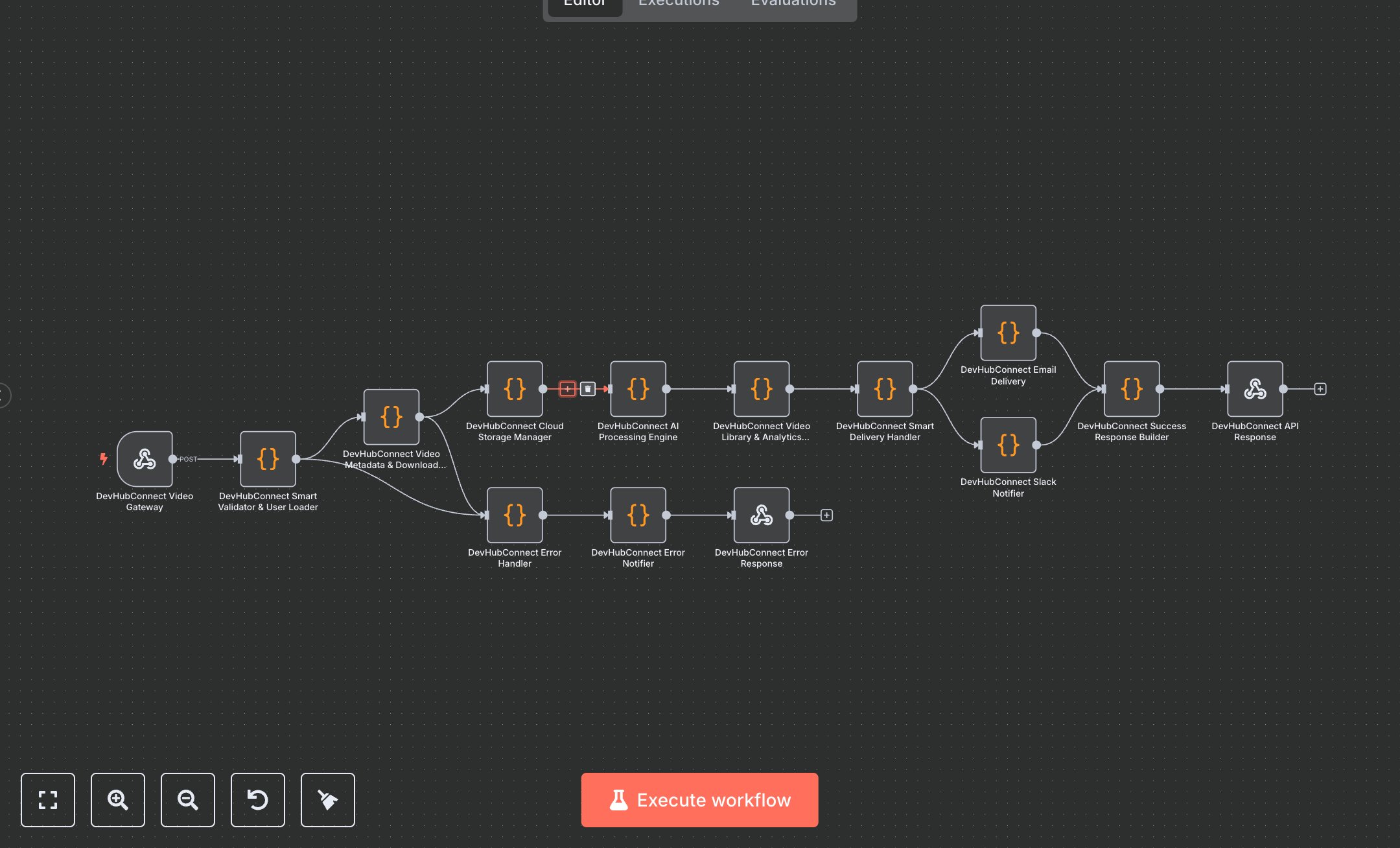
This workflow automates video downloading and AI processing from platforms like YouTube, replacing manual tools like browser extensions and separate transcription apps that consume 3-5 hours per video for content teams. The Video Gateway Webhook receives authenticated requests with URLs and purposes, the Smart Validator & User Loader Code node checks quotas and subscriptions, the Video Metadata & Download Engine Code node fetches details and downloads, the Cloud Storage Manager Code node uploads to Drive, the AI Processing Engine Code node handles transcription/summarization/repurposing, the Video Library & Analytics Recorder Code node logs to database, the Smart Delivery Handler Code node routes emails/Slack by tier, and the Success Response Builder Code node formats outputs. Error paths (Error Handler Code, Error Notifier Code) classify issues like quota exceeded or compliance fails. It helps content creators in digital agencies (10-40 staff) processing 150+ videos monthly, enabling compliant, enriched assets for marketing without fragmented workflows, reducing errors and accelerating production.\n\nThis workflow saves 15-20 hours weekly on 150 videos, cutting costs by 70% via automation. Use cases include campaign archiving for brands, legal evidence processing for firms. Suitable for small-mid teams. Requires Google Sheets ($10/month Pro), APYHub ($0.001/conversion, $10/month), Google Drive ($1.99/month). Scalable to 1,000 videos/month with Pro tiers.\n\nInstall n8n via n8n.io or cloud.n8n.io. For Google Sheets/Drive, enable APIs at console.cloud.google.com, create OAuth2 (download JSON, scopes: sheets/drive). For APYHub, sign up at apyhub.com, get token. Set env vars: APY_TOKEN. Import JSON, configure Video Gateway Webhook POST 'video-download-factory' with header auth (e.g., API key). Update Smart Validator Code with database connections if needed. Webhook URL: https://your-n8n-instance/webhook/video-download-factory.\n\nTest with Postman: {userId: '123', videoUrl: 'youtube.com/watch?v=...', purpose: 'marketing'}. Verify Drive upload, Sheets log. Errors: Invalid token (401, regenerate), quota exceeded (402). Deploy by activating webhook. Monitor dashboard weekly. Optimize batching; refresh OAuth quarterly.", "businessValue": "Saves 15-20 hours/week processing 150 videos", "setupTime": "30-45 minutes", "difficulty": "Intermediate", "requirements": ["Google Sheets OAuth2 (read/write access)", "APYHub API (HTTP Header Auth with apy-token)", "Google Drive OAuth2 (file upload access)"], "useCase": "Automated video download and AI content enrichment"
$5.49
Workflow steps: 14
Integrated apps: webhook, code, respondToWebhook