Mautic Automation: Sync 500+ Contacts Effortlessly
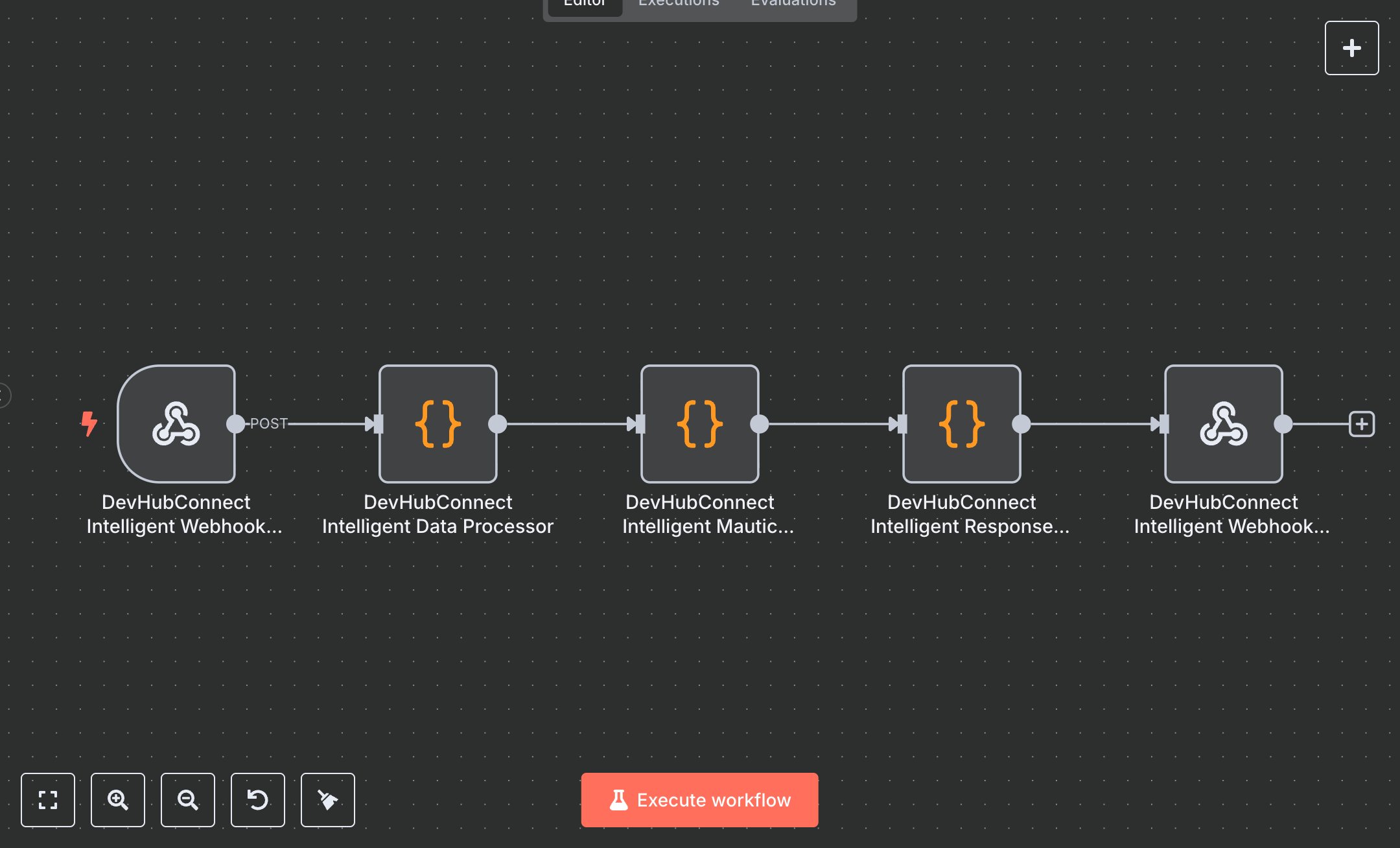
This workflow replaces manual user synchronization between business systems and Mautic, which often involves tedious CSV exports, data cleaning, and imports, consuming hours weekly. It automates real-time syncing via intelligent webhook integration, handling user creation, updates, subscriptions, unsubscriptions, and tagging for events like signups or purchases. Key nodes include the Webhook trigger for incoming data from CRMs or e-commerce platforms, a Code node for intelligent data processing with validation and normalization, another Code node as the Mautic manager simulating API interactions, a third Code node for response handling, and the Respond to Webhook node for detailed success/error responses. This workflow streamlines marketing automation for teams managing 500+ contacts, reducing data silos and compliance risks while improving campaign targeting.\n\nThis workflow saves 5-10 hours weekly on manual syncs for teams handling 500+ contacts monthly, cutting errors by 90% with built-in validation. Use cases include e-commerce syncing purchase data, SaaS managing opt-ins, or agencies automating client CRM integrations. Ideal for small to mid-sized businesses (10-50 team members). Requires a Mautic subscription (free or cloud from $50/month), n8n account (free or cloud from $20/month), and basic API access. Scalable up to 1,000 daily events.\n\nThis workflow requires n8n installation via n8n.io download for self-hosting or cloud.n8n.io signup. For Mautic API credentials, log into Mautic, go to Settings > API Settings, enable API, create OAuth credentials with contact read/write access, and note the base URL, client ID, secret. In n8n, import the JSON, set the Webhook node to POST with path 'mautic-intelligent-sync', and copy the production webhook URL. Replace simulated API calls in Code nodes with HTTP Request nodes using Mautic endpoints, setting Authorization with Bearer token from MAUTIC_URL and MAUTIC_TOKEN environment variables.\n\nThis workflow’s testing involves sending sample POST requests via Postman to the webhook URL with JSON payloads (e.g., {email: 'test@example.com', action: 'subscribe'}); verify Mautic contact updates and responses. Common errors include invalid tokens (refresh credentials), rate limits (add retries), or invalid emails (check logs). Activate in production mode, monitor via n8n’s executions dashboard. Maintain by reviewing logs weekly, updating API versions quarterly, and optimizing with Schedule triggers for batch processing if exceeding 1,000 events/day.", "businessValue": "Saves 5-10 hours/week automating sync for 500+ contacts, reducing errors by 90%", "setupTime": "30-45 minutes", "difficulty": "Intermediate", "requirements": ["Active Mautic subscription (free or paid cloud plan)", "n8n instance (self-hosted or cloud)", "Mautic API credentials with contact read/write access"], "useCase": "Automating real-time user data sync from CRMs or e-commerce to Mautic for targeted marketing"
$3.49
Workflow steps: 5
Integrated apps: webhook, code, respondToWebhook