Salesforce CRM Manager
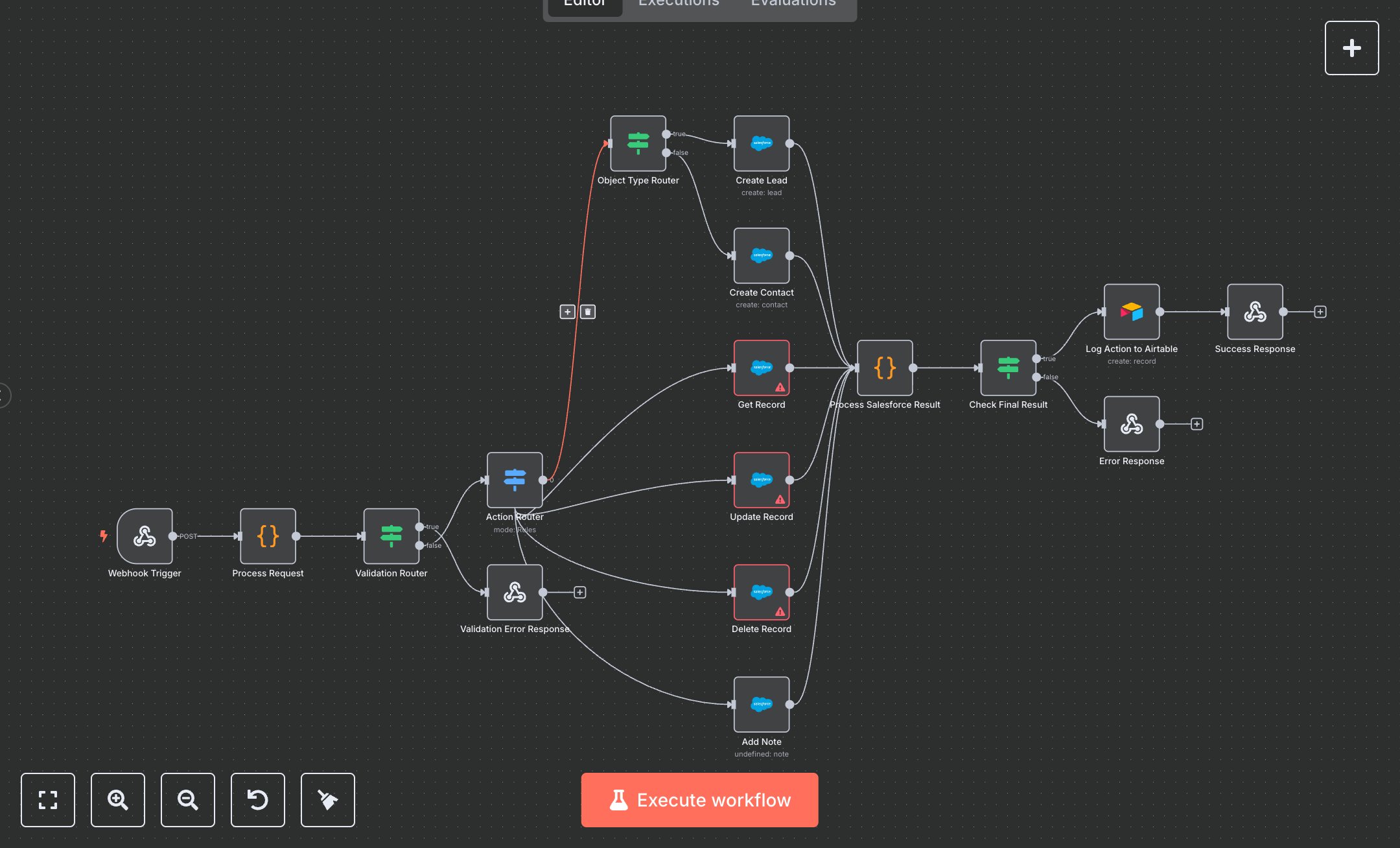
This workflow manages Salesforce CRM records (leads, contacts, opportunities, accounts) via webhook, supporting create, get, update, delete, and add_note actions with validation and logging. Key nodes include Webhook Trigger (receives requests), Process Request (validates inputs), Action Router (directs actions), Object Type Router (splits lead/contact creation), Create Lead/Contact, Get/Update/Delete Record, Add Note (Salesforce API calls), Process Salesforce Result (handles responses), Log Action to Airtable (logs outcomes), and Success/Error Response (returns results). It uses Salesforce and Airtable APIs.\n\nSetup Requirements: Install n8n from n8n.io or sign up at cloud.n8n.io. Import the JSON into n8n’s workflow editor. Create a Salesforce Connected App at salesforce.com (Setup > Apps > App Manager > New Connected App, enable OAuth, select scopes: api, refresh_token, offline_access). Get OAuth2 credentials (Client ID, Secret) and authorize via n8n. Obtain an Airtable API token from airtable.com (Account > API). In n8n, configure credentials: Salesforce (OAuth2) and Airtable (API Token). Set the webhook path in Webhook Trigger (e.g., salesforce-crm). Configure your application to send POST requests to n8n’s webhook URL (displayed in the node). Ensure payload includes action, object_type, and required fields (e.g., last_name, company for leads). Handle errors like invalid email (400: Invalid email format) or missing credentials (401: Authentication failed).\n\nTesting and Deployment: Import the JSON into n8n. Send a test POST request to the webhook URL with JSON: {"action": "create", "object_type": "lead", "last_name": "Smith", "company": "Acme", "email": "test@example.com"}. Verify Process Request validates inputs, and Action Router directs to Create Lead. Confirm Process Salesforce Result processes the response, and Log Action to Airtable stores data. Check the Success Response for status 200 or the Error Response for errors (400: Record not found). Test with invalid data (e.g., {"action": "create"}) to trigger Validation Error Response (400). Monitor logs for issues like rate limits (429: Too many requests) or permissions (403: Forbidden). If actions fail, verify OAuth credentials and payload. Activate the workflow in n8n and ensure the webhook is live. Deploy for automated CRM management.
$6.99
Workflow steps: 17
Integrated apps: webhook, code, if