AWS Comprehend Text Analysis Workflow
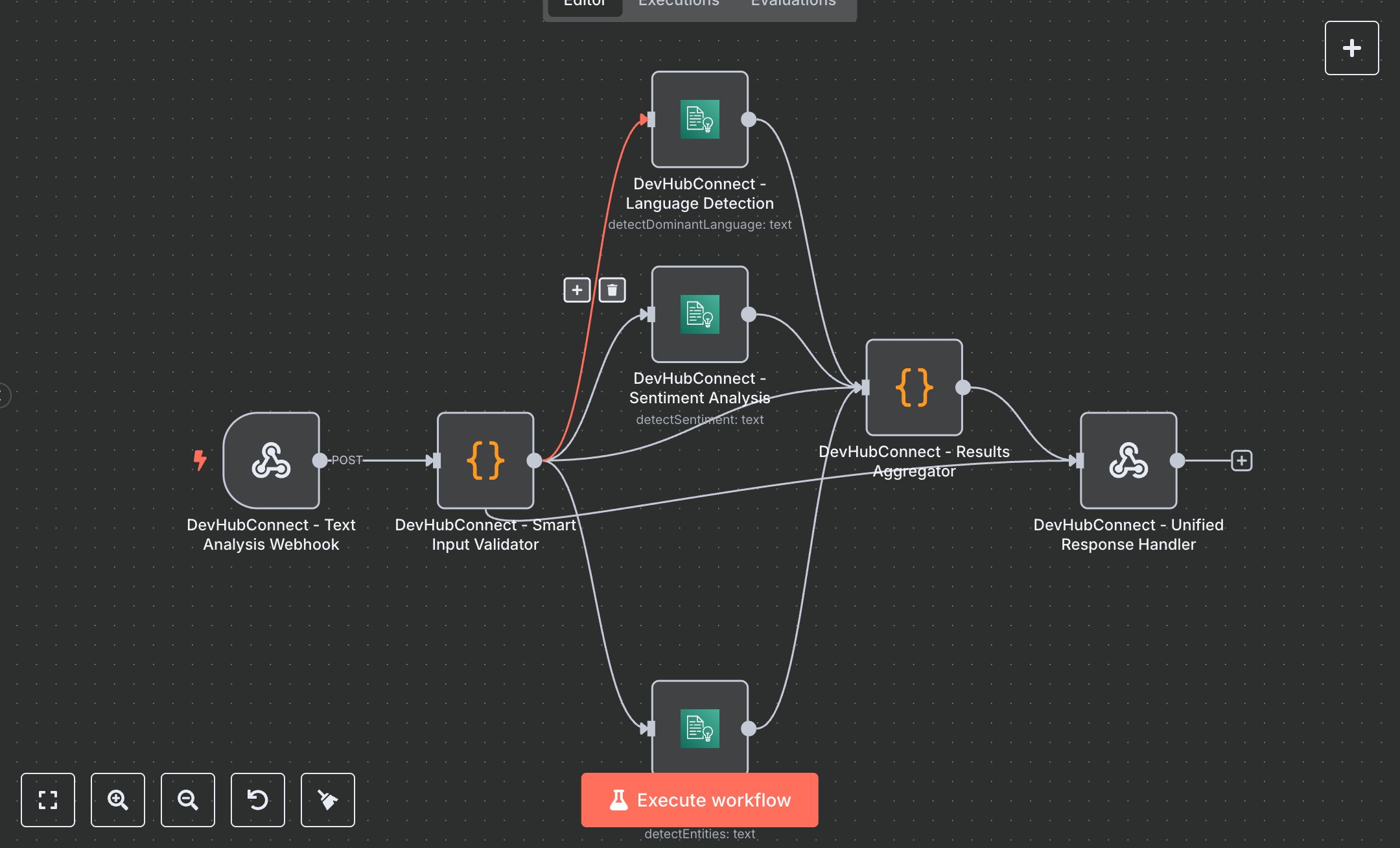
This workflow automates manual text analysis tasks using AWS Comprehend, replacing labor-intensive processes like reviewing customer feedback via spreadsheets or custom scripts for language detection, sentiment scoring, and entity identification. It processes input text to deliver insights, reducing analysis time from hours to seconds per entry. For customer service teams managing 1,000+ reviews or social media comments, it identifies languages, gauges positivity/negativity, and extracts key elements like names or locations, enabling faster response strategies and trend spotting. Key nodes include the Webhook node for receiving text payloads (with optional operations like 'sentiment'), the Code node for input validation and normalization, three AWS Comprehend nodes for specific analyses (language detection, sentiment analysis, entity extraction), another Code node for aggregating results into a structured format, and the Respond to Webhook node for delivering standardized outputs. This empowers marketing or support teams to handle high-volume text data efficiently, minimizing human error and accelerating decision-making in dynamic business environments. The workflow saves about 5 hours weekly by automating analysis of 500+ text items. Suited for customer support, marketing, or e-commerce teams in small to medium businesses, it requires AWS Comprehend (pay-per-use, ~$0.0001 per character) and n8n subscriptions. Scalability is tied to AWS quotas (up to 25 requests/second); basic integrations suffice, with no heavy coding needed. Install n8n from n8n.io or use cloud.n8n.io. Create AWS IAM user with Comprehend full access, generate access keys via AWS Console (IAM > Users > Security credentials). Configure Webhook node with URL like https://your-n8n-instance/webhook/text-analysis. Set AWS Comprehend nodes with credentials, text expressions, and operations (detectDominantLanguage, detectSentiment, detectEntities). Test with sample payloads like { \"text\": \"Great product!\", \"operations\": [\"sentiment\"] } via tools like Postman. Activate workflow in n8n interface. Watch for errors like invalid keys or text limits; verify in logs. Maintain by rotating AWS credentials quarterly; optimize with batching to respect rate limits.", "businessValue": "Saves 5 hours/week analyzing 500+ text entries automatically", "setupTime": "30-45 minutes", "difficulty": "Beginner", "requirements": [ "n8n (free/community or cloud subscription), AWS Comprehend", "AWS access keys with Comprehend permissions", "Stable internet, modern browser, no coding required" ], "useCase": "Analyzing customer reviews for sentiment and entities in support or marketing"
$5.49
Workflow steps: 7
Integrated apps: webhook, code, awsComprehend