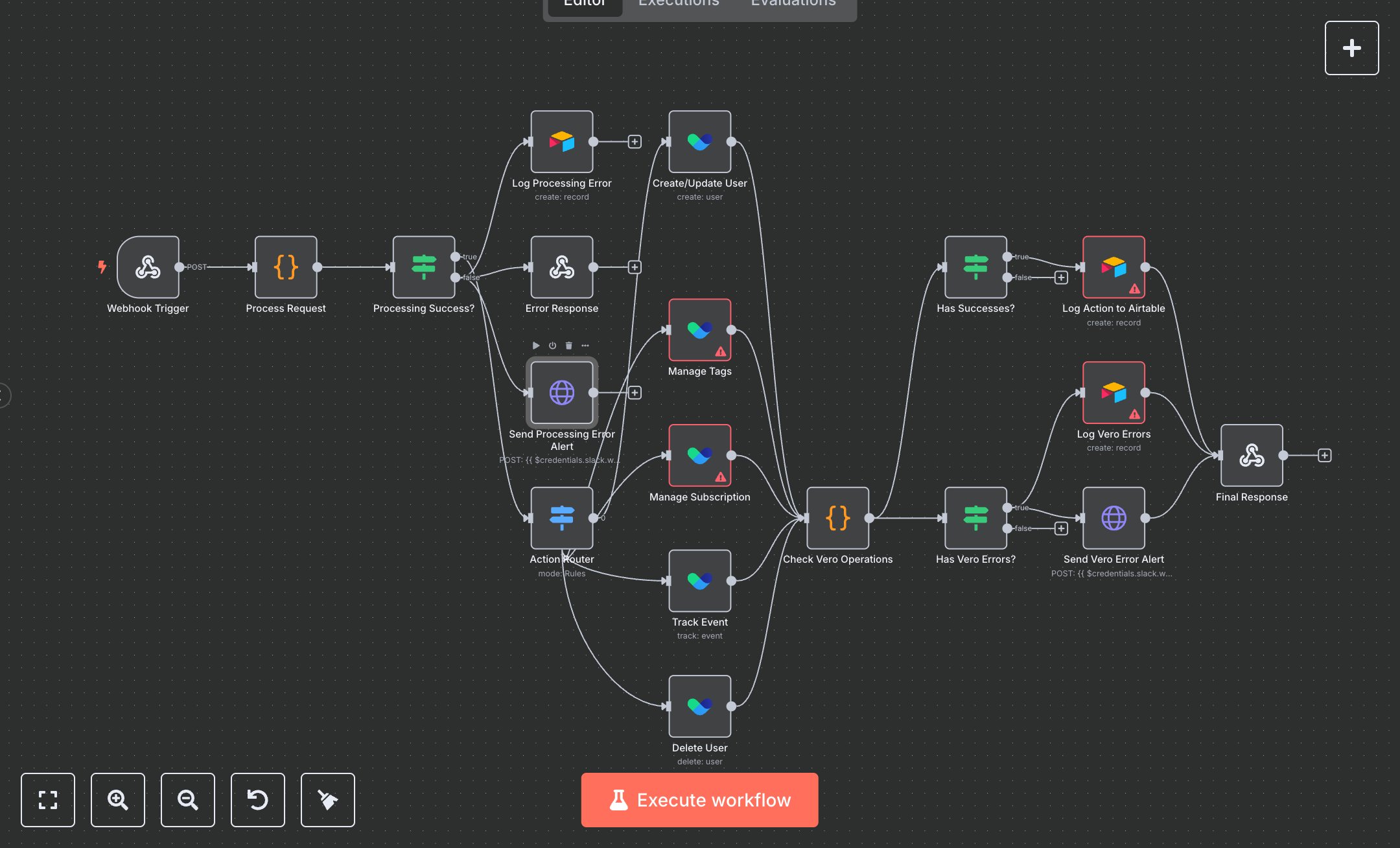
Vero User Management Service
This workflow manages Vero users (create, update, tag, untag, subscribe, unsubscribe, track, delete), logs actions and errors in Airtable, and sends Slack alerts for failures. Key nodes include Webhook Trigger (receives requests), Process Request (validates inputs), Processing Success? (checks validation), Action Router (directs actions), Create/Update User, Manage Tags, Manage Subscription, Track Event, Delete User (Vero API interactions), Log Action to Airtable (stores results), Log Processing Error, Log Vero Errors (error logging), Send Processing Error Alert, Send Vero Error Alert (Slack notifications), and Final Response (returns status). It uses Vero and Airtable APIs.\n\nSetup Requirements: Install n8n from n8n.io or sign up at cloud.n8n.io. Import the JSON into n8n’s workflow editor. Configure Webhook Trigger with path vero-user and HTTP method POST. Obtain Vero API key from getvero.com (Settings > API Keys). Create an Airtable base at airtable.com with Vero Actions and Error Logs tables; get API key and Base ID from Account settings. Get Slack Webhook URL from slack.com (Apps > Incoming Webhooks, create in #vero-alerts). In n8n, configure credentials: Vero (API Key), Airtable (Token API), and Slack (Webhook URL). Handle errors like invalid email (400: Invalid email format) or missing API key (401: Unauthorized).\n\nTesting and Deployment: Import the JSON into n8n. Test with curl -X POST http://your-n8n-instance/vero-user -d '{"action":"create","email":"test@example.com","user_data":{"name":"Test"}}'. Verify Process Request validates inputs and Action Router directs to correct Vero nodes. Confirm Vero API actions execute, Log Action to Airtable stores data, and Final Response returns {"status":"success"} or {"status":"partial_success"}. Test with invalid input ({"action":"invalid"}) to trigger 400: Invalid action or missing tags ({"action":"tag"}) to trigger 400: Tags are required. Check Log Processing Error and Send Processing Error Alert for errors like 400: Invalid request body structure. Monitor logs for Vero rate limits (429) or Airtable issues (404: Table not found). If alerts fail, verify Slack URL and Airtable setup. Activate the workflow in n8n and integrate the webhook URL into your application. Deploy for robust Vero user management.
$6.99
Workflow steps: 19
Integrated apps: webhook, code, if