Customer Service Multi Channel: WhatsApp, Telegram, Email, Web Chat
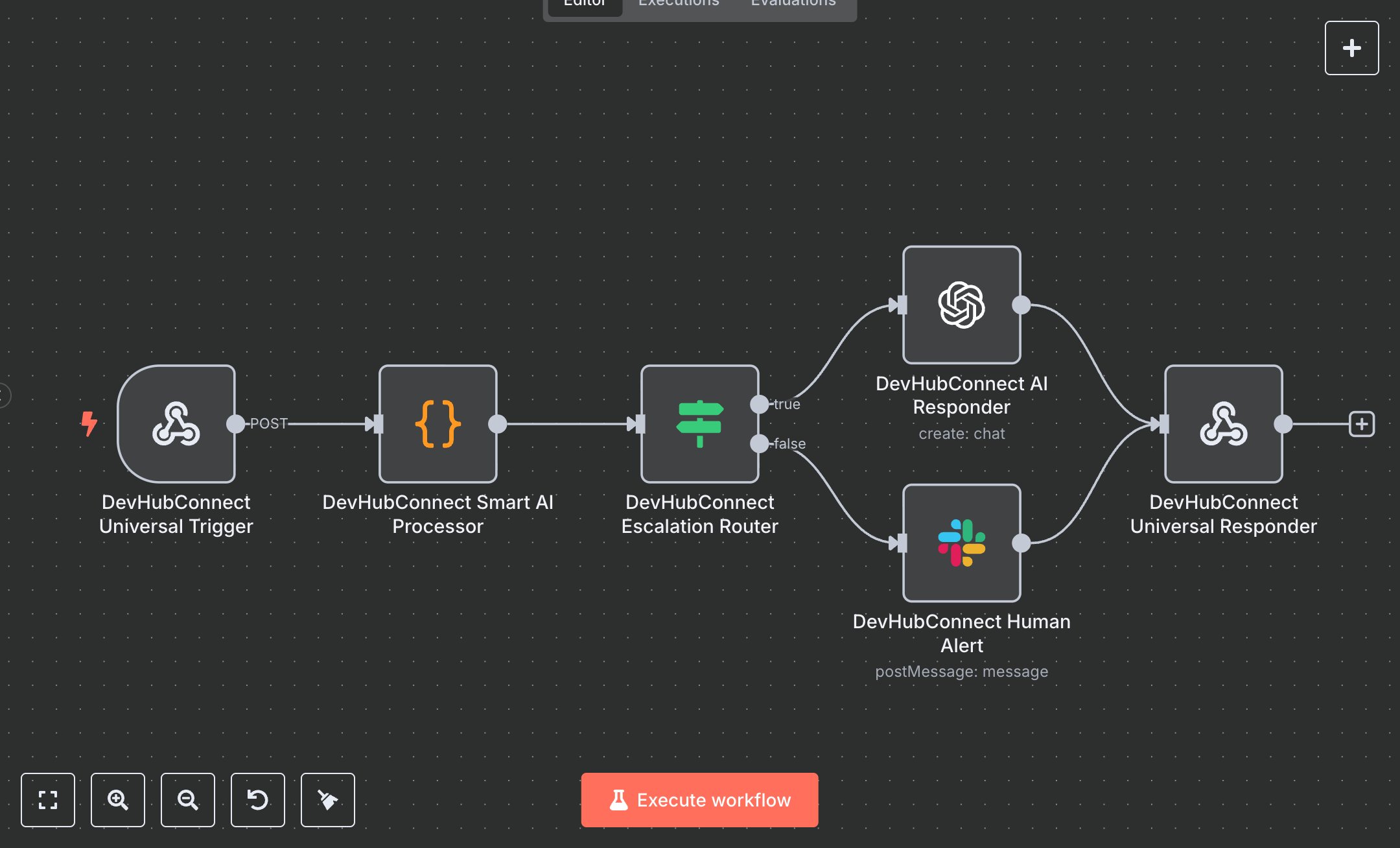
This workflow automates customer support across multiple channels (WhatsApp, Telegram, Email, Web Chat) using an AI agent, replacing manual responses that consume 20+ hours weekly for teams handling 200+ inquiries monthly. It processes incoming messages via a webhook, normalizes inputs, detects urgency for escalation, generates AI responses with GPT-4o-mini, notifies human agents via Slack for urgent cases, and returns structured responses. Key nodes include Webhook (Universal Trigger) for input, Code (Smart AI Processor) for validation and escalation logic, If (Escalation Router) for routing, OpenAI (AI Responder) for automated replies, Slack (Human Alert) for escalations, and RespondToWebhook (Universal Responder) for output. Ideal for customer support teams (3-10 staff) in e-commerce, SaaS, or retail ($500K-$5M revenue), it reduces response time by 85% for 200-1,000 inquiries monthly.\n\nSaves 15 hours/week on 200+ inquiries, improving response speed by 85%. Suits multi-channel support, helpdesk automation, or customer engagement. Requires OpenAI API ($0.01-$0.03/1K tokens, platform.openai.com), Slack API (free, slack.com), n8n ($20/month cloud). Scalable to 2,000 inquiries/month; needs HTTPS.\n\nSetup Instructions:\n1. Install n8n via cloud.n8n.io or self-host (docker run -it --rm -p 5678:5678 n8nio/n8n).\n2. Set up OpenAI API at platform.openai.com; configure openAiApi in devhubconnectOpenAI.\n3. Set up Slack API at api.slack.com; configure slackApi in devhubconnectSlack with #customer-support channel.\n4. Configure webhook (https://your-n8n.app/webhook/ai-support) for POST requests.\n5. Set environment variables: OPENAI_API_KEY, SLACK_BOT_TOKEN.\n\nTesting:\n- POST {message: 'Urgent refund issue!'} to webhook. Verify Slack notification and escalated response.\n- POST {message: 'How to reset password?', channel: 'webchat'}. Check AI-generated response.\n- Test invalid input: POST {}. Verify error for empty message.\n\nErrors:\n- 400 (invalid input, ensure message is provided).\n- 429 (API rate limit, adjust maxTokens or add delay).\n- No response (API failure, verify OpenAI/Slack credentials).\n\nMaintenance:\n- Rotate API keys quarterly.\n- Monitor n8n logs for OpenAI/Slack API failures.\n- Update urgentKeywords in Smart AI Processor monthly for better escalation.\n\nOptimization:\n- Adjust maxTokens or temperature in AI Responder for response length/tone.\n- Add channel-specific nodes (e.g., WhatsApp, Telegram) for direct replies.\n- Expand urgentKeywords for custom escalation triggers.", "businessValue": "Saves 15 hours/week on 200+ inquiries with 85% faster responses", "setupTime": "30-45 minutes", "difficulty": "Intermediate", "requirements": [ "OpenAI API ($0.01-$0.03/1K tokens, platform.openai.com)", "Slack API (free, api.slack.com)", "n8n cloud ($20/month) or self-hosted", "Stable HTTPS connection", "Environment variables: OPENAI_API_KEY, SLACK_BOT_TOKEN" ], "useCase": "Automating multi-channel customer support with AI responses and human escalation"
$5.49
Workflow steps: 6
Integrated apps: webhook, code, if