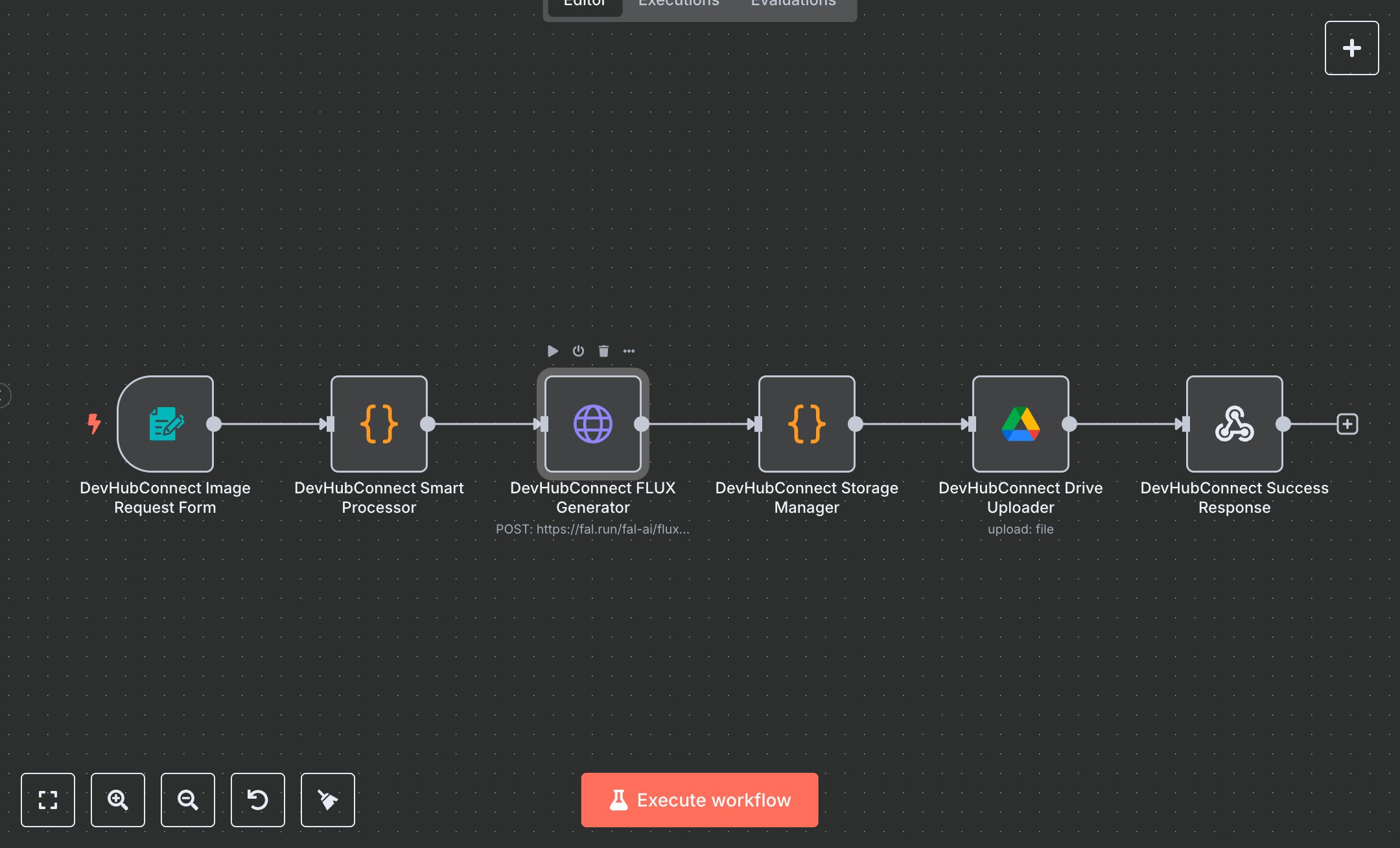
AI Image Generation with FLUX Pro + FAL.ai: Save 10+ Hours Weekly
This workflow automates AI image generation using the FLUX Pro model via FAL.ai, replacing manual image creation that consumes 10+ hours weekly for content teams producing 20+ images monthly. It captures user inputs through a form, validates and sanitizes data, generates images, stores them in Google Drive, and returns shareable links. Key nodes include FormTrigger (Image Request Form) for user input, Code (Smart Processor) for validation and API preparation, HTTP Request (FLUX Generator) for image creation, Code (Storage Manager) for downloading images, GoogleDrive (Drive Uploader) for storage, and RespondToWebhook (Success Response) for delivering results. Ideal for content creators, marketing teams, or designers (3-10 staff) in agencies or e-commerce ($500K-$5M revenue), it reduces image creation time by 90% for 20-100 images monthly.\n\nSaves 8 hours/week on 20+ images, improving production speed by 90%. Suits creative agencies, social media teams, or e-commerce. Requires FAL.ai API ($0.01-$0.05/image), Google Drive API (free), n8n ($20/month cloud). Scalable to 200 images/month; needs HTTPS.\n\nSetup Instructions:\n1. Install n8n via cloud.n8n.io or self-host (docker run -it --rm -p 5678:5678 n8nio/n8n).\n2. Obtain FAL.ai API key at fal.ai; configure in devhub-fal-ai.\n3. Set up Google Drive API at console.developers.google.com; configure devhub-google-drive and set YOUR_GOOGLE_DRIVE_FOLDER_ID.\n4. Create a Google Drive folder for image storage; note its ID.\n5. Set environment variables: FAL_AI_API_KEY, GOOGLE_DRIVE_CLIENT_EMAIL, GOOGLE_DRIVE_PRIVATE_KEY, YOUR_GOOGLE_DRIVE_FOLDER_ID.\n\nTesting:\n- Submit form with {Image Prompt: 'Futuristic cityscape at sunset', Aspect Ratio: '16:9', Output Format: 'png'}. Verify Google Drive upload and response with shareable link.\n- Test invalid input: Submit {Image Prompt: 'hi'}. Check error for short prompt.\n\nErrors:\n- 400 (invalid input, ensure prompt is 5+ characters).\n- 429 (rate limit, adjust rateData.count in Smart Processor).\n- 500 (API failure, verify FAL.ai key or image URL).\n\nMaintenance:\n- Rotate API keys quarterly.\n- Monitor n8n logs for FAL.ai/Google Drive API failures.\n- Clear Google Drive folder monthly to manage storage.\n\nOptimization:\n- Adjust num_inference_steps or guidance_scale in FLUX Generator for quality/speed.\n- Add custom aspect ratios in Smart Processor.\n- Implement image preview URLs in Success Response.", "businessValue": "Saves 8 hours/week on 20+ images with 90% faster production", "setupTime": "30-45 minutes", "difficulty": "Intermediate", "requirements": [ "FAL.ai API ($0.01-$0.05/image, fal.ai)", "Google Drive API (free, console.developers.google.com)", "n8n cloud ($20/month) or self-hosted", "Stable HTTPS connection", "Environment variables: FAL_AI_API_KEY, GOOGLE_DRIVE_CLIENT_EMAIL, GOOGLE_DRIVE_PRIVATE_KEY, YOUR_GOOGLE_DRIVE_FOLDER_ID" ], "useCase": "Automating AI image generation with FLUX Pro and Google Drive storage"
$5.49
Workflow steps: 6
Integrated apps: formTrigger, code, httpRequest