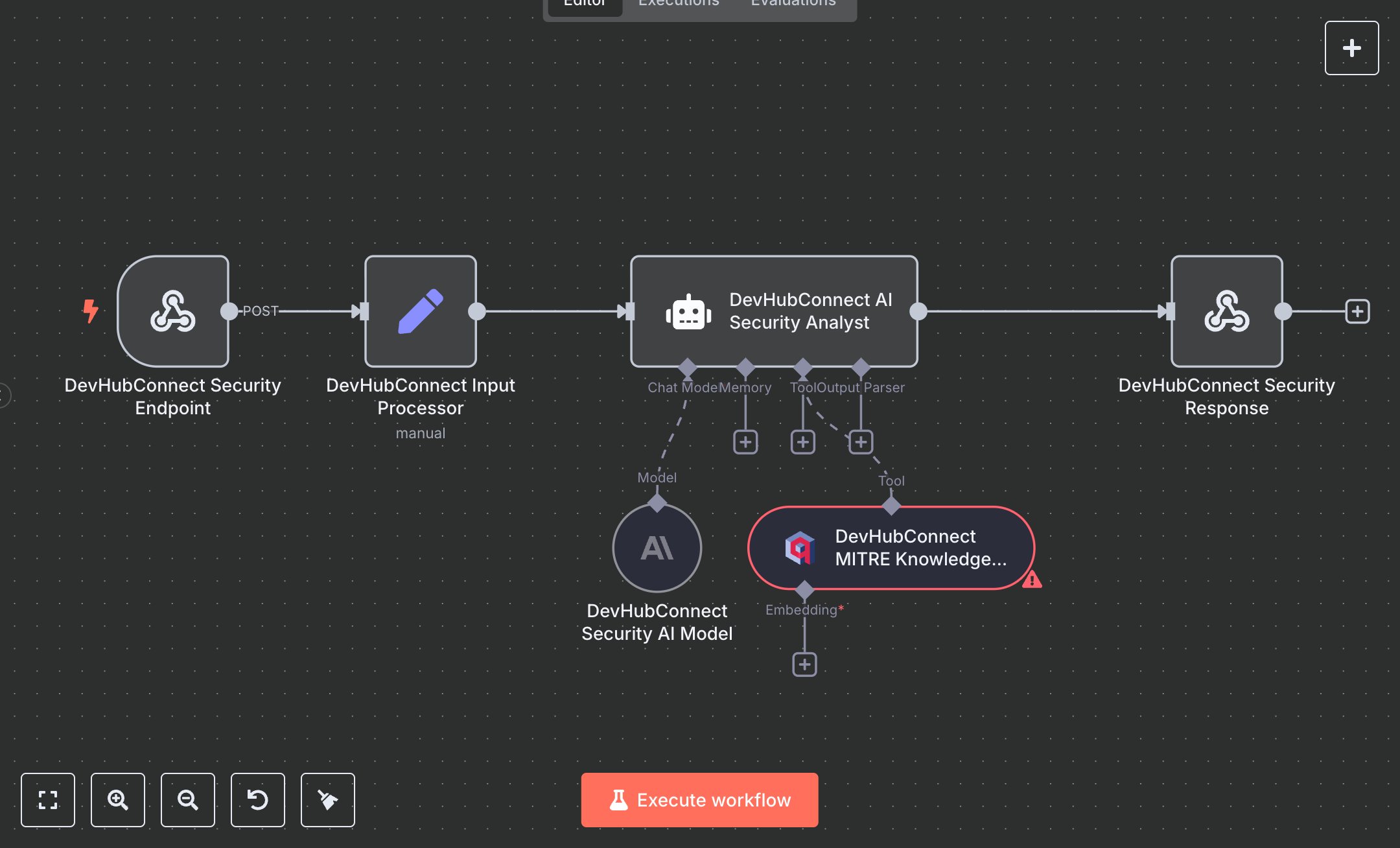
Security Incident Analysis with MITRE ATT&CK, Qdrant & AI
This workflow automates security incident analysis using the MITRE ATT&CK framework, replacing manual threat analysis that consumes 20+ hours weekly for security teams handling 50+ incidents monthly. It processes incident data via a webhook, validates inputs, retrieves relevant MITRE techniques from a Qdrant vector store, and uses an AI analyst to map threats, assess severity, and provide actionable remediation steps. Key nodes include Webhook (Security Endpoint) for input, Set (Input Processor) for validation, VectorStoreQdrant (MITRE Knowledge Base) for threat intelligence, LangChain Agent (AI Security Analyst) with OpenAI (Security AI Model) for analysis, and RespondToWebhook (Security Response) for structured JSON output. Ideal for cybersecurity teams (3-10 staff) in tech or financial services ($1M-$10M revenue), it reduces analysis time by 85% for 50-200 incidents monthly.\n\nSaves 15 hours/week on 50+ incidents, improving response speed by 85%. Suits SOCs, MSSPs, or enterprise IT. Requires OpenAI API ($0.01-$0.10/1K tokens), Qdrant (free tier or $50/month cloud), n8n ($20/month cloud). Scalable to 500 incidents/month; needs HTTPS.\n\nSetup Instructions:\n1. Install n8n via cloud.n8n.io or self-host (docker run -it --rm -p 5678:5678 n8nio/n8n).\n2. Obtain OpenAI API key at platform.openai.com; configure in devhub-openai-security.\n3. Set up Qdrant vector database at qdrant.tech; configure mitre_attack_intelligence collection in devhub-qdrant-security.\n4. Configure webhook (https://your-n8n.app/webhook/mitre-security-analysis) with header authentication (devhub-security-api).\n5. Load MITRE ATT&CK data into Qdrant via MITRE_DATA_PATH (e.g., 'path/to/mitre-data.json').\n6. Set environment variables: OPENAI_API_KEY, QDRANT_API_URL, QDRANT_API_KEY, MITRE_DATA_PATH.\n\nTesting:\n- Test incident: POST {ticket_description: 'Suspicious login attempts detected', ticket_id: 'INC-001'} to webhook. Verify JSON response with MITRE mappings and remediation steps.\n- Test invalid input: POST {}. Check error response for missing incident data.\n\nErrors:\n- 400 (invalid input, ensure ticket_description or alert_data provided).\n- 429 (API rate limit, adjust maxTokens or add delay).\n- No response (AI failure, verify Qdrant data or prompt).\n\nMaintenance:\n- Update MITRE data in Qdrant quarterly.\n- Rotate API keys every 3 months.\n- Monitor n8n logs for Qdrant/OpenAI failures.\n\nOptimization:\n- Increase topK in MITRE Knowledge Base for broader technique retrieval.\n- Add SEVERITY_KEYWORDS to AI prompt for custom severity scoring.\n- Adjust maxIterations in AI Security Analyst for deeper analysis.", "businessValue": "Saves 15 hours/week on 50+ incidents with 85% faster analysis", "setupTime": "60-90 minutes", "difficulty": "Advanced", "requirements": [ "OpenAI API ($0.01-$0.10/1K tokens, platform.openai.com)", "Qdrant vector database (free tier or $50/month cloud, qdrant.tech)", "n8n cloud ($20/month) or self-hosted", "Stable HTTPS connection", "Environment variables: OPENAI_API_KEY, QDRANT_API_URL, QDRANT_API_KEY, MITRE_DATA_PATH (e.g., 'path/to/mitre-data.json')" ], "useCase": "Automating MITRE ATT&CK-based security incident analysis with AI-driven threat mapping and remediation"
$3.49
Workflow steps: 6
Integrated apps: webhook, set, vectorStoreQdrant