Boost Sales Productivity: 85% Faster Data Processing from Calls to Notion
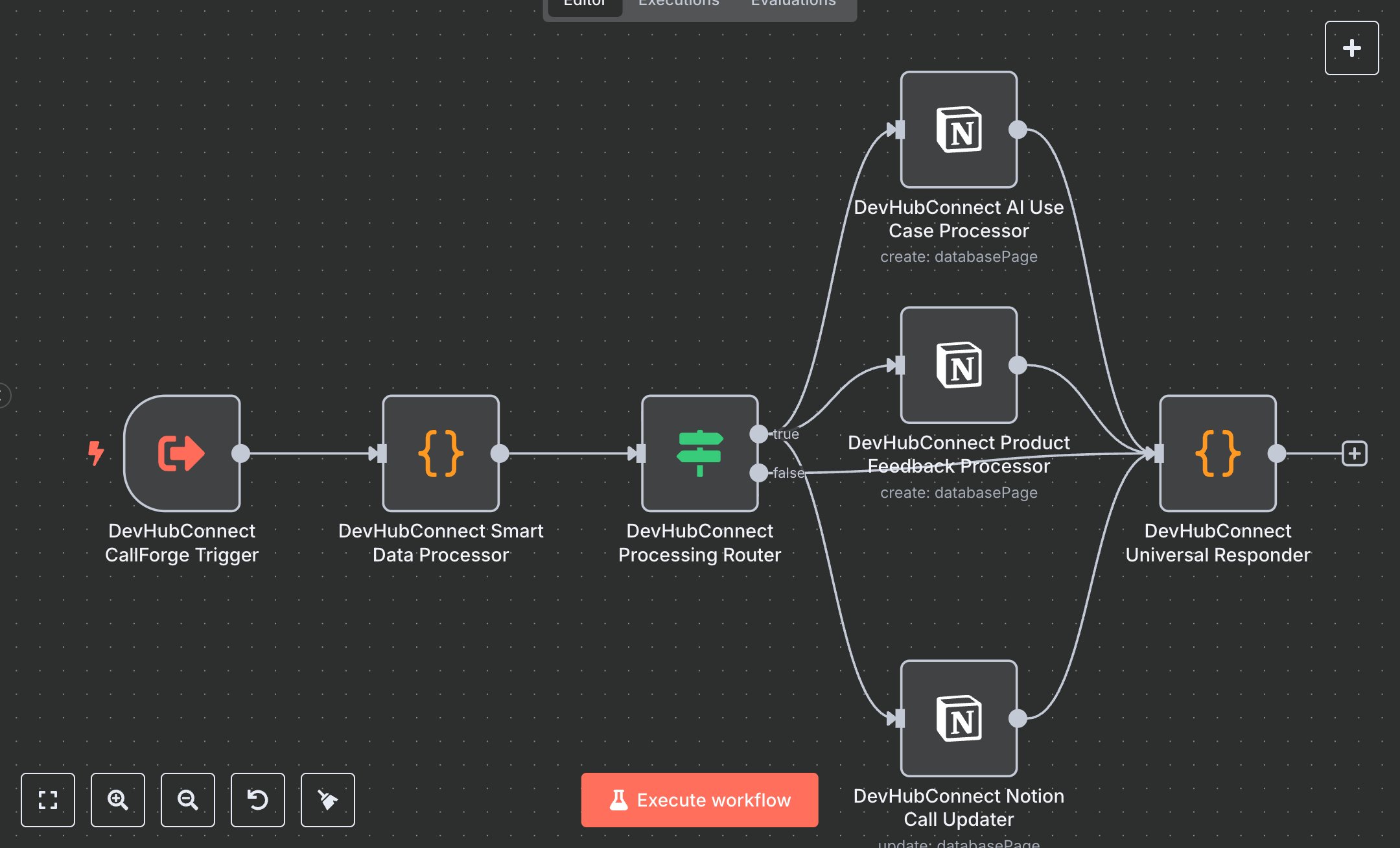
This workflow automates sales intelligence processing for CallForge data, replacing manual CRM updates that consume 15+ hours weekly for sales teams handling 50+ calls monthly. It processes AI-generated call insights, validates inputs, analyzes AI use cases and product feedback, and updates Notion with prioritized records for AI use cases, feedback, and call metadata. Key nodes include ExecuteWorkflowTrigger (CallForge Trigger) for secure input, Code (Smart Data Processor) for validation, sanitization, and priority analysis, IF (Processing Router) for routing valid/error data, Notion (AI Use Case Processor/Product Feedback Processor/Notion Call Updater) for CRM updates, and Code (Universal Responder) for aggregating results with success metrics. Ideal for sales or business development teams (3-10 staff) in tech or consulting ($500K-$5M revenue), it reduces data processing time by 85% for 50-200 calls monthly.\n\nSaves 12 hours/week on 50+ calls, improving data entry speed by 85%. Suits SaaS, consulting, or tech sales teams. Requires Notion API (free, notion.com), n8n ($20/month cloud). Scalable to 500 calls/month; needs HTTPS.\n\nSetup Instructions:\n1. Install n8n via cloud.n8n.io or self-host (docker run -it --rm -p 5678:5678 n8nio/n8n).\n2. Set up Notion API at notion.com; configure devhubconnect-notion-creds.\n3. Create Notion databases for AI use cases and product feedback; set NOTION_AI_USECASE_DB and NOTION_PRODUCT_FEEDBACK_DB environment variables.\n4. Ensure CallForge input includes aiResponse, metaData, and optional notionData/sfOpp.\n5. Set environment variables: NOTION_API_KEY, NOTION_AI_USECASE_DB, NOTION_PRODUCT_FEEDBACK_DB.\n\nTesting:\n- Test input: Trigger with {aiResponse: {AIoutput: {ProductFeedback: [{Feedback: 'Great feature', Sentiment: 'positive'}], AI_ML_References: {Exist: true, Context: 'automation', Details: {RequiresRAG: true}}}}, metaData: {title: 'Client Call', started: '2025-09-12', CompanyName: 'TechCorp'}}. Verify Notion records and response metrics.\n- Test invalid input: Trigger with {aiResponse: {}}. Check error response with validation details.\n\nErrors:\n- 400 (invalid input, ensure aiResponse and metaData are complete).\n- 500 (processing error, verify input structure or Notion API key).\n- No updates (data missing, check CallForge output format).\n\nMaintenance:\n- Rotate Notion API key quarterly.\n- Monitor n8n logs for Notion API failures.\n- Review Notion database schema monthly for consistency.\n\nOptimization:\n- Adjust priority logic in Smart Data Processor for custom business rules.\n- Add Salesforce integration by extending crmType in Smart Data Processor.\n- Increase maxTries in Notion nodes for better reliability.", "businessValue": "Saves 12 hours/week on 50+ calls with 85% faster data processing", "setupTime": "45-60 minutes", "difficulty": "Intermediate", "requirements": [ "Notion API (free, notion.com)", "n8n cloud ($20/month) or self-hosted", "Stable HTTPS connection", "Environment variables: NOTION_API_KEY, NOTION_AI_USECASE_DB, NOTION_PRODUCT_FEEDBACK_DB" ], "useCase": "Automating AI-driven sales intelligence processing and Notion CRM updates for CallForge data"
$5.49
Workflow steps: 7
Integrated apps: executeWorkflowTrigger, code, if