Send Priority Based Discord Messages Automatically for Teams
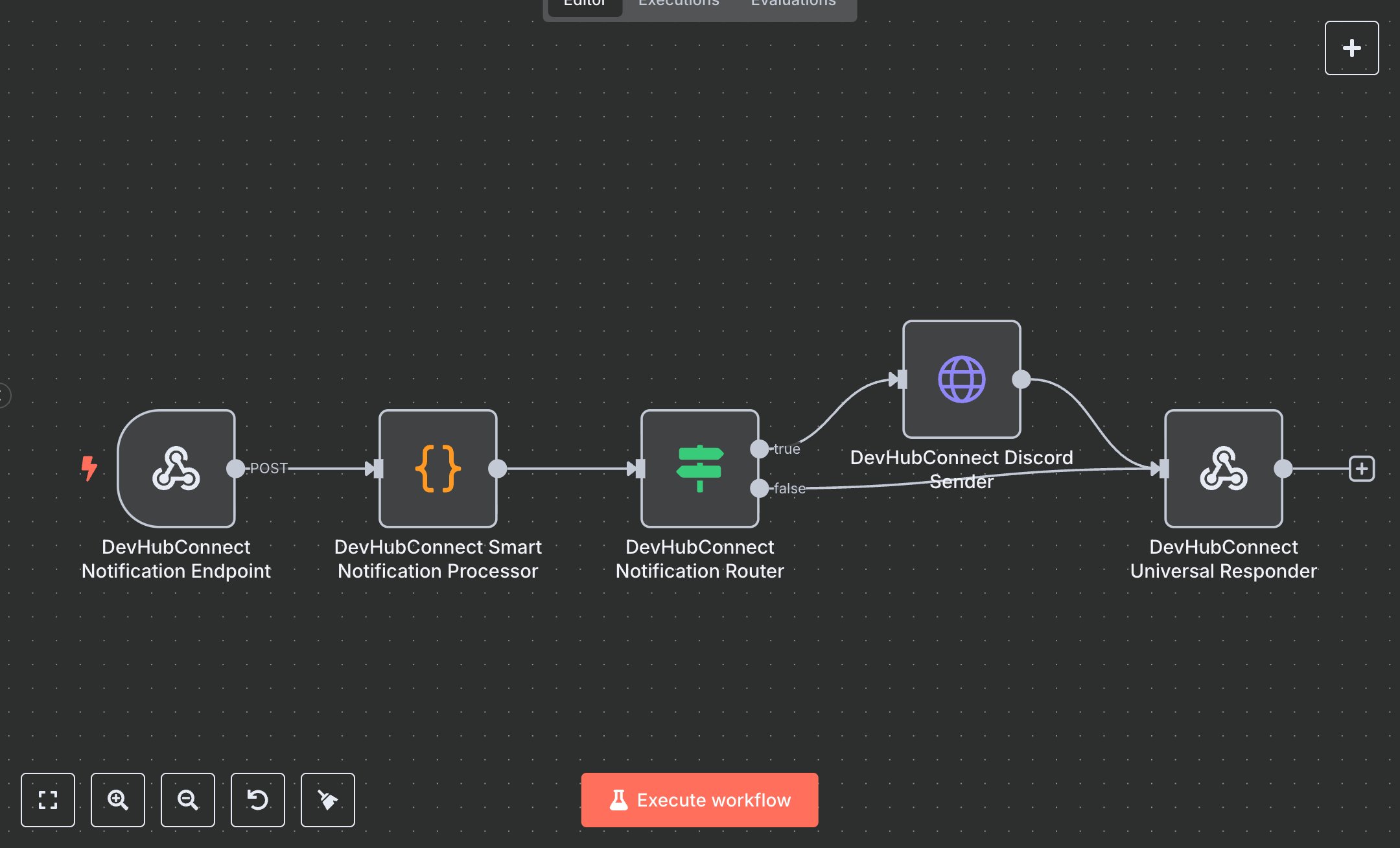
This workflow automates sending rich Discord notifications, replacing manual messaging tasks that consume 5+ hours weekly for teams managing 100+ notifications monthly. It processes JSON payloads via a webhook, validates and sanitizes inputs, formats messages with priority-based styling (e.g., critical, urgent, normal), and sends them to Discord channels with embeds, mentions, and custom visuals. Invalid requests receive detailed error responses. Key nodes include Webhook (Notification Endpoint) for input, Code (Smart Notification Processor) for validation and message formatting, IF (Notification Router) for routing valid/error messages, HTTP Request (Discord Sender) for sending to Discord, and RespondToWebhook (Universal Responder) for HTTP responses. Ideal for DevOps, community managers, or marketing teams (3-10 staff) in tech or gaming ($500K-$5M revenue), it reduces notification time by 90% for 100-500 messages monthly.\n\nSaves 4 hours/week on 100+ notifications, improving delivery speed by 90%. Suits startups, gaming communities, or support teams. Requires Discord webhook (free, discord.com), n8n ($20/month cloud). Scalable to 1,000 notifications/month; needs HTTPS.\n\nSetup Instructions:\n1. Install n8n via cloud.n8n.io or self-host (docker run -it --rm -p 5678:5678 n8nio/n8n).\n2. Create Discord webhooks at discord.com; set in environment variables (e.g., DISCORD_GENERAL_WEBHOOK, DISCORD_CRITICAL_WEBHOOK).\n3. Configure webhook (https://your-n8n.app/webhook/discord-notify) with header authentication (devhubconnect-discord-auth).\n4. Set environment variables: DISCORD_DEFAULT_WEBHOOK, DISCORD_CRITICAL_WEBHOOK, DISCORD_URGENT_WEBHOOK, DISCORD_HIGH_WEBHOOK, DISCORD_LOW_WEBHOOK, DISCORD_ALERTS_WEBHOOK, DISCORD_MONITORING_WEBHOOK, DISCORD_ERRORS_WEBHOOK.\n\nTesting:\n- Test notification: POST {message: 'Server downtime scheduled', priority: 'urgent', channel: 'alerts'} to webhook. Verify Discord message with urgent styling and mentions.\n- Test invalid input: POST {message: ''}. Check error response with validation details.\n\nErrors:\n- 400 (invalid input, ensure message/title/description provided).\n- 401 (missing auth header, include Bearer token or set requireAuth: false).\n- 500 (invalid webhook, verify Discord webhook URLs).\n\nMaintenance:\n- Rotate webhook URLs quarterly.\n- Monitor n8n logs for Discord API failures.\n- Review notification logs monthly for accuracy.\n\nOptimization:\n- Add custom priorityConfig in Smart Notification Processor for branded styling.\n- Adjust mention_users/mention_roles limits for larger teams.\n- Use image_url or thumbnail_url for richer visuals.", "businessValue": "Saves 4 hours/week on 100+ notifications with 90% faster delivery", "setupTime": "30-45 minutes", "difficulty": "Beginner", "requirements": [ "Discord webhook (free, discord.com)", "n8n cloud ($20/month) or self-hosted", "Stable HTTPS connection", "Environment variables: DISCORD_DEFAULT_WEBHOOK, DISCORD_CRITICAL_WEBHOOK, DISCORD_URGENT_WEBHOOK, DISCORD_HIGH_WEBHOOK, DISCORD_LOW_WEBHOOK, DISCORD_ALERTS_WEBHOOK, DISCORD_MONITORING_WEBHOOK, DISCORD_ERRORS_WEBHOOK" ], "useCase": "Automating rich Discord notifications with priority-based styling and embeds"
$3.49
Workflow steps: 5
Integrated apps: webhook, code, if