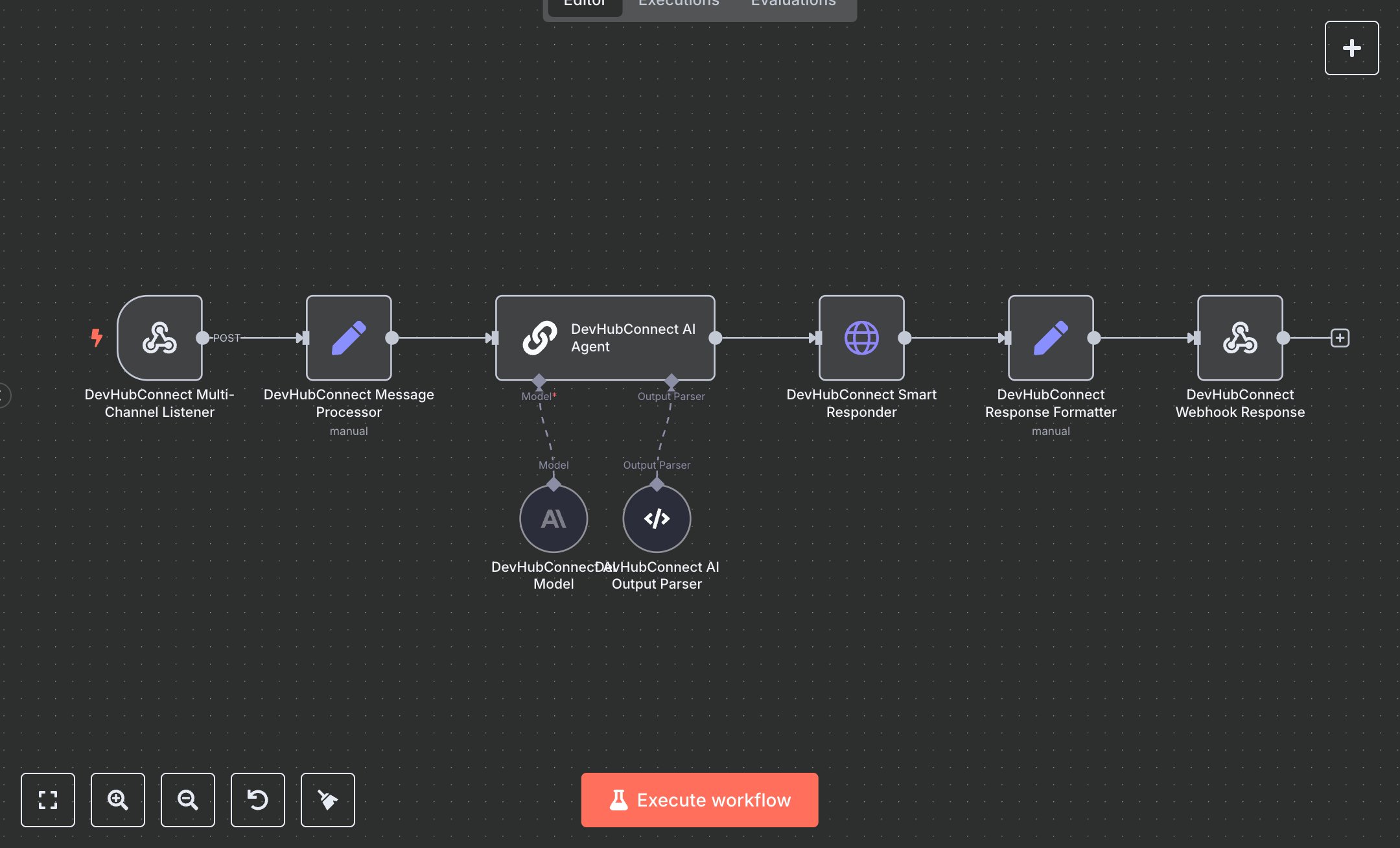
Customer Support Automation: WhatsApp, Telegram, Email & WebChat
This workflow automates customer support across multiple channels (WhatsApp, Telegram, Email, WebChat), replacing manual responses that consume 15+ hours weekly for teams handling 100+ inquiries daily. It processes incoming messages via a single webhook, normalizes data, uses an AI agent (GPT-4 Turbo) to analyze sentiment, urgency, and category, generates tailored responses, and escalates complex issues to human agents via Slack. Key nodes include Webhook (Multi-Channel Listener) for message intake, Set (Message Processor) for normalization and channel detection, LangChain ChainLlm (AI Agent) with OutputParserStructured (AI Output Parser) and OpenAI (AI Model) for response generation, HTTP Request (Smart Responder) for sending replies and escalations, and Set (Response Formatter) for logging metrics. Ideal for small to medium support teams (5-15 staff) in e-commerce or SaaS businesses ($500K-$10M revenue), it reduces response time by 85% for 100-500 inquiries daily.\n\nSaves 12 hours/week on 100+ inquiries, improving response speed by 85%. Suits online retailers, tech startups, or service providers. Requires OpenAI API ($0.01-$0.10/1K tokens), n8n ($20/month cloud), and channel-specific APIs (e.g., Twilio for WhatsApp, $0.005/message). Scalable to 1,000 inquiries/day; needs HTTPS.\n\nSetup Instructions:\n1. Install n8n via cloud.n8n.io or self-host (docker run -it --rm -p 5678:5678 n8nio/n8n).\n2. Obtain OpenAI API key at platform.openai.com; set in devhubconnect-openai-creds.\n3. Configure channel APIs (e.g., Twilio for WhatsApp, Telegram Bot API, SMTP for email); set webhook URL (https://your-n8n.app/webhook/ai-support) in each platform.\n4. Set up Slack for escalations; configure SLACK_WEBHOOK_URL for human notifications.\n5. Set environment variables: OPENAI_API_KEY for AI access, SLACK_WEBHOOK_URL for escalations, DEFAULT_RESPONSE_API (e.g., 'https://your-response-api.com/send') for fallback responses.\n\nTesting:\n- Send test message via WhatsApp: {channel: 'whatsapp', from: {phone: '+1234567890'}, message: 'I have a billing issue'}. Verify AI response and Slack escalation for billing category.\n- Test email: {from: {email: 'user@example.com'}, body: 'How do I reset my password?'}. Check JSON response with category: technical.\n\nErrors:\n- 400 (invalid message, check payload format).\n- 429 (OpenAI rate limit, reduce maxTokens or add delay).\n- No response (AI misclassification, adjust prompt guidelines).\n\nMaintenance:\n- Rotate OpenAI API key quarterly.\n- Monitor n8n logs for webhook or API failures.\n- Review escalation logs weekly for AI accuracy.\n\nOptimization:\n- Add channel-specific keywords to AI prompt for better detection.\n- Adjust temperature in AI Model for more/less creative responses.\n- Set up cron job to archive old session data.", "businessValue": "Saves 12 hours/week on 100+ inquiries with 85% faster responses", "setupTime": "45-60 minutes", "difficulty": "Intermediate", "requirements": [ "OpenAI API ($0.01-$0.10/1K tokens, platform.openai.com)", "n8n cloud ($20/month) or self-hosted", "Channel APIs (e.g., Twilio for WhatsApp at $0.005/message, Telegram Bot API free, SMTP for email)", "Slack for escalations (free or paid)", "Stable HTTPS connection", "Environment variables: OPENAI_API_KEY, SLACK_WEBHOOK_URL, DEFAULT_RESPONSE_API (e.g., 'https://your-response-api.com/send')" ], "useCase": "Automating multi-channel customer support with AI-driven responses and human escalation"
$5.49
Workflow steps: 8
Integrated apps: webhook, set, chainLlm