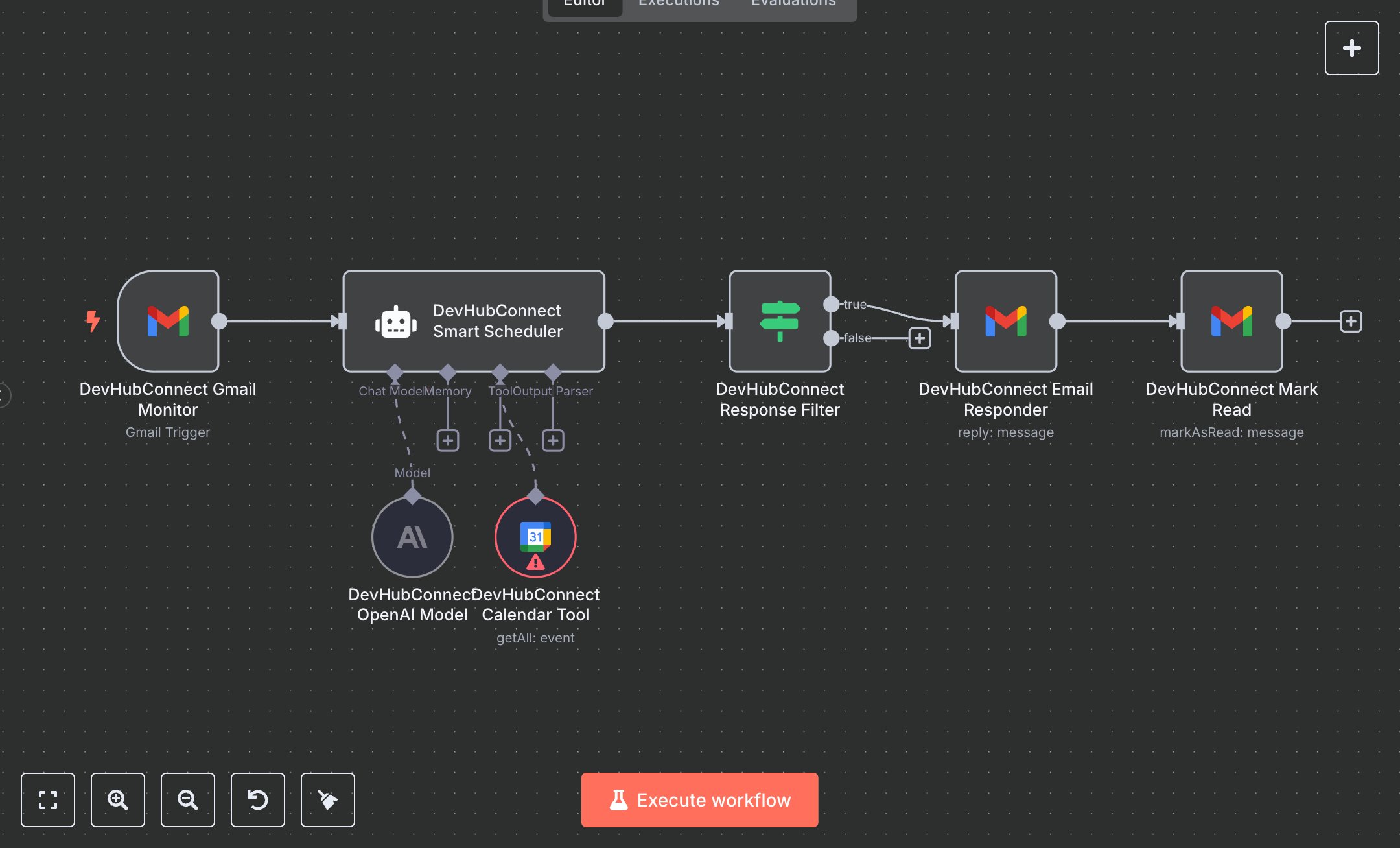
Appointment Scheduling via Email Using Gmail, Google Calendar, and AI
This workflow automates email-based appointment scheduling, replacing manual email sorting and response tasks that consume 10+ hours weekly for professionals handling 50+ emails daily. It monitors Gmail for unread emails, uses an AI agent to detect appointment requests, checks Google Calendar for availability, generates professional responses with proposed times, and marks emails as read. Key nodes include GmailTrigger (Gmail Monitor) for email detection, GoogleCalendarTool (Calendar Tool) for availability, LangChain Agent (Smart Scheduler) with OpenAI (OpenAI Model) for request detection and response generation, IF (Response Filter) to ensure responses are sent only for scheduling requests, and Gmail (Email Responder/Mark Read) for replying and updating email status. Ideal for freelancers, consultants, or small teams (1-10 staff) in service-based businesses ($100K-$5M revenue), it reduces email handling time by 80% for 50-200 emails daily.\n\nSaves 8 hours/week on 50+ emails, cutting response time by 80%. Suits coaches, therapists, or small agencies. Requires Gmail OAuth2 (free), Google Calendar OAuth2 (free), OpenAI API ($0.01-$0.10/1K tokens), n8n ($20/month cloud). Scalable to 500 emails/day; needs HTTPS.\n\nSetup Instructions:\n1. Install n8n via cloud.n8n.io or self-host (docker run -it --rm -p 5678:5678 n8nio/n8n).\n2. Configure Gmail and Google Calendar OAuth2 at console.developers.google.com; set credentials in gmail-account and google-calendar-account.\n3. Obtain OpenAI API key at platform.openai.com; set in openai-account.\n4. Set environment variables: OPENAI_API_KEY for OpenAI access, TIMEZONE (e.g., 'America/Chicago') for accurate scheduling.\n\nTesting:\n- Send test email to monitored Gmail account with subject 'Schedule a meeting' and body 'Can we meet next week?'. Verify AI-generated response with proposed times and 'Powered by DevHubConnect Automation' signature.\n- Check Google Calendar for conflicts and ensure email is marked read.\n\nErrors:\n- 401 (invalid credentials, re-authenticate OAuth2).\n- 429 (OpenAI rate limit, reduce maxTokens or add delay).\n- No response (AI missed request, adjust CONTENT_KEYWORDS in system message for better detection).\n\nMaintenance:\n- Refresh OAuth2 tokens monthly.\n- Monitor OpenAI usage for cost control.\n- Check n8n logs for failed API calls.\n\nOptimization:\n- Add CONTENT_KEYWORDS (e.g., 'meeting,call,appointment') to system message for precise detection.\n- Adjust maxTokens in OpenAI Model for longer/shorter responses.\n- Set poll interval in Gmail Monitor to every 30 seconds for faster processing.", "businessValue": "Saves 8 hours/week on 50+ emails with 80% faster response time", "setupTime": "30-45 minutes", "difficulty": "Beginner", "requirements": [ "Gmail OAuth2 (free, Google Developer Console)", "Google Calendar OAuth2 (free, Google Developer Console)", "OpenAI API ($0.01-$0.10/1K tokens, platform.openai.com)", "n8n cloud ($20/month) or self-hosted", "Stable HTTPS connection", "Environment variables: OPENAI_API_KEY, TIMEZONE (e.g., 'America/Chicago')" ], "useCase": "Automating appointment scheduling via email with AI-driven responses"
$5.49
Workflow steps: 7
Integrated apps: gmailTrigger, agent, googleCalendarTool