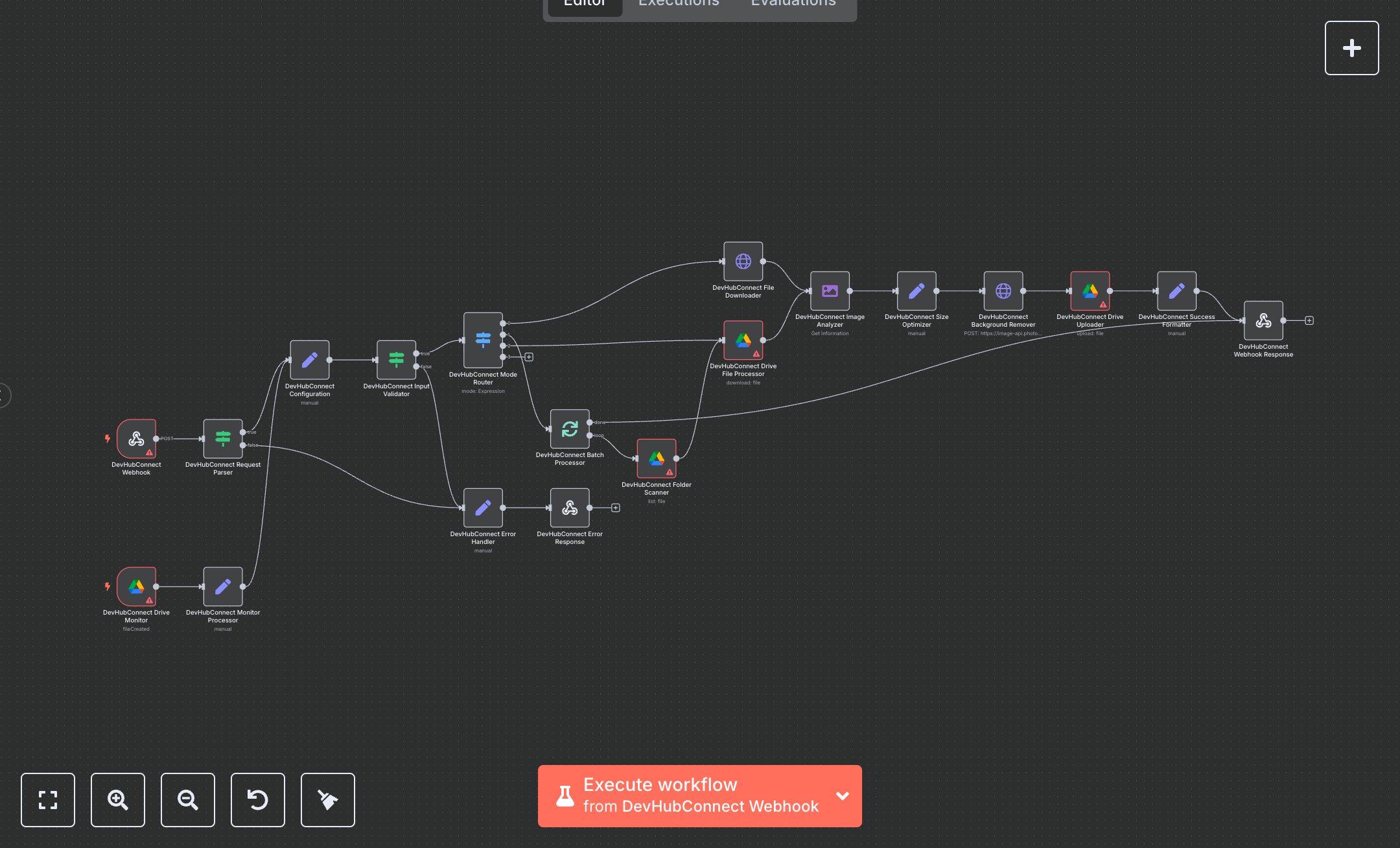
Image Background Removal with PhotoRoom API and Google Drive
This workflow automates image background removal using the PhotoRoom API, supporting single-file processing, batch processing, and Google Drive folder monitoring. It accepts image uploads via webhook or monitors a Drive folder, validates inputs, optimizes image sizes, removes backgrounds with customizable settings (e.g., background color, padding), and uploads results to Google Drive. Key nodes include Webhook and Google Drive Trigger for inputs, IF and Switch for routing, HTTP Request for PhotoRoom API, and Google Drive for file handling. Ideal for e-commerce, design teams, or photographers (1-50 users) processing 20+ images daily, reducing manual editing time from 5-15 minutes to seconds per image.\n\nROI saves 5-10 hours weekly for teams processing 100+ images, streamlining product photography or content creation. Use cases include preparing product images for online stores, creating clean visuals for marketing, or automating photo editing workflows. Requirements: PhotoRoom API key (~$0.05/image), Google Drive OAuth2 (free with Google Workspace, ~$6/user/month), n8n instance (free or cloud.n8n.io, ~$20/month), PHOTOROOM_API_KEY, DEFAULT_OUTPUT_FOLDER, MONITOR_FOLDER_URL env vars. Scalability supports thousands of daily images; limited by PhotoRoom rate limits (~1,000 requests/day) and Google Drive API (~1,000 requests/day).\n\nInstall n8n from n8n.io or cloud.n8n.io. Obtain PhotoRoom API key from photoroom.com, Google Drive OAuth2 via Google Cloud Console. Set env vars. Configure n8n credentials: HTTP Header Auth (PhotoRoom), Google Drive OAuth2. Node setup: Webhook (POST, path: 'background-removal'), Google Drive Trigger (fileCreated, every minute), PhotoRoom API (multipart-form-data, dynamic bg_color/padding/outputSize), Google Drive Uploader (dynamic folderId). Expose webhook via ngrok.\n\nTest with POST requests (e.g., {body: {file_url: 'https://example.com/image.jpg', mode: 'single', background_color: 'white'}}) or upload images to monitored Drive folder; verify processed images in Drive and webhook response. Common errors: Invalid API key (401—check PhotoRoom credentials), missing file source (400—validate request), rate limits (429—add retry logic). Deploy by activating workflow, sharing webhook URL. Maintenance: Monitor API quotas, rotate keys quarterly, validate file sources. Optimize: Adjust batch size (3-7), tune output size (800x800 to 2000x2000), cache frequent folder scans.", "businessValue": "Saves 5-10 hours/week automating 100+ image background removals for e-commerce or design workflows", "setupTime": "20-30 minutes", "difficulty": "Intermediate", "requirements": ["PhotoRoom API key", "Google Drive OAuth2", "PHOTOROOM_API_KEY, DEFAULT_OUTPUT_FOLDER, MONITOR_FOLDER_URL env vars", "n8n installation, API integration knowledge"], "useCase": "Automating image background removal for e-commerce product images, marketing visuals, or photography workflows"
$5.49
Workflow steps: 19
Integrated apps: webhook, if, set