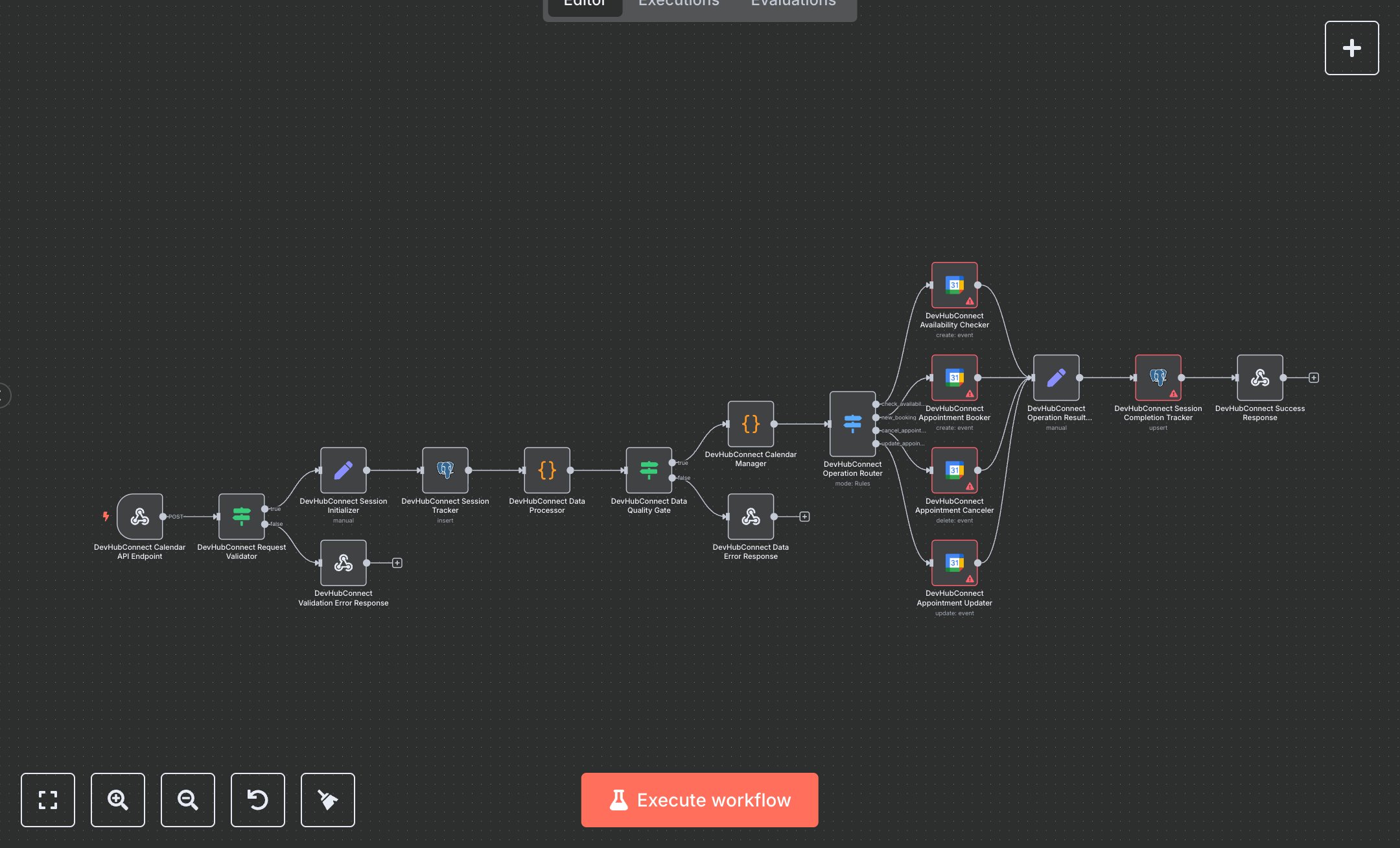
Booking and Appointment Scheduling Using Vapi AI and Google Calendar
This workflow automates enterprise appointment management by integrating with Google Calendar and Vapi AI for voice-driven scheduling, replacing manual calendar coordination. It processes requests via a secure webhook, validates inputs, parses date/time with natural language processing, and manages bookings, cancellations, updates, or availability checks, storing session data in a PostgreSQL database for auditability. Key nodes include Webhook for Vapi integration, IF and Switch for request validation and routing, Code nodes for data cleaning and date parsing, Google Calendar nodes for operations, and PostgreSQL for session tracking. It serves enterprises (100-1000 employees) handling 50+ daily appointments, such as executive assistants or customer service teams, reducing scheduling time from 5-10 minutes to seconds per request, with voice interaction support.\n\nROI saves 8-12 hours weekly for teams managing 200+ appointments, improving efficiency and audit compliance. Use cases include corporate scheduling, client meeting coordination, or service appointment management. Requirements: Google Workspace ($6/user/month), Vapi API key (pay-per-use, ~$0.02/call), PostgreSQL (free or Supabase ~$25/month), n8n instance (free or cloud.n8n.io, ~$20/month), DEVHUB_VAPI_API_KEY env var. Scalability supports thousands of daily requests; limited by Google Calendar API (~2,000 requests/day) and Vapi rate limits.\n\nInstall n8n from n8n.io or cloud.n8n.io. Set up Google Calendar OAuth2 via Google Cloud Console (enable Calendar API). Obtain Vapi API key from dashboard.vapi.ai. Configure PostgreSQL (e.g., Supabase) with calendar_sessions table (fields: session_id, tool_call_id, raw_arguments, client_ip, status, created_at, operation_result, completion_timestamp, processing_time_seconds, workflow_version). Set env var DEVHUB_VAPI_API_KEY. Configure n8n credentials: HTTP Header Auth (X-API-Key), Google Calendar OAuth2, PostgreSQL. Node setup: Webhook (POST, path: 'enterprise-calendar-assistant', allowed origins: Vapi domains), Code (parses dates like 'tomorrow 2pm'), Google Calendar (primary calendar), PostgreSQL (insert/upsert sessions). Expose webhook via ngrok.\n\nTest with POST requests from Vapi (e.g., {message: {toolCalls: [{id: '123', function: {arguments: '{"category":"new_booking","name":"John Doe","email":"john@example.com","dateTime":"tomorrow 2pm"}'}}]}) using Vapi’s test tool or Postman; verify calendar events and database logs. Common errors: Invalid API key (401—check Vapi/Google credentials), malformed JSON (400—validate toolCalls), rate limits (429—add retry logic). Deploy by activating workflow, sharing webhook URL with Vapi. Maintenance: Monitor PostgreSQL storage, rotate keys quarterly, update Vapi configurations. Optimize: Adjust date parsing logic for edge cases, cache frequent availability checks.", "businessValue": "Saves 8-12 hours/week automating 200+ appointment tasks for enterprise scheduling teams", "setupTime": "30-45 minutes", "difficulty": "Advanced", "requirements": ["Google Workspace with Calendar API", "Vapi API key", "PostgreSQL database", "DEVHUB_VAPI_API_KEY env var", "n8n installation, Google/Vapi integration knowledge"], "useCase": "Automating voice-driven appointment management for corporate scheduling or client services"
$5.49
Workflow steps: 17
Integrated apps: webhook, if, respondToWebhook