AI Style Transfer Service
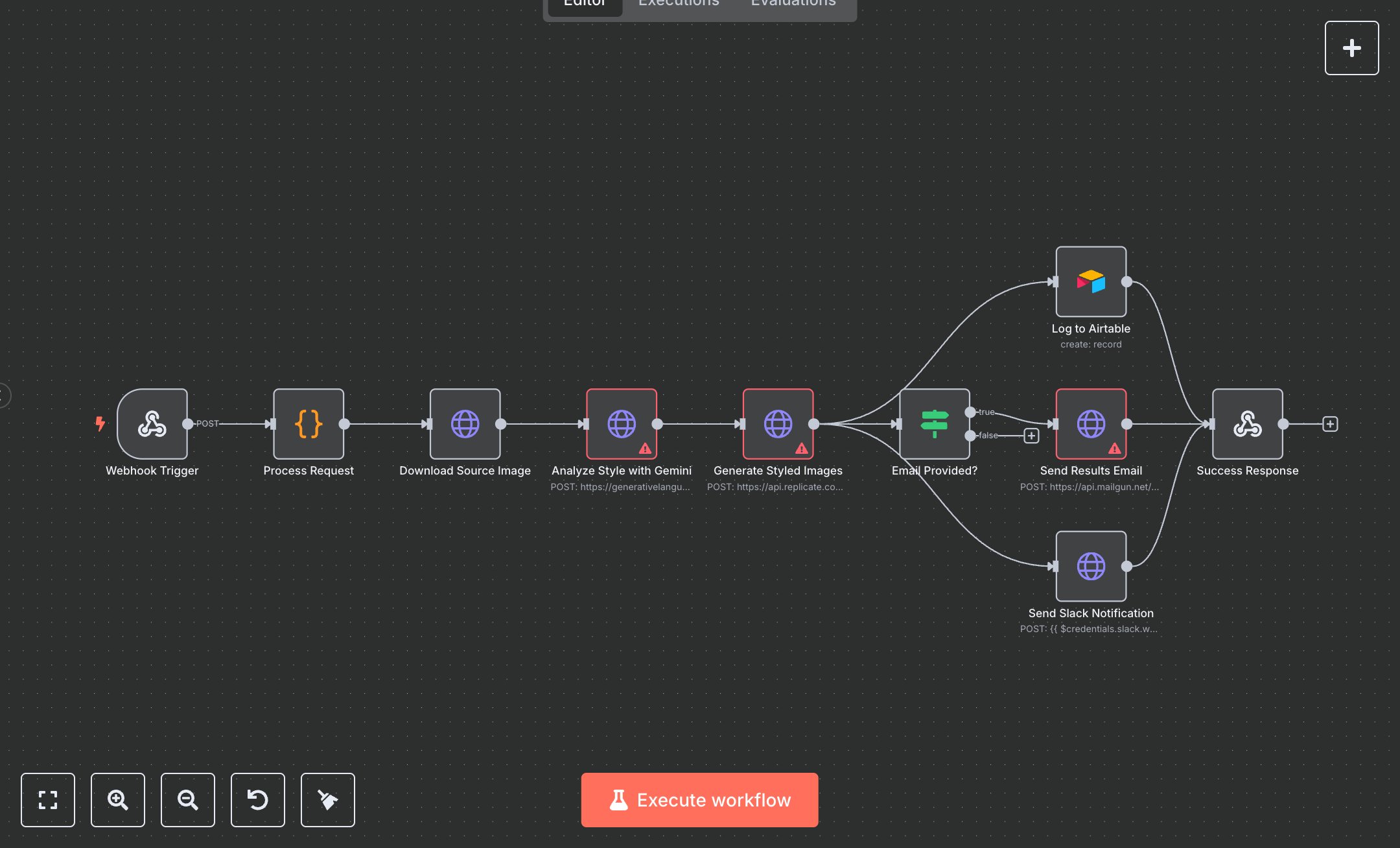
This workflow processes image style transfer requests using Gemini and Replicate APIs, logs results in Airtable, sends email results via Mailgun, and notifies via Slack. Key nodes include Webhook Trigger (receives requests), Process Request (validates inputs), Download Source Image (fetches image), Analyze Style with Gemini (describes style), Generate Styled Images (creates images), Log to Airtable (stores data), Email Provided? (checks email), Send Results Email (sends results), Send Slack Notification (alerts team), and Success Response (returns status). It uses Gemini, Replicate, Airtable, and Mailgun APIs.\n\nSetup Requirements: Install n8n from n8n.io or sign up at cloud.n8n.io. Import the JSON into n8n’s workflow editor. Configure Webhook Trigger with path style-transfer and HTTP method POST. Obtain Gemini API key from ai.google.dev (API Keys). Get Replicate API key from replicate.com (Account > API Tokens). Create an Airtable base at airtable.com with a Style Transfer Jobs table; get API key and Base ID from Account settings. Acquire Mailgun API key and domain from mailgun.com (Domains > API Keys). Get Slack Webhook URL from slack.com (Apps > Incoming Webhooks, create in #ai-results). In n8n, configure credentials: Gemini (HTTP Header Auth), Replicate (HTTP Header Auth), Airtable (Token API), Mailgun (HTTP Basic Auth), and Slack (Webhook URL). Handle errors like invalid image URL (400: Invalid URL format) or missing API keys (401: Unauthorized).\n\nTesting and Deployment: Import the JSON into n8n. Test with curl -X POST http://your-n8n-instance/style-transfer -d '{"source_image_url":"https://example.com/image.jpg","target_prompt":"Van Gogh style","email":"test@example.com"}'. Verify Process Request validates inputs and Download Source Image fetches the image. Check Analyze Style with Gemini returns style description and Generate Styled Images produces images. Confirm Log to Airtable stores data, Send Results Email delivers to the provided email, and Send Slack Notification posts to Slack. Validate Success Response returns {"status":"success","generated_images":[...]}. Test with invalid input ({"source_image_url":"invalid"}) to trigger {"error":"Invalid URL format"}. Monitor logs for issues like Replicate rate limits (429) or Airtable errors (404: Table not found). If emails fail, verify Mailgun setup. Activate the workflow in n8n and integrate the webhook URL into your application. Deploy for automated style transfers.
$6.99
Workflow steps: 10
Integrated apps: webhook, code, httpRequest