WhatsApp Customer Support with n8n, Supabase & Twilio API
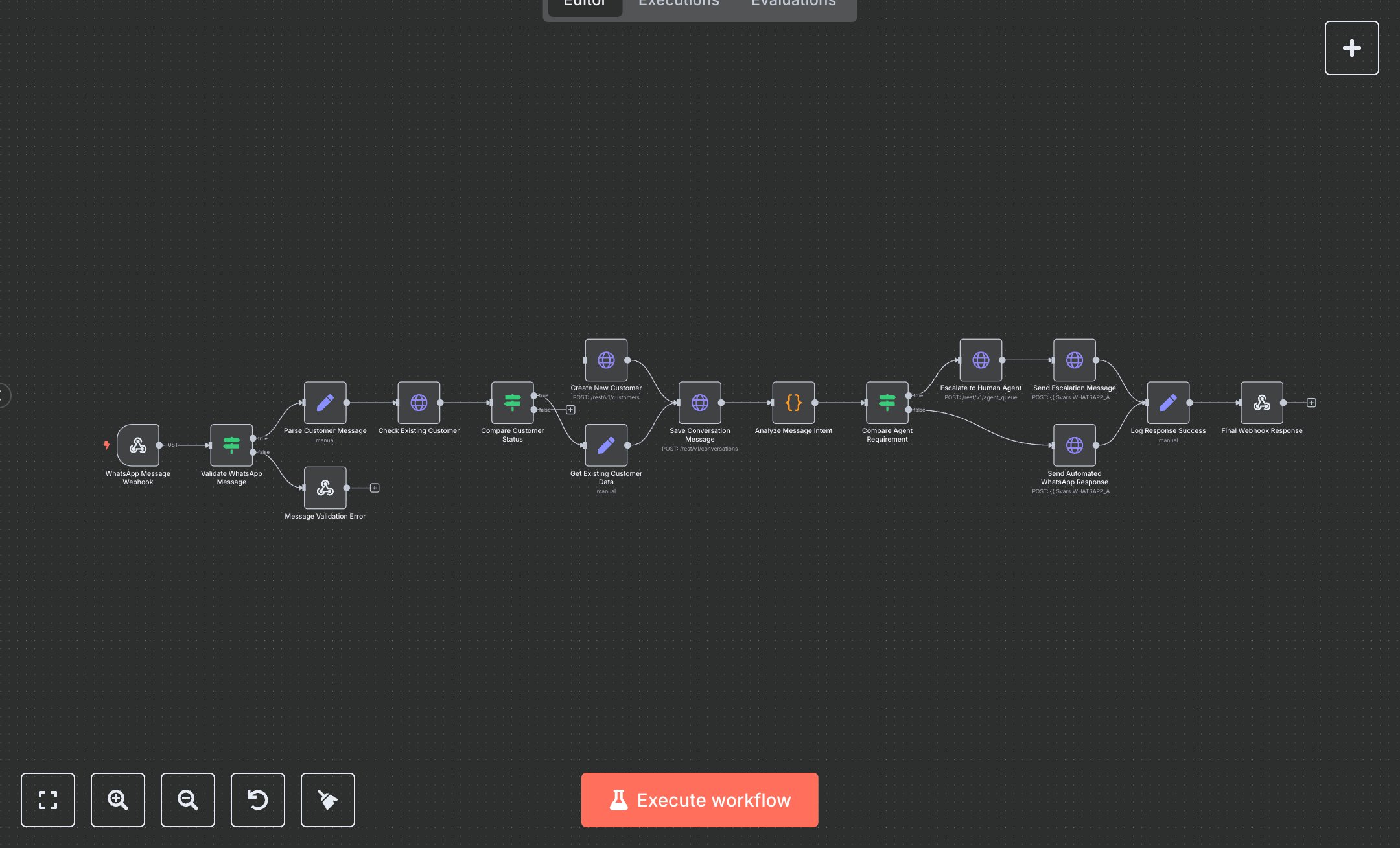
This workflow automates customer support via WhatsApp, streamlining query handling for businesses using the WhatsApp Business API. It replaces manual message processing by receiving messages through a secure webhook, validating inputs, checking customer records in Supabase, analyzing message intent, and routing to automated responses or human agents. Key nodes include Webhook for message intake, IF for validation and routing, HTTP Request for Supabase queries and WhatsApp responses, Code for intent analysis, and Respond To Webhook for API feedback. It benefits small to mid-size businesses (10-100 employees) managing 100+ daily customer inquiries, reducing response time from 10 minutes to seconds for automated cases and ensuring high-priority issues reach agents quickly.\n\nThe ROI saves 8-12 hours weekly for support teams handling 200+ messages, improving customer satisfaction with fast, consistent responses. Use cases include e-commerce support for order inquiries, service companies addressing complaints, or retail managing cancellations. Requirements: WhatsApp Business API (via Twilio, ~$0.005/message), Supabase (free tier for 500MB, ~$25/month Pro), n8n instance (free or cloud.n8n.io, ~$20/month), DEVHUB_API_KEY for webhook auth, WHATSAPP_API_URL, and SUPABASE_ANON_KEY. Scalability supports thousands of messages; limited by API rate limits (WhatsApp: ~1,000 messages/hour; Supabase: ~10,000 requests/day).\n\nInstall n8n from n8n.io or cloud.n8n.io. Set up WhatsApp Business API (e.g., via Twilio) and get API token. Configure Supabase (tables: customers, conversations, agent_queue) and obtain SUPABASE_URL and SUPABASE_ANON_KEY from project dashboard. Set environment variables: DEVHUB_API_KEY, WHATSAPP_API_URL, SUPABASE_URL, SUPABASE_ANON_KEY. Configure n8n credentials: HTTP Header Auth for webhook (X-API-Key) and WhatsApp API. Set nodes: Webhook (POST, path: 'whatsapp-customer-service'), IF for validation, Code for intent detection, HTTP Request for Supabase and WhatsApp. Expose webhook via ngrok.\n\nTest with POST requests (e.g., {from: '+1234567890', text: 'Help with order'}) using Postman or WhatsApp API simulator; verify response or escalation in Supabase. Common errors: Invalid webhook auth (401—check DEVHUB_API_KEY), missing Supabase keys (500—verify env vars), invalid table (400—check schema). Deploy by activating workflow and configuring WhatsApp API to send messages to webhook. Maintenance: Monitor logs, rotate keys quarterly, check Supabase table permissions. Optimize by enhancing intent analysis with NLP services or adding batch message processing.", "businessValue": "Saves 8-12 hours/week automating 200+ WhatsApp customer inquiries", "setupTime": "30-45 minutes", "difficulty": "Intermediate", "requirements": ["WhatsApp Business API", "Supabase account", "DEVHUB_API_KEY, WHATSAPP_API_URL, SUPABASE_URL, SUPABASE_ANON_KEY", "n8n installation, webhook and API knowledge"], "useCase": "Automating WhatsApp customer support for e-commerce or service businesses"
$5.49
Workflow steps: 16
Integrated apps: webhook, if, respondToWebhook