Global Teams Streamline Customer Data Retrieval with n8n + Supabase
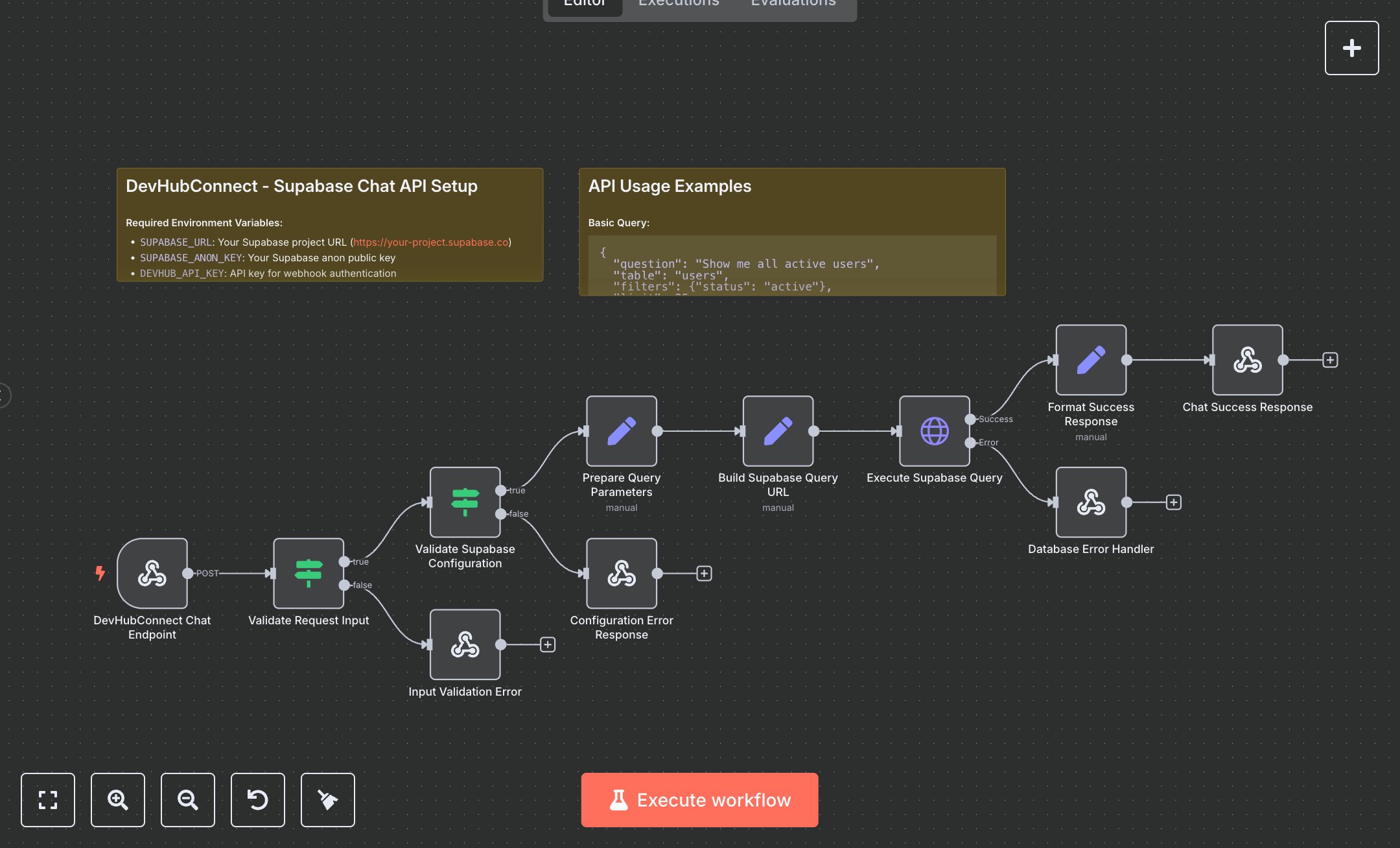
This workflow provides a secure, authenticated API for querying Supabase databases, streamlining data retrieval for applications like customer support, analytics, or internal tools. It replaces manual SQL queries or Supabase dashboard navigation by accepting POST requests with table names, questions, filters, and limits, validating inputs, constructing queries, and returning formatted JSON results. Key nodes include Webhook for secure request intake (with X-API-Key authentication), IF nodes for validating inputs and Supabase configuration, Set nodes for query preparation, HTTP Request for executing queries, and Respond To Webhook for success/error responses. Sticky Notes provide setup and usage guidance. It benefits small to mid-size teams (10-100 employees) handling 100+ daily queries, such as support agents fetching customer data or developers building data-driven apps, reducing query time from 10 minutes to seconds.\n\nThe ROI saves 5-8 hours weekly for teams processing 100+ queries, ensuring secure and consistent data access. Use cases include support teams retrieving user profiles, operations tracking inventory, or marketing pulling campaign metrics. Requirements: Supabase account (free tier for 500MB, ~$25/month Pro), n8n instance (free or cloud.n8n.io, ~$20/month), DEVHUB_API_KEY for authentication. Scalability handles thousands of rows; limited by Supabase API rate limits (~10,000 requests/day on free tier). Environment variables: SUPABASE_URL, SUPABASE_ANON_KEY, DEVHUB_API_KEY.\n\nInstall n8n from n8n.io or cloud.n8n.io. Get Supabase URL and anon key from project dashboard (Settings > API). Configure n8n environment variables: SUPABASE_URL (e.g., https://your-project.supabase.co), SUPABASE_ANON_KEY, DEVHUB_API_KEY. Set credentials: HTTP Header Auth (X-API-Key). Configure nodes: Webhook (POST, path: 'devhub-supabase-chat', header auth), IF (validate question, table, regex for table name), HTTP Request (dynamic URL with filters, retry logic). Expose webhook via ngrok for external access.\n\nTest with POST requests (e.g., {question: 'List active users', table: 'users', filters: {status: 'active'}, limit: 25}, header: X-API-Key) using Postman; verify data and metadata in response. Common errors: Invalid API key (401—check DEVHUB_API_KEY), missing/invalid table (400/500—verify table name, permissions), rate limits (429—adjust retry logic). Deploy by activating workflow and sharing webhook URL. Maintenance: Monitor logs, rotate keys quarterly. Optimize by caching frequent queries or adding advanced filter parsing.", "businessValue": "Saves 5-8 hours/week automating 100+ Supabase queries for data-driven teams", "setupTime": "20-30 minutes", "difficulty": "Intermediate", "requirements": ["Supabase account with API access", "SUPABASE_URL, SUPABASE_ANON_KEY, DEVHUB_API_KEY", "n8n installation, webhook and API knowledge"], "useCase": "Automating secure Supabase queries for support, analytics, or app development"
$5.49
Workflow steps: 13
Integrated apps: webhook, if, respondToWebhook