Startup Alerts in Mattermost for IT & DevOps Teams
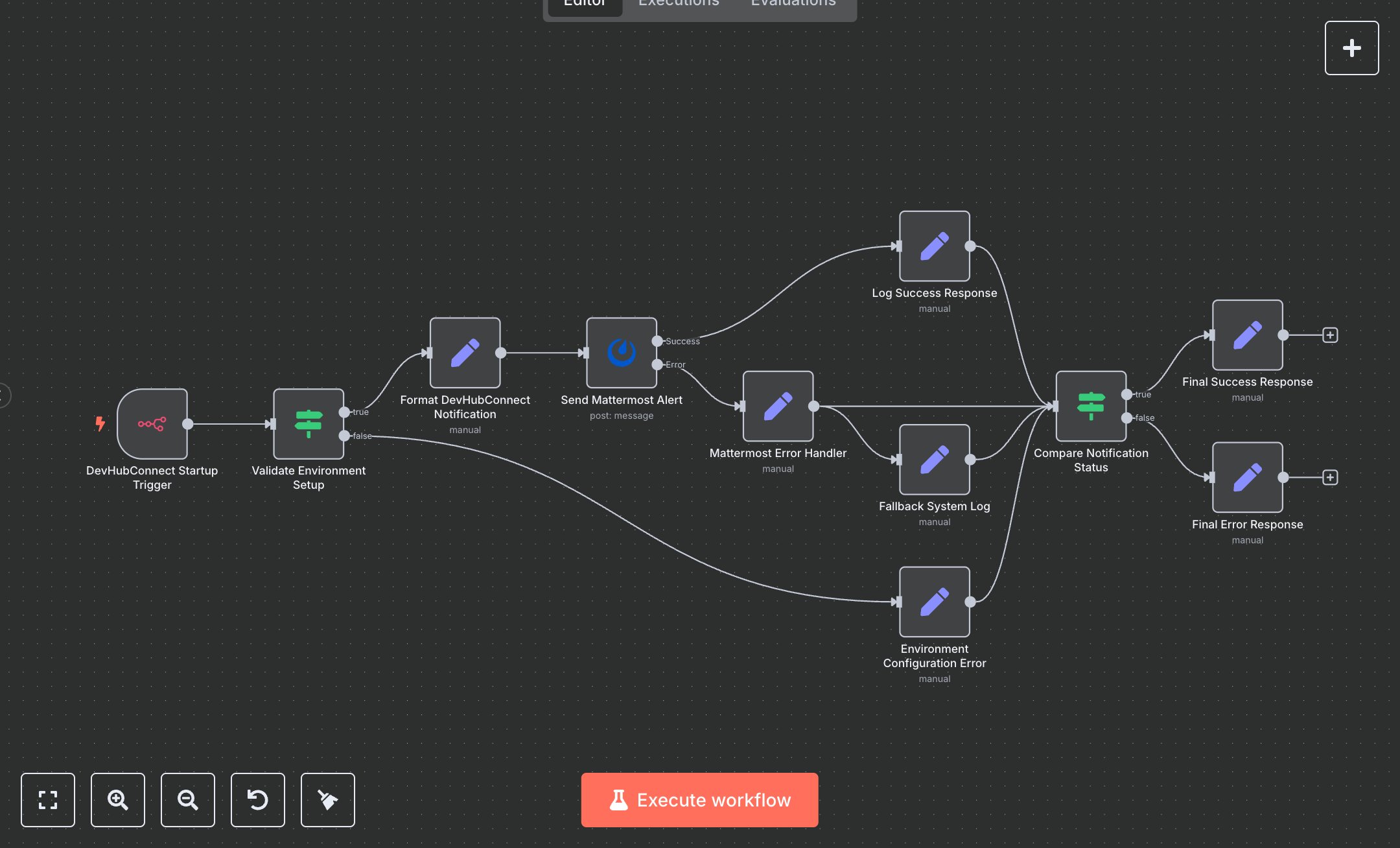
This workflow automates the sending of alerts to a Mattermost channel when an n8n instance starts, eliminating the manual task of monitoring system uptime for IT or DevOps teams. It replaces checking server logs by triggering on startup, validating environment variables, formatting a detailed notification with instance details (ID, version, hostname), and posting to Mattermost. Key nodes include n8nTrigger for startup detection, IF for environment validation, Set nodes for formatting messages and handling errors, and Mattermost for sending alerts. It benefits IT teams in small to mid-size firms (10-100 employees) managing 5+ n8n instances, ensuring instant uptime confirmation, reducing detection time from 10 minutes to seconds.\n\nThe ROI saves 2-3 hours weekly by automating alerts for teams monitoring multiple instances. Use cases include DevOps ensuring workflow reliability or operations teams tracking automation systems. Requirements: Mattermost account (free self-hosted, ~$10/user/month Cloud) and n8n instance (free or cloud.n8n.io, ~$20/month). Scalability is robust, limited by Mattermost API rates (~1,000 requests/hour). Environment variables (MATTERMOST_URL, MATTERMOST_CHANNEL_ID, MATTERMOST_BOT_TOKEN) must be set.\n\nInstall n8n from n8n.io or use cloud.n8n.io. Create a Mattermost Personal Access Token via user settings (e.g., mattermost.yourdomain.com). In n8n, configure Mattermost API credentials with token and server URL. Set environment variables in n8n config: MATTERMOST_URL (server), MATTERMOST_CHANNEL_ID (e.g., 'general'), MATTERMOST_BOT_TOKEN. No webhook setup is needed. Configure nodes: n8nTrigger (events: init), Mattermost (channelId from variable, botUsername, e.g., 'DevHubConnect Bot').\n\nTest by restarting n8n and checking the Mattermost channel for the formatted alert. Verify instance details (ID, version). Common errors: Missing environment variables (set in config), invalid token (regenerate in Mattermost), or network issues (check server URL). Deploy by activating workflow; it triggers on startup. Maintenance: Monitor logs for errors, rotate tokens annually. Optimize by customizing Set node messages or adding retry logic in Mattermost node for transient failures.", "businessValue": "Saves 2-3 hours/week automating n8n startup alerts for IT teams", "setupTime": "15-20 minutes", "difficulty": "Beginner", "requirements": ["Mattermost account with Personal Access Token", "Token with channel post permissions", "n8n installation, environment variable setup"], "useCase": "Automating startup notifications for DevOps monitoring n8n instances"
$5.49
Workflow steps: 11
Integrated apps: n8nTrigger, if, set