Bulk Data Operations: Inventory, CRM & ETL Made Easy
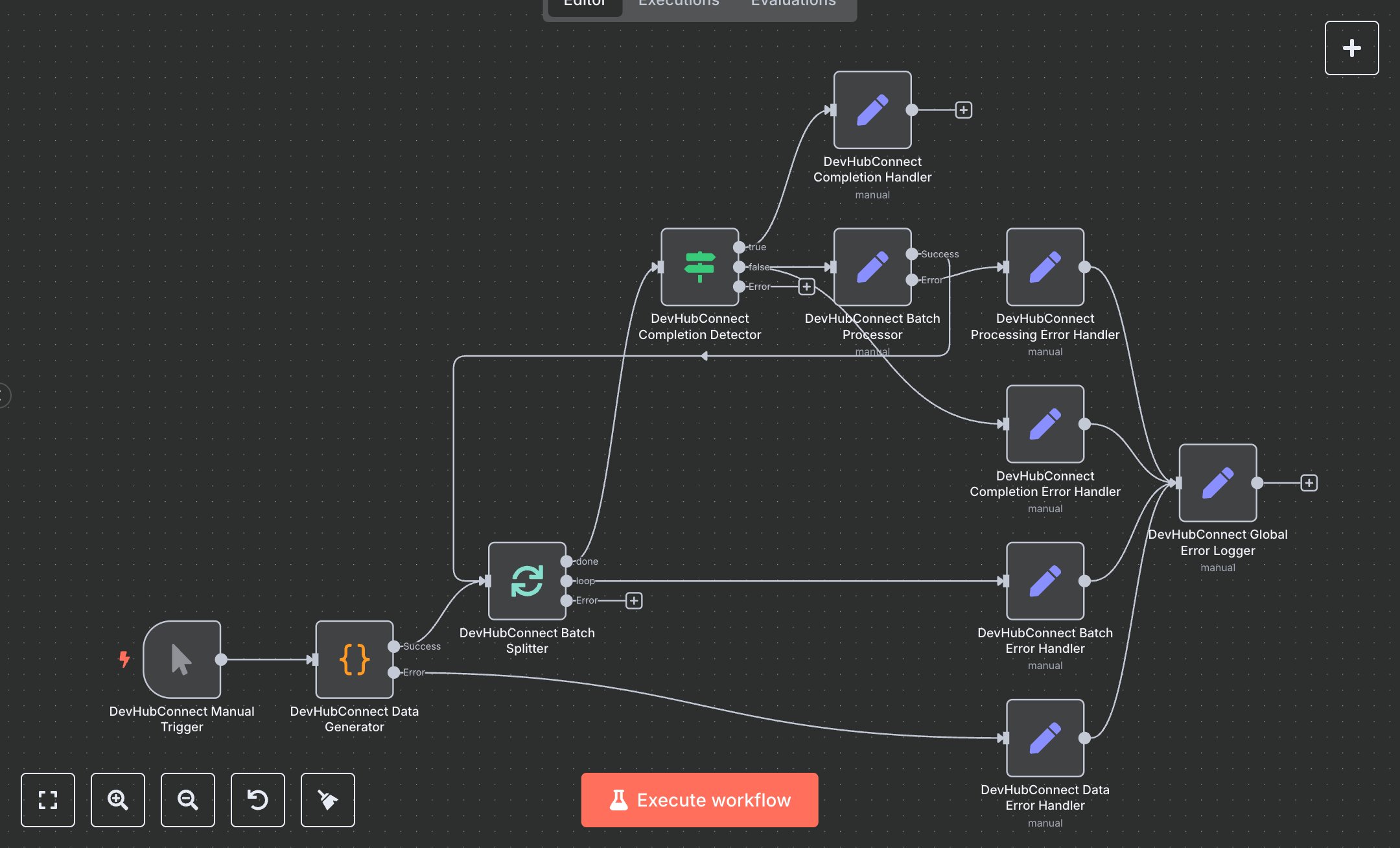
This workflow automates batch data processing, replacing manual tasks like splitting large datasets in Excel or custom scripts, which are error-prone and time-consuming, often taking hours for 1000+ records. Manual division risks data loss, inconsistent processing, and resource overload. The workflow generates test data, splits it into batches of 3, processes each with metadata, and logs errors, ensuring reliable execution. Key nodes include Manual Trigger to initiate runs, Code to generate 10 sample items with IDs and timestamps, SplitInBatches for controlled batching, IF to check completion, Set nodes for batch processing and completion summaries, and error handlers (Data, Batch, Completion, Processing, Global Error Logger) for robust error tracking. It benefits data teams or analysts handling 500+ records daily in ETL pipelines, inventory updates, or CRM syncing for e-commerce, finance, or analytics, cutting processing time and errors by enabling scalable, audited workflows.\n\nThe workflow saves 4-8 hours weekly on 1000+ item datasets, reducing errors by 50% via structured batching. Ideal for small to medium firms in e-commerce or analytics. Requires n8n community edition (free) or cloud ($20/month). Scalable to 10,000 items, limited by memory (add Wait nodes for large datasets) and execution timeouts.\n\nInstall n8n from n8n.io or cloud.n8n.io (free tier for testing, $20/month unlimited). No APIs needed. To use a Webhook, add Webhook node post-trigger, set path to 'batch', and copy production URL (e.g., https://your-n8n/webhook/batch123) for external POST calls. Configure Code node JS (adjust totalItems), SplitInBatches (batchSize=3), IF for noItemsLeft, Set nodes for batchInfo/summary, and error handlers for detailed logging.\n\nTest manually: Run workflow, verify 10 items generated, processed in 4 batches of 3, and completion summary. Check error nodes for failures (e.g., JS syntax errors in Code, fixed via editor debugging; batch issues due to memory, resolved by lowering batchSize). Deploy by activating; monitor logs. Maintain by adjusting batchSize for scale, adding Wait nodes for stability, and integrating notification nodes (e.g., Email) for error alerts.", "businessValue": "Saves 4-8 hours/week processing 1000+ data items with error handling", "setupTime": "20-30 minutes", "difficulty": "Beginner", "requirements": ["n8n community edition (free) or cloud ($20/month)", "No API access needed", "Basic JS knowledge for Code node"], "useCase": "Automating bulk data processing for ETL or inventory updates"
$5.49
Workflow steps: 11
Integrated apps: manualTrigger, code, splitInBatches