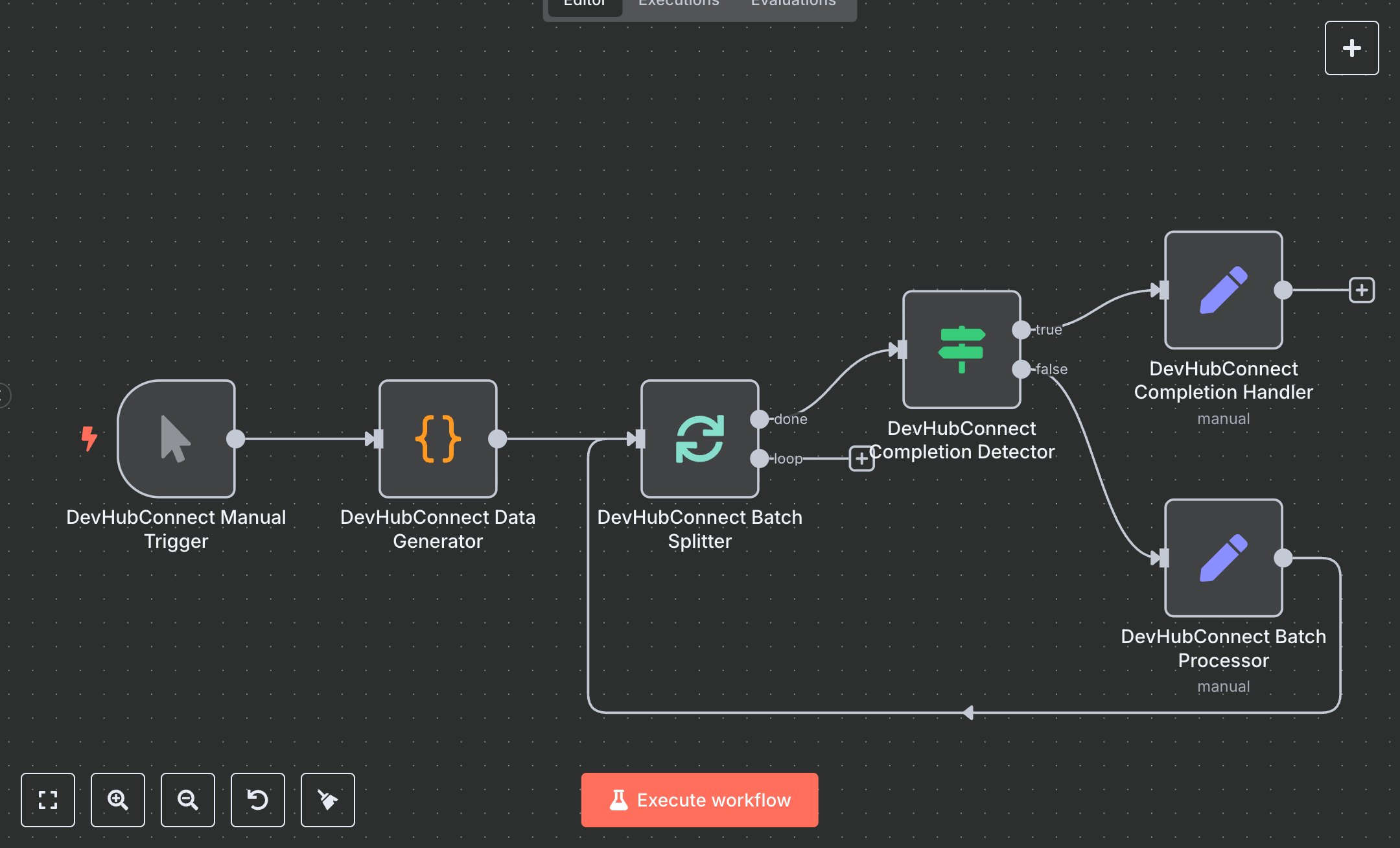
Scalable Batch Data Workflow (No APIs Needed)
This workflow automates batch data processing, replacing manual handling of large datasets in tools like Excel or custom scripts, where splitting, processing, and tracking chunks often leads to errors, inconsistencies, and hours of repetitive work. Manually dividing 1000+ records into groups for analysis or transformation requires constant monitoring and can cause resource overload or incomplete runs. The workflow generates sample data, splits it into batches of 3, processes each with metadata, and loops until complete, ensuring efficient, controlled execution. Key nodes include Manual Trigger to start runs, Code to generate structured test items with IDs and timestamps for realistic simulation, SplitInBatches to divide data into manageable groups preventing overload, IF to detect completion and route flows, and Set nodes for batch processing (adding status, timestamps, progress info) and completion handling (summarizing totals, messages). It helps data teams or analysts managing 500+ records daily by automating division and tracking, reducing manual oversight, and providing summaries for auditing, ideal for ETL pipelines or bulk operations in e-commerce inventory or customer data syncing, potentially halving processing time while minimizing errors.\n\nThe workflow yields strong ROI by saving 4-8 hours weekly on data handling for 1000+ items, with batching cutting error rates by 50% through controlled loops. Suited for small to medium firms in e-commerce, finance, or analytics needing scalable data flows. Use cases include inventory updates, report generation, or CRM syncing. Requires free n8n community edition (self-hosted) or cloud plans ($20/month unlimited). No external services; scalable to 10,000 items but limited by n8n's memory (add pauses for large sets) and execution timeouts.\n\nSet up n8n by downloading from n8n.io or creating a cloud.n8n.io account (free tier for basics, $20/month unlimited). No API credentials needed, as it's internal. The workflow lacks a Webhook; to add one, insert Webhook node after trigger, copy production URL (e.g., https://your-instance.n8n.cloud/webhook/abc123), and POST data to it. Configure Code node JS to generate items (adjust totalItems=10), SplitInBatches batchSize=3, IF for noItemsLeft=true, Set expressions for batchInfo and summary.\n\nTest manually: Run workflow, check outputs—data gen creates 10 items, batches process in loops of 3, completion shows summary. Common errors: infinite loops (verify IF condition), code syntax (debug JS in editor). Deploy by toggling 'Active'; monitor via logs. Maintain by updating batchSize for scale, add error branches for failures like memory issues, optimize with Wait nodes for heavy processing.", "businessValue": "Saves 4-8 hours/week automating batch processing for 500+ data items", "setupTime": "15-20 minutes", "difficulty": "Beginner", "requirements": ["n8n community edition (free self-hosted) or cloud ($20/month)", "No API access required", "Basic JS knowledge for Code node customization"], "useCase": "Efficiently handling large datasets in ETL or bulk operations for data teams"
$3.49
Workflow steps: 6
Integrated apps: manualTrigger, code, splitInBatches