Universal AI Assistant with n8n + GPT: Automate 100+ Daily Tasks
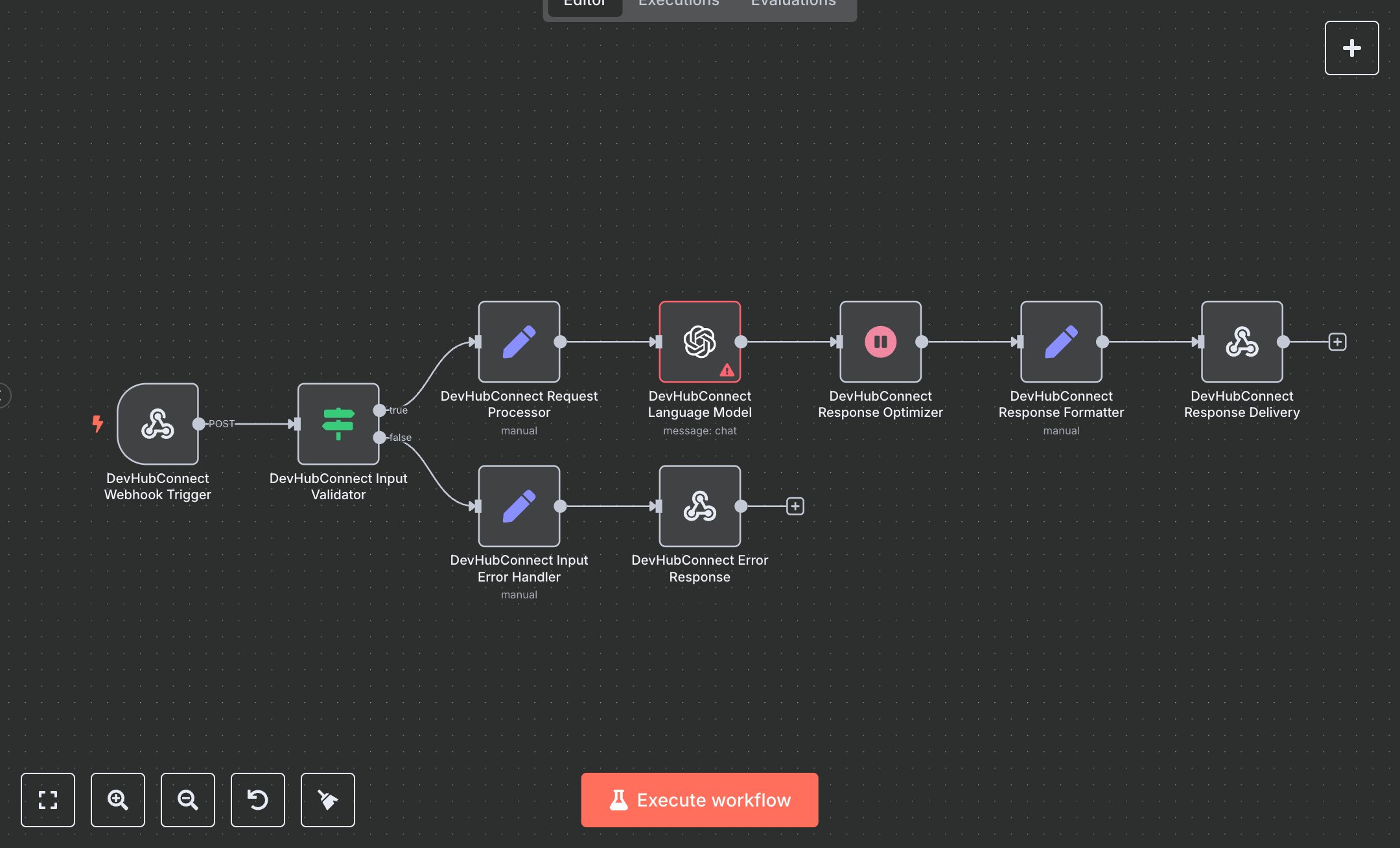
This workflow automates a Universal AI Assistant, replacing manual task handling like email drafting, calendar checks, contact lookups, or smart home control, which often require navigating multiple apps or voice assistants with limited capabilities. Manual processes lead to errors, delays, and fragmented workflows for busy professionals. The workflow processes text/voice inputs via a webhook, generates intelligent responses using OpenAI's GPT-4o, and delivers formatted outputs for seamless integration into apps or devices. Key nodes include Webhook for receiving POST requests, IF for input validation, Set for processing user inputs and metadata like userId and timezone, OpenAI for contextual responses, Wait for response optimization, and Respond to Webhook for JSON delivery with headers. It benefits small business owners, freelancers, or teams managing 100+ daily tasks by centralizing operations, reducing app-switching, and enabling scalable automation for customer support, scheduling, or home automation, potentially cutting task management time and improving response accuracy across industries like retail or consulting.\n\nThe workflow saves 5-10 hours weekly by automating 100+ daily queries, boosting efficiency by 60% for task-heavy teams. Ideal for small to medium businesses in retail, consulting, or tech. Requires OpenAI API (~$0.02/query for GPT-4o) and n8n cloud ($20/month unlimited) or self-hosted (free). Scalable to 1000 queries/day but limited by API rate limits (e.g., OpenAI’s 200 requests/minute) and webhook throughput.\n\nInstall n8n via n8n.io download or cloud.n8n.io signup ($20/month for unlimited). For OpenAI credentials, create an API key at openai.com dashboard, enable GPT-4o access, and add to n8n’s credentials manager (select OpenAI, paste key). Configure Webhook node with path 'assistant', copy production URL (e.g., https://your-n8n/webhook/devhubconnect-ai-assistant-endpoint) for external app integration. Set OpenAI node to GPT-4o, adjust messages for custom prompts. Update Set nodes for inputType (text/voice) and metadata fields. No additional auth needed for webhook.\n\nTest with sample POST requests (e.g., {input: 'Check my calendar', inputType: 'text'}) using tools like Postman; verify JSON response structure. Common errors: invalid API key (regenerate in OpenAI dashboard), empty input (check request body), rate limits (add Wait node delays). Deploy by activating workflow; monitor execution logs. Maintain by updating prompts for new tasks, optimizing temperature (0.7 default) for response quality, and scaling webhook capacity for high traffic.", "businessValue": "Saves 5-10 hours/week automating 100+ daily tasks with AI responses", "setupTime": "30-45 minutes", "difficulty": "Intermediate", "requirements": ["OpenAI API key with GPT-4o access", "n8n cloud ($20/month) or self-hosted (free)", "Webhook-compatible client app or device"], "useCase": "Streamlining task automation for small business operations"
$3.49
Workflow steps: 9
Integrated apps: webhook, if, set