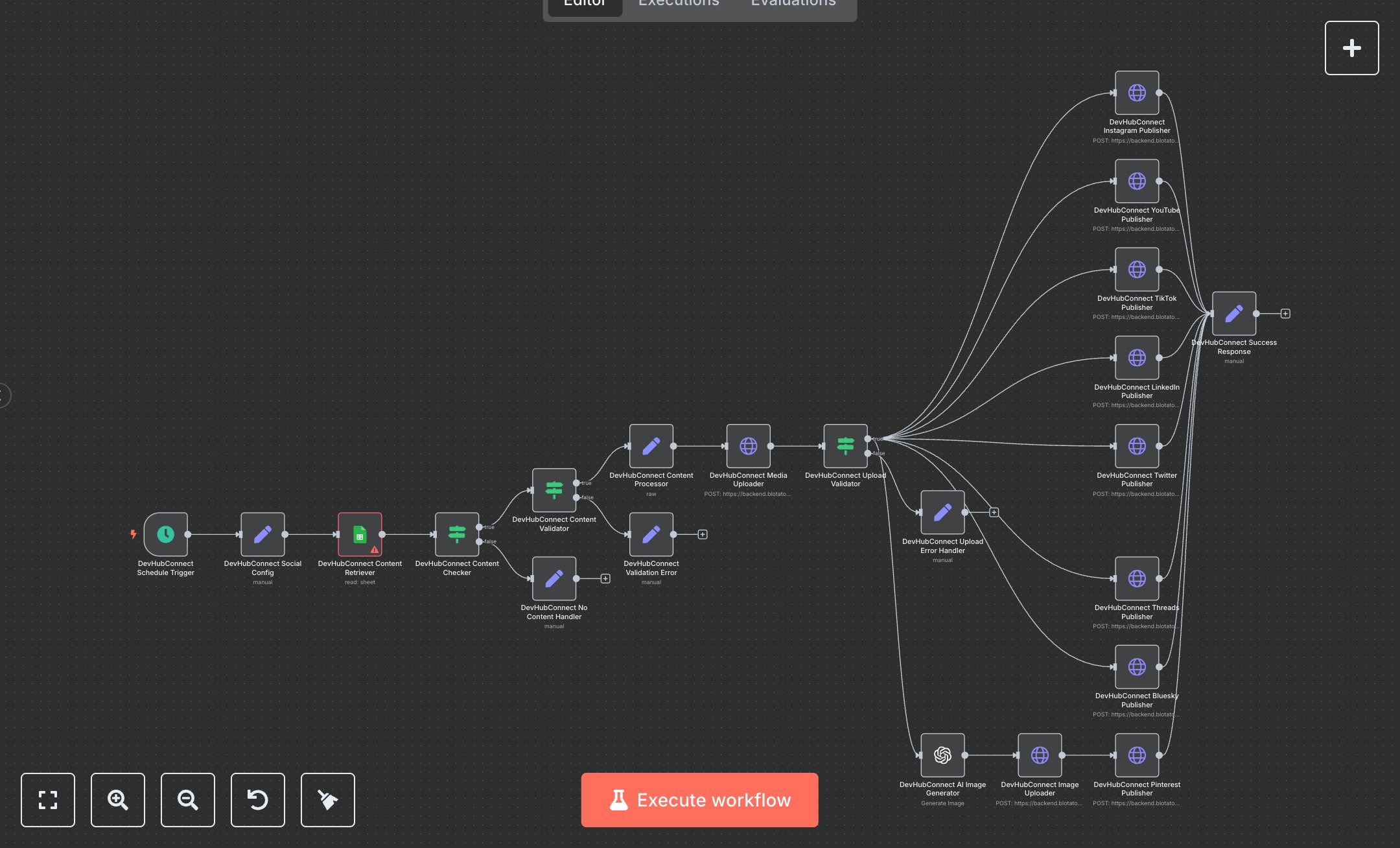
Social Media Publishing: Instagram, TikTok, YouTube & Pinterest Posting with Blotato
This workflow automates multi-platform social media publishing, replacing manual content uploads across platforms like Instagram, YouTube, and TikTok, which often consume hours daily for content creators juggling spreadsheets and individual logins. Manually scheduling and posting videos involves copying captions, downloading files, and navigating each app's interface, leading to errors, inconsistent timing, and missed opportunities for engagement. This automation fetches ready content from Google Sheets, validates it, uploads media via Blotato API, generates AI images for Pinterest, and publishes simultaneously to eight platforms, ensuring brand consistency and timely distribution. Key nodes include Schedule Trigger for daily runs at 9 AM UTC to align with peak audience times, Google Sheets for retrieving captioned video URLs marked 'Ready to Post,' IF nodes for content existence and validation checks to prevent invalid posts, Set nodes for processing Drive IDs, cleaning captions, and handling configs/errors/success responses for auditing, HTTP Request nodes for Blotato media uploads with retries and platform-specific publishing with timeouts, and OpenAI for DALL-E thumbnail generation based on captions. It helps marketing teams or solopreneurs managing 100+ content pieces monthly by centralizing operations, reducing duplication, and freeing time for strategy over execution, potentially slashing posting costs by automating what could take 10+ hours weekly.\n\nThe workflow delivers high ROI by saving 8-12 hours weekly on content distribution for teams handling 50-200 posts monthly, with automated validation cutting error rates by 70%. Ideal for small to medium businesses in e-commerce, education, or influencer marketing needing cross-platform reach. Requires Blotato subscription (starts at $10/month for basic, $50 for pro with more platforms), Google Sheets (free with Google account), OpenAI API (pay-as-you-go, ~$0.04/image), and social accounts. Scalable to 100 posts/day but limited by API rate limits (e.g., Blotato's 500 calls/hour) and platform quotas like Twitter's 300 posts/day.\n\nInstall n8n via desktop download from n8n.io or sign up at cloud.n8n.io for hosted (free tier limited, $20/month unlimited). For credentials: Create Google Sheets OAuth2 in n8n—go to Google Cloud Console, enable Sheets API, generate OAuth client ID/secret, authorize scopes (spreadsheets.readonly); set OpenAI API key from openai.com dashboard; Blotato uses header API key from blotato.com account. No webhook here, but if adding one, insert Webhook node, copy production URL (e.g., https://your-n8n/webhook/123), trigger externally. Configure Schedule Trigger cron, Google Sheets with document ID/sheet name/filters, HTTP Request URLs/headers/bodies per JSON, Set expressions for data extraction.\n\nTest in n8n editor: Add sample row in Sheets with 'Ready to Post' status, valid Drive URL/caption, run manually—check outputs for successful uploads/posts, error branches for missing fields. Common errors: Invalid tokens (refresh OAuth), rate limits (add waits via Wait node), Drive access (share file publicly). Deploy by activating workflow; monitor via execution logs. Maintain by updating env vars for new accounts, optimize with batch processing for high volume, test samples before live to avoid platform bans.", "businessValue": "Saves 8-12 hours/week automating posts to 8 platforms for 100+ content items monthly", "setupTime": "45-60 minutes", "difficulty": "Intermediate", "requirements": ["Blotato account (from $10/month for API access)", "Google Sheets OAuth2 credentials with read access", "OpenAI API key and social media developer accounts"], "useCase": "Streamlining content publishing for marketing teams in digital media"
$6.99
Workflow steps: 22
Integrated apps: scheduleTrigger, googleSheets, if