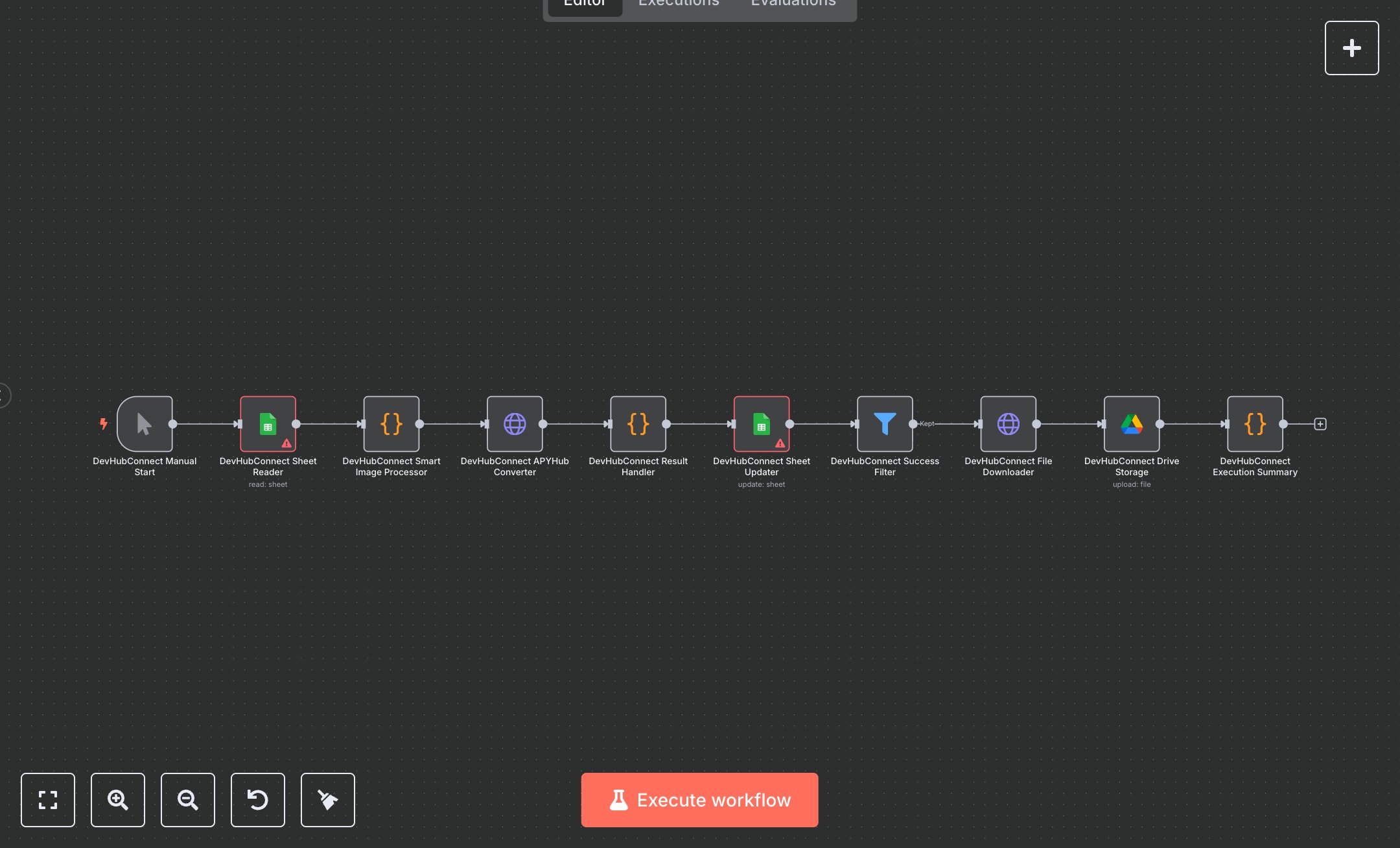
JPG/PNG to WebP Conversion Workflow with APYHub
This workflow automates batch image conversion to WebP format, replacing manual editing in Photoshop or online tools that consume 2-4 hours for web teams processing hundreds of assets. The Manual Start ManualTrigger node initiates runs, the Sheet Reader Google Sheets node fetches unprocessed URLs from a sheet, the Smart Image Processor Code node validates formats (JPEG/PNG) and prepares API calls, the APYHub Converter HTTP Request node converts via APYHub with retries, the Result Handler Code node handles successes/errors, the Sheet Updater Google Sheets node logs WebP URLs or failures, the Success Filter Filter node routes valid conversions, the File Downloader HTTP Request node retrieves WebP files, the Drive Storage Google Drive node uploads to organized folders, and the Execution Summary Code node compiles metrics like success rates. It aids web developers in small agencies (10-30 staff) optimizing 200+ images monthly for faster sites, reducing file sizes by 30% without quality loss, streamlining asset management and improving page loads for better SEO and user experience.\n\nThis workflow saves 4-6 hours weekly on 200 images, cutting storage costs by 25%. Use cases include e-commerce product photo optimization, blog image compression for digital agencies. Suitable for small creative teams. Requires Google Sheets (free), APYHub ($0.001/conversion, $10/month starter), Google Drive ($1.99/month). Scalable to 1,000 images/run with APYHub Pro.\n\nInstall n8n via n8n.io download or cloud.n8n.io signup. For Google Sheets/Drive, enable APIs at console.cloud.google.com, create OAuth2 credentials (download JSON, set scopes). For APYHub, sign up at apyhub.com, get API token. Create Google Sheet with columns (FROM, TO, DONE, row_number); get URL/ID. Set env vars: APY_TOKEN. Import JSON, configure Sheet Reader/Updater Google Sheets nodes with documentId/sheetName, filters for empty DONE. Update APYHub Converter HTTP Request with header auth (apy-token). Webhook not used; manual trigger.\n\nTest manually: Add URLs to Sheet (FROM column), run workflow. Verify TO column updates with WebP URLs, Drive files. Errors: Invalid token (401, regenerate at apyhub.com), empty URLs (validation fail). Activate by running manually or scheduling. Monitor dashboard weekly. Optimize: Batch 50 images; refresh OAuth quarterly.", "businessValue": "Saves 4-6 hours/week converting 200 images", "setupTime": "30-45 minutes", "difficulty": "Intermediate", "requirements": ["Google Sheets OAuth2 (read/write access)", "APYHub API (HTTP Header Auth with apy-token)", "Google Drive OAuth2 (file upload access)"], "useCase": "Bulk image optimization for web performance"
$5.49
Workflow steps: 10
Integrated apps: manualTrigger, googleSheets, code