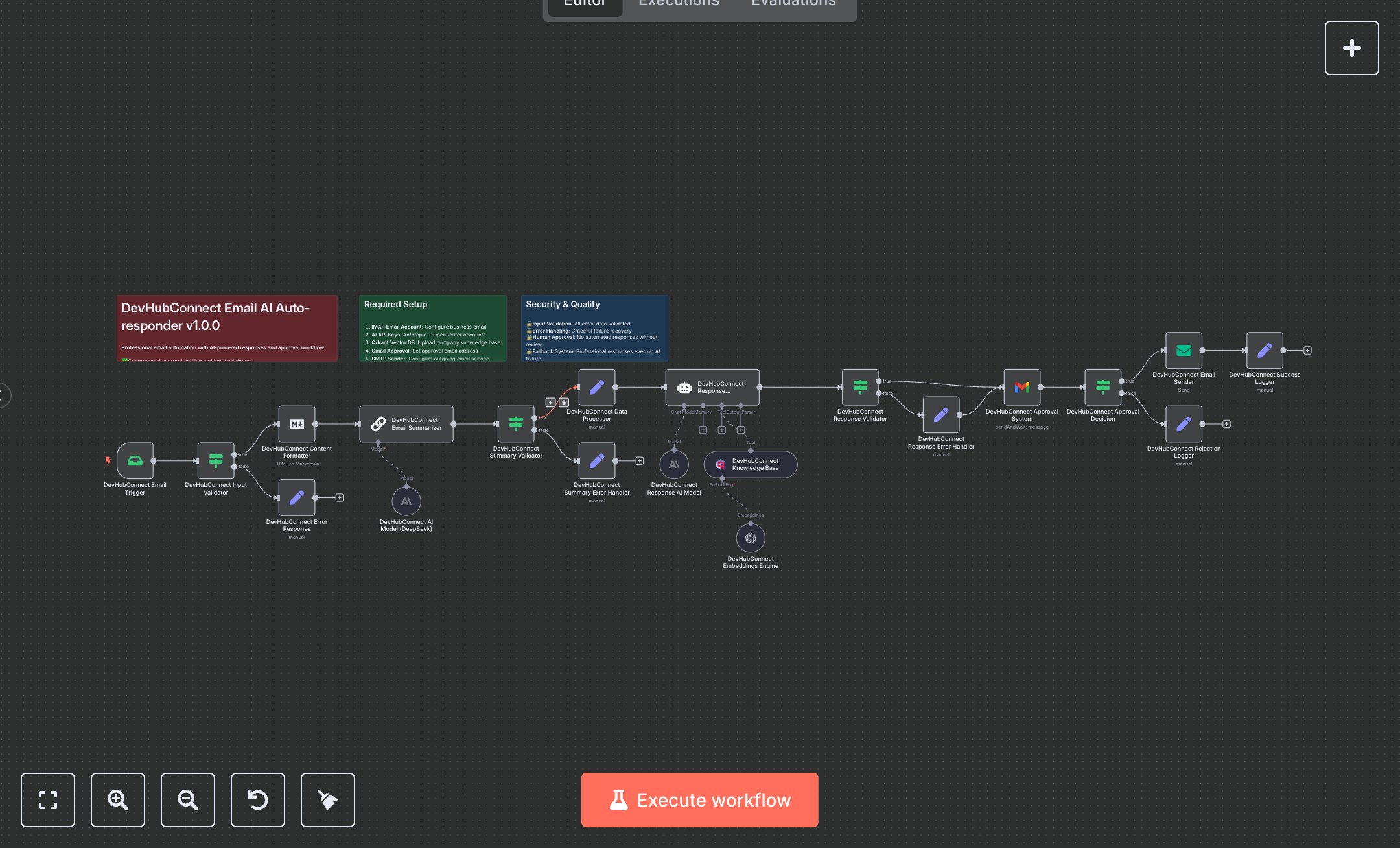
Customer Support for Service Teams with Summarized Emails, Drafting & Sending Under Human Oversight
This workflow automates manual email response drafting and sending, replacing hours of reading, summarizing, and crafting replies with AI-driven processing while requiring human approval for quality control. It uses EmailReadImap (n8n-nodes-base.emailReadImap) to trigger on new emails, If (n8n-nodes-base.if) for input validation, Markdown (n8n-nodes-base.markdown) to format content, ChainSummarization (@n8n/n8n-nodes-langchain.chainSummarization) with LmChatOpenAi (@n8n/n8n-nodes-langchain.lmChatOpenAi) for summarization, Set (n8n-nodes-base.set) to process data, EmbeddingsOpenAi (@n8n/n8n-nodes-langchain.embeddingsOpenAi) and VectorStoreQdrant (@n8n/n8n-nodes-langchain.vectorStoreQdrant) for RAG knowledge retrieval, Agent (@n8n/n8n-nodes-langchain.agent) to generate responses, another If for response validation, Gmail (n8n-nodes-base.gmail) for approval requests, If for decision handling, EmailSend (n8n-nodes-base.emailSend) to dispatch approved replies, and Set nodes for success/rejection logging. This helps customer support teams managing 100-500 daily emails, enabling quick, context-aware responses to inquiries like product questions or complaints, reducing backlog and improving satisfaction in fast-paced environments.\n\nThis workflow saves 5-10 hours weekly on email handling for teams, enhancing efficiency in customer service or sales. Ideal for small to medium businesses (20-200 employees) in e-commerce or tech support. Requires email services (IMAP/SMTP free with providers), OpenAI (~$0.02/1k tokens), Qdrant (free self-hosted), Gmail (free/business). Scalable to thousands of emails, limited by API rates and vector database size.\n\nThis workflow requires n8n from n8n.io (self-hosted) or cloud.n8n.io. For IMAP: Enable in email settings (e.g., Gmail app password), add to Imap credentials. OpenAI: Get key from platform.openai.com, add to OpenAiApi; configure in LmChatOpenAi and EmbeddingsOpenAi nodes. Qdrant: Set up instance at qdrant.io, add API key to QdrantApi for VectorStoreQdrant. Gmail: Create OAuth2 at console.google.com, add to GmailOAuth2. SMTP: Add server details to Smtp credentials for EmailSend. No webhook; EmailReadImap polls inbox.\n\nThis workflow is tested by sending sample emails to monitored inbox, verifying summary, response generation, approval email, and final send. Common errors: Invalid IMAP credentials (verify app password), OpenAI rate limits (monitor usage/upgrade plan). Deploy by activating workflow. Monitor n8n executions for failures; optimize by adjusting max_tokens in LmChatOpenAi. Review knowledge base quarterly for updates.", "businessValue": "Saves 5-10 hours/week automating email responses", "setupTime": "60-90 minutes", "difficulty": "Advanced", "requirements": ["IMAP/SMTP email access (free with providers)", "OpenAI API key (~$0.02/1k tokens)", "Qdrant vector database (free self-hosted)", "Gmail OAuth2 (free/business)"], "useCase": "Automated email handling with AI and approval for customer support"
$6.99
Workflow steps: 23
Integrated apps: emailReadImap, if, set