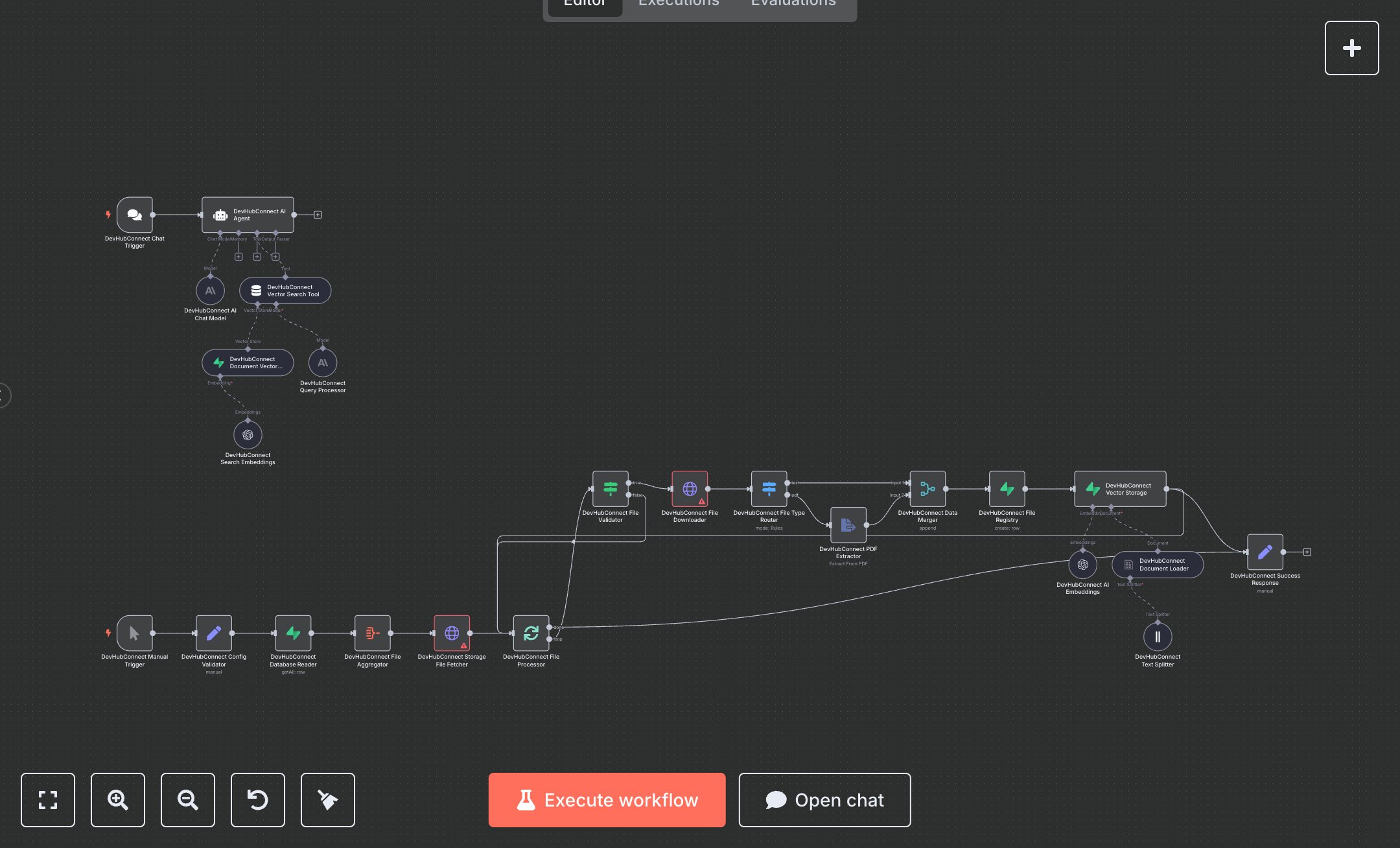
PDF Processing and Document Q&A Using Supabase + OpenAI
This workflow automates manual document processing and querying, replacing time-intensive file reviews, text extraction, and knowledge searches with AI-driven chat interfaces. It fetches files from Supabase via HTTP Request (n8n-nodes-base.httpRequest), validates and processes with IF (n8n-nodes-base.if) and SplitInBatches (n8n-nodes-base.splitInBatches), routes types using Switch (n8n-nodes-base.switch), extracts PDF text with ExtractFromFile (n8n-nodes-base.extractFromFile), loads documents via DocumentDefaultDataLoader (@n8n/n8n-nodes-langchain.documentDefaultDataLoader), splits with TextSplitterRecursiveCharacterTextSplitter (@n8n/n8n-nodes-langchain.textSplitterRecursiveCharacterTextSplitter), embeds using EmbeddingsOpenAi (@n8n/n8n-nodes-langchain.embeddingsOpenAi), and stores vectors in VectorStoreSupabase (@n8n/n8n-nodes-langchain.vectorStoreSupabase). For chat, ChatTrigger (@n8n/n8n-nodes-langchain.chatTrigger) handles inputs, LmChatOpenAi (@n8n/n8n-nodes-langchain.lmChatOpenAi) processes queries, Agent (@n8n/n8n-nodes-langchain.agent) orchestrates, and ToolVectorStore (@n8n/n8n-nodes-langchain.toolVectorStore) enables semantic search. This aids legal teams, researchers, and knowledge workers managing 100-1000 documents, enabling instant Q&A and insights without manual searching, reducing errors and accelerating decision-making.\n\nThis workflow saves 5-10 hours weekly on document analysis for teams, boosting efficiency in legal review, research compilation, and customer support. Suits small to medium businesses (10-200 employees) in law, education, and consulting. Requires Supabase (free tier or Pro $25/month+ for storage/compute), OpenAI (pay-per-use, ~$0.01/1M tokens for embeddings), n8n (free self-hosted or $20/month cloud). Scalable to thousands of documents, limited by Supabase's 500GB free storage and OpenAI token rates.\n\nThis workflow needs n8n from n8n.io (self-hosted) or cloud.n8n.io. For Supabase: Sign up at supabase.com, get service key from Settings > API, add as Supabase credentials in n8n. OpenAI: Create key at platform.openai.com, add to OpenAI credentials; set model in EmbeddingsOpenAi node. Configure HTTP Request nodes with Supabase URLs, Set node for config validation. Chat webhook: Generate URL in editor for ChatTrigger. No additional webhook setup needed.\n\nThis workflow is tested by uploading sample PDFs/text to Supabase, running manual trigger to process, then querying via chat webhook with test questions. Common errors: Invalid Supabase key (regenerate in dashboard), OpenAI rate limits (monitor usage/upgrade tier). Deploy by activating the workflow. Monitor n8n executions for failures; optimize by adjusting chunk sizes in TextSplitter. Reprocess documents monthly for updates.", "businessValue": "Saves 5-10 hours/week automating document queries for knowledge teams", "setupTime": "45-60 minutes", "difficulty": "Advanced", "requirements": ["Supabase account (free or Pro $25/month+ for storage and database)", "OpenAI API key (pay-per-use embeddings ~$0.01/1M tokens)", "n8n installed with Langchain nodes enabled"], "useCase": "AI chat for querying document repositories in legal and research workflows"
$6.99
Workflow steps: 24
Integrated apps: httpRequest, documentDefaultDataLoader, textSplitterRecursiveCharacterTextSplitter