Discord Notifications: Webhooks, Formatting & Priority Management
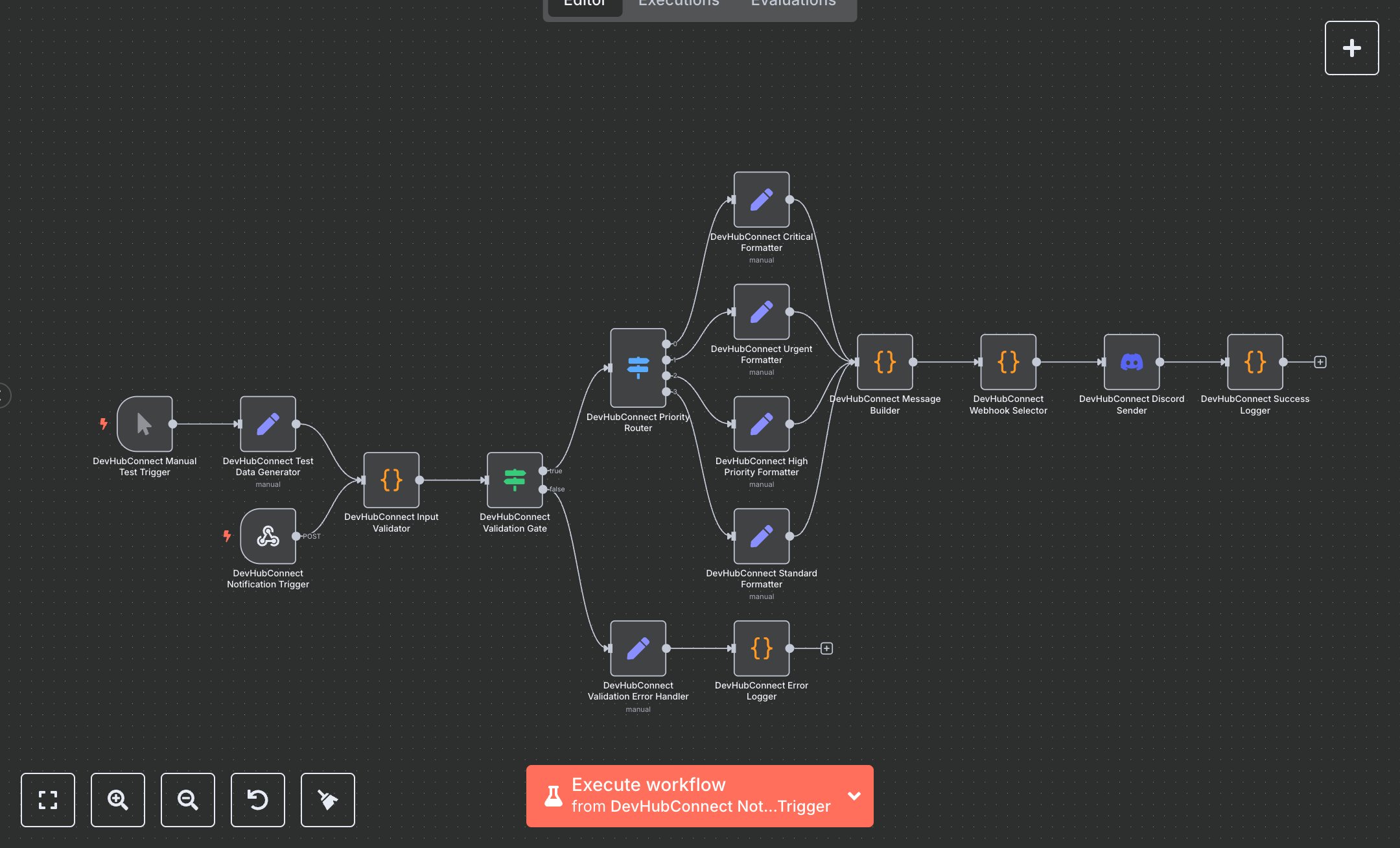
This workflow automates sending rich Discord notifications, replacing manual alert postings. It receives notifications via webhook, validates inputs, formats messages based on priority, and sends them to specific Discord channels. Key nodes include Webhook for notification triggers, Code for input validation and message building, and Discord for sending formatted messages. It saves 4-6 hours weekly for devops or community teams (5-30 members) managing 100+ notifications monthly, ideal for startups or communities needing real-time, prioritized alerts with rich embeds. Saves 4-6 hours weekly on 100+ monthly notifications. Suits devops/community teams (5-50 employees). Requires Discord (free), n8n (~$20/month). Scalable to 1,000 notifications/month, limited by Discord webhook rate limits. Install n8n via cloud.n8n.io. Create a Discord webhook via Discord server settings (Integrations > Webhooks). Configure webhook URL in Discord Sender node (e.g., https://discord.com/api/webhooks/...). Set up n8n webhook URL (e.g., https://your-n8n-instance/webhook/devhubconnect-discord-webhook). Replace placeholder webhook URLs in Webhook Selector node with channel-specific URLs. Test with sample payload (e.g., {message: 'Test alert', title: 'Test', priority: 'normal', channel: 'general', headers: {authorization: 'Bearer test-token'}}). Handle errors: invalid webhook URLs—verify in Discord; rate limits—adjust notification frequency. Activate workflow in n8n. Monitor Discord channels for formatted messages. Optimize by adjusting priority colors or field limits.", "businessValue": "Saves 4-6 hours/week on 100+ monthly notifications", "setupTime": "30-45 minutes", "difficulty": "Intermediate", "requirements": [ "Discord (free), n8n (~$20/month)", "Discord webhook URLs", "Basic knowledge of webhooks and Discord formatting" ], "useCase": "Automating prioritized Discord notifications"
$6.99
Workflow steps: 16
Integrated apps: webhook, code, if