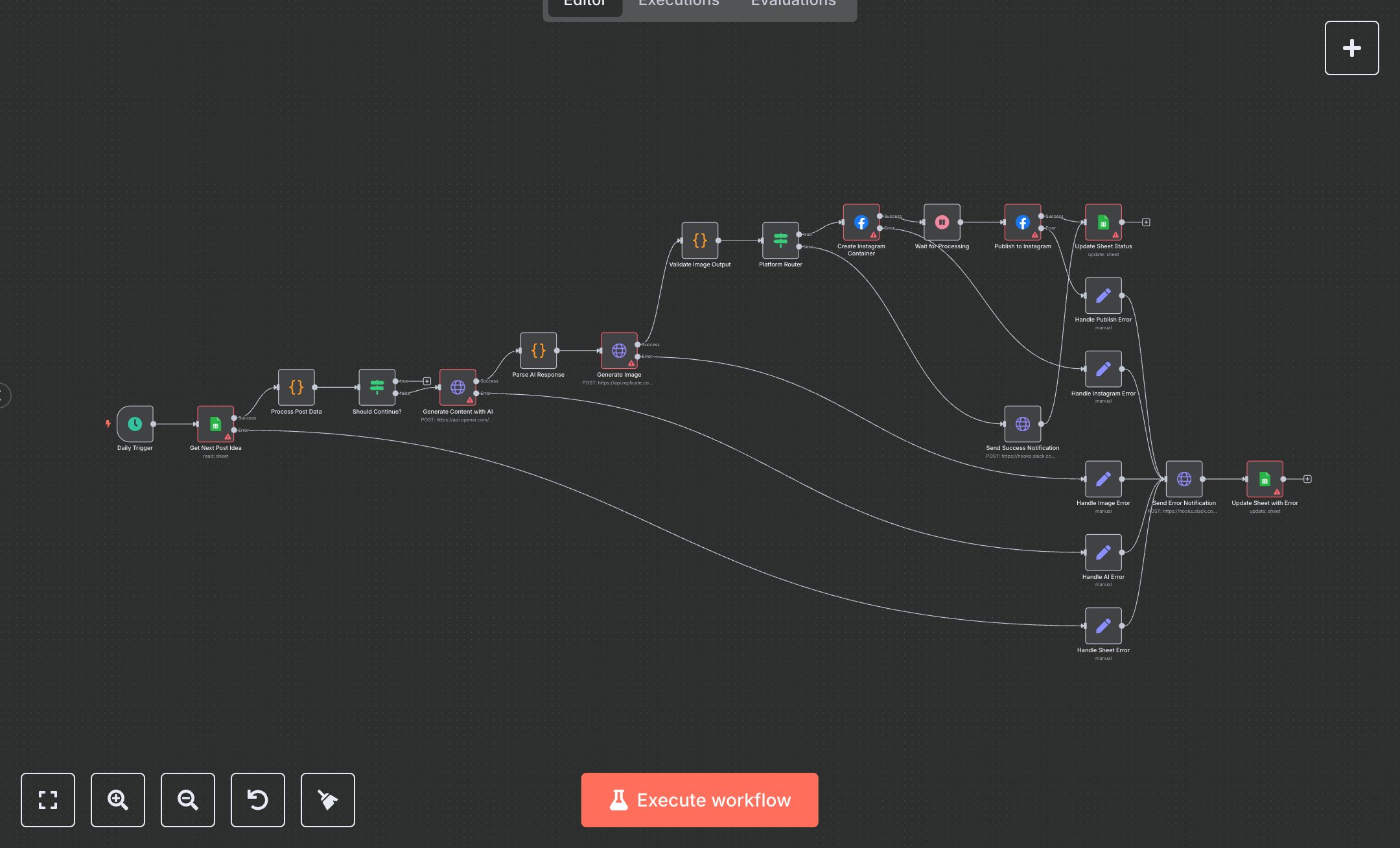
AI Social Media Post Generator
This workflow generates and publishes Instagram posts using AI, pulling ideas from Google Sheets, creating content with OpenAI, generating images via Replicate, and notifying via Slack. Key nodes include Daily Trigger (schedules execution), Get Next Post Idea (fetches from Google Sheets), Process Post Data (validates inputs), Generate Content with AI (OpenAI API), Generate Image (Replicate API), Create Instagram Container and Publish to Instagram (Meta Graph API), Update Sheet Status (logs results), Send Success Notification and Send Error Notification (Slack alerts), and error handlers (Handle Sheet Error, Handle AI Error, Handle Image Error, Handle Instagram Error, Handle Publish Error). It uses Google Sheets, OpenAI, Replicate, Meta, and Slack APIs.\n\nSetup Requirements: Install n8n from n8n.io or sign up at cloud.n8n.io. Import the JSON into n8n’s workflow editor. Create a Google Sheet with a Posts tab (columns: Topic, Status, Audience, Platform, Voice); get Sheet ID from the URL. Obtain Google Sheets credentials via Google Cloud Console (APIs > Credentials > OAuth 2.0). Get OpenAI API key from platform.openai.com (Settings > API Keys). Get Replicate API key from replicate.com (Account > API Tokens). Obtain Meta Graph API token and Instagram Business Account ID from developers.facebook.com (App > Graph API Explorer). Get Slack Webhook URL from slack.com (Apps > Incoming Webhooks, create in #social-media). In n8n, configure credentials: Google Sheets (OAuth 2.0), OpenAI (API Key), Replicate (API Token), Meta (Access Token), Slack (Webhook URL). Handle errors like missing Topic (invalid_content) or invalid API keys (401: Unauthorized).\n\nTesting and Deployment: Import the JSON into n8n. Add test data to your Google Sheet (e.g., Topic: “Summer Fashion”, Status: 0). Trigger manually via Daily Trigger. Verify that Get Next Post Idea retrieves data and Process Post Data validates Topic. Confirm that Generate Content with AI produces JSON with image_concept, image_prompt, and caption. Check that Generate Image outputs a valid image_url. Validate Publish to Instagram posts and Update Sheet Status marks Status as 1. Test with an empty Topic to trigger invalid_content. Monitor Slack for success or error notifications (e.g., 401: Invalid access token). If posting fails, verify the Meta token and Instagram ID. Activate the workflow for daily automated Instagram posts.
$6.99
Workflow steps: 21
Integrated apps: scheduleTrigger, googleSheets, set