Invoice Processing with Invoice Ninja, Slack, and Email Notifications
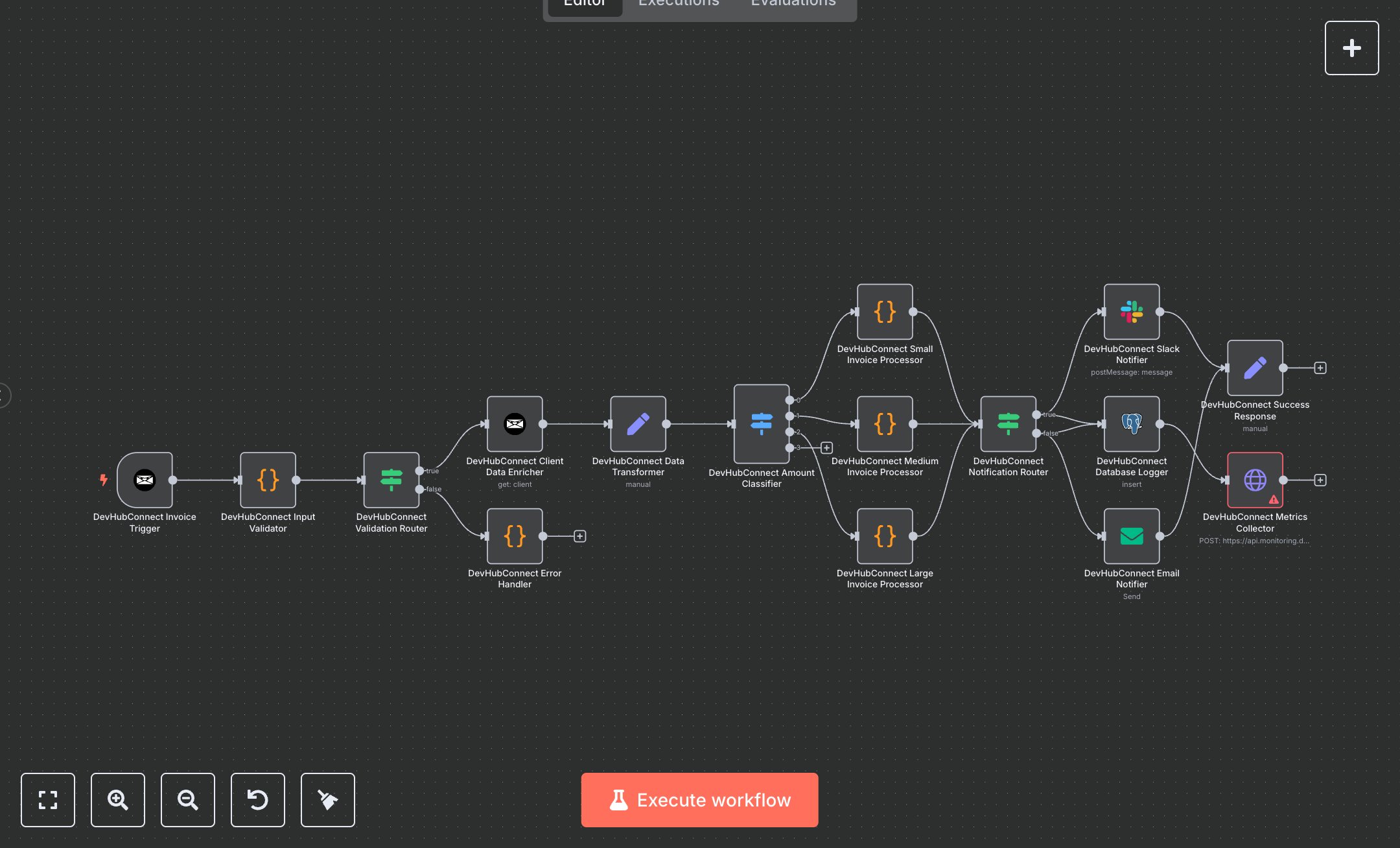
This workflow automates invoice processing with Invoice Ninja, triggering on new invoice creation. It validates data, enriches client details, classifies invoices by amount, and sends notifications via Slack and email. Key nodes include Webhook Trigger, Code, Condition, Switch, Invoice Ninja, Slack, Email Send, Postgres, and HTTP Request, ensuring robust processing, logging, and monitoring for financial workflows.\n\nTo set up, download n8n from n8n.io for self-hosting or sign up at cloud.n8n.io for cloud deployment. Obtain an Invoice Ninja API token from your Invoice Ninja account under Settings > API Tokens. In n8n, navigate to Credentials, add Invoice Ninja, Slack, SMTP (for email), and Postgres credentials, entering respective API keys or database connection details. Import the workflow JSON via the Workflows menu. Configure the Webhook Trigger to use Invoice Ninja’s webhook URL, selecting the 'create_invoice' event. Set the Postgres node with your database credentials and table name 'invoice_processing_log'. Ensure Slack node points to a valid channel (e.g., #invoices) and Email Send node has correct recipient addresses. For the HTTP Request node, add a monitoring API key if available, or disable it for initial setup.\n\nTest by activating the workflow in n8n and creating a test invoice in Invoice Ninja. Verify execution: check Code node output for validation, Postgres for logged data, and Slack/email for notifications. For errors like missing credentials, confirm API tokens in n8n. If validation fails (e.g., negative amount or invalid email), inspect Code node logs for 'validation_failed' errors. Webhook issues may stem from mismatched URLs; ensure Invoice Ninja’s webhook matches n8n’s. For deployment, keep the workflow active, monitor Postgres logs for audit trails, and check HTTP Request metrics for performance. Handle errors like 'MAX_RETRIES_EXCEEDED' by reviewing retry logic or contacting support with the support reference code. Schedule regular checks to ensure consistent operation and validate output data in notifications and database logs for accuracy.
$5.49
Workflow steps: 16
Integrated apps: invoiceNinjaTrigger, code, if