Data Transfer: Seamlessly Migrate CSV to MySQL with ETL Automation
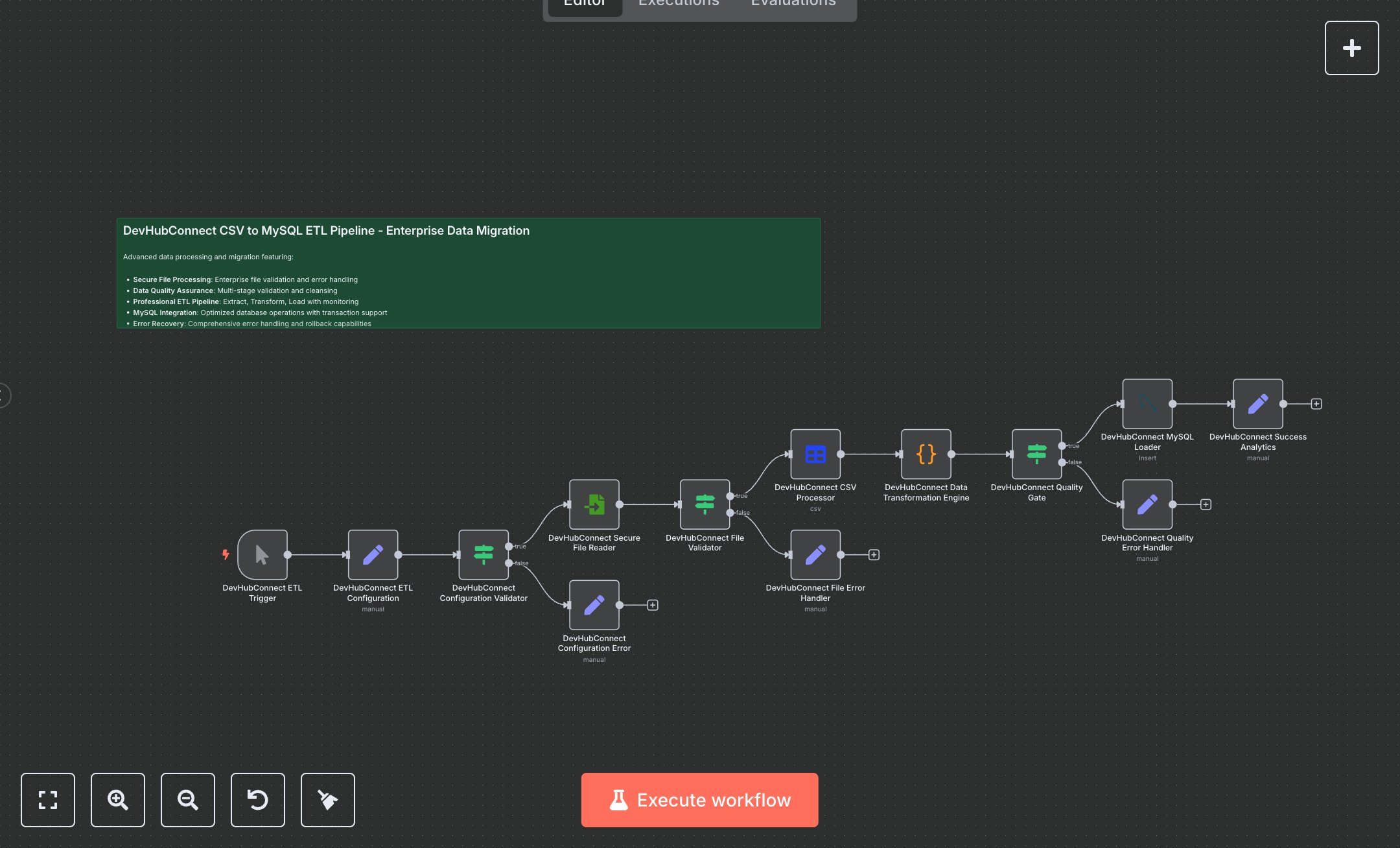
This workflow automates the extraction, transformation, and loading of CSV data into MySQL, replacing manual data migration processes that involve exporting spreadsheets, cleaning data in tools like Excel, and scripting SQL inserts—tasks that can take days for large datasets and risk errors like duplicates or data loss. Designed for enterprise-scale operations, it processes files securely, validates configurations and content, transforms records with quality scoring, and loads only high-integrity data while logging errors and analytics. Key nodes include the Manual Trigger for controlled executions, a Set node for ETL configuration (session IDs, file paths, batch sizes), IF validators for config and file checks, Read Binary File for secure ingestion, Spreadsheet File for CSV parsing, a Code node for advanced cleansing (date formatting, truncation, quality scoring based on field completeness), another IF as a quality gate (threshold 50+, required fields like band/date), MySQL node for bulk inserts with ignore options and low-priority queuing, and Set nodes for success metrics and error messages. This empowers data engineers and analysts at mid-to-large enterprises (100-1000+ employees) handling 10,000+ records quarterly, ensuring compliant, auditable migrations for BI dashboards or CRM integrations without downtime.\n\nAutomating ETL saves 20-40 hours per migration cycle for teams processing 50,000+ rows, cutting error rates by 90% and accelerating insights from raw CSVs to queryable MySQL tables in minutes versus weeks. Perfect for finance firms auditing transaction logs, retail chains syncing inventory exports, or healthcare providers migrating patient datasets compliantly. Requires n8n self-hosted or Cloud Pro ($50/mo for unlimited workflows), MySQL 8.0+ server (AWS RDS ~$0.02/hour), file storage access (e.g., local or S3), and basic scripting knowledge. Scales to 1M+ rows via batching but monitor MySQL connections (max 100 concurrent); integrates with Airtable or Google Sheets for hybrid sources.\n\nDownload n8n from n8n.io (Docker install: docker run -it --rm --name n8n -p 5678:5678 n8nio/n8n) or use cloud.n8n.io signup (5-min setup). Create MySQL credentials in n8n: host/port/database/username/password (test connection via Execute). Place CSV (e.g., concerts-2023.csv) at /home/node/.n8n/. Import JSON workflow, update Set node's source_file_path to your CSV, target_table to MySQL schema table (create via phpMyAdmin: columns like etl_session_id VARCHAR(50), date DATE). Connect MySQL creds to 'DevHubConnect MySQL Loader' (operation: insert, columns: etl_session_id,record_id,date,...). Adjust Code node's field mappings if CSV headers differ; enable options like bulkSize=1000. Test validators by toggling IF conditions.\n\nTest manually: Execute Trigger, input sample CSV with 100 rows (curl or Postman to simulate), verify MySQL inserts (SELECT COUNT(*) FROM target_table) and console messages. Errors: 404 File Not Found (fix path permissions), MySQL 1062 Duplicate (add unique index), low quality (tune Code score logic). Activate via workflow toggle, schedule with Cron for recurring. Maintain by auditing logs weekly, backing up MySQL pre-load, optimizing Code for custom validations; for high volume, add SplitInBatches node post-CSV. Monitor via n8n executions dashboard; update to n8n v1.0+ patches quarterly.", "businessValue": "Saves 30 hours/migration on 50k+ rows, reduces errors 90%, enables real-time BI from legacy CSVs", "setupTime": "60-90 minutes", "difficulty": "Intermediate", "requirements": ["n8n Cloud Pro or self-hosted", "MySQL 8.0+ database with INSERT privileges", "File system access for CSV storage", "Basic SQL schema setup"], "useCase": "Migrating bulk CSV exports to MySQL for enterprise reporting and analytics dashboards"
$5.49
Workflow steps: 14
Integrated apps: stickyNote, manualTrigger, set