LLM Stock Analysis Assistant: TradingView Charts and Insights via Telegram with OpenAI and Anthropic
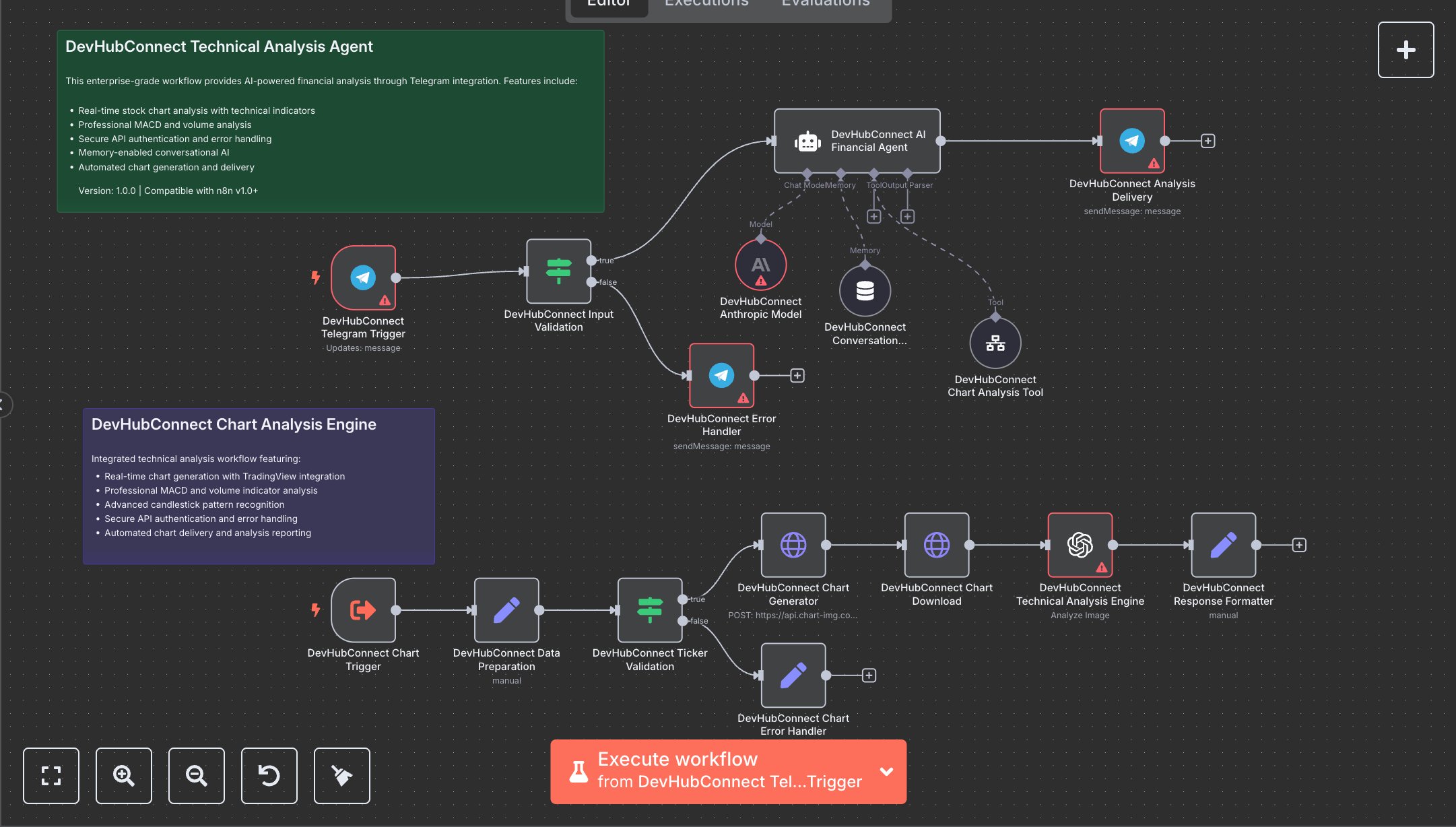
This workflow provides AI-powered stock analysis via Telegram, using TradingView for charts and OpenAI/Anthropic for insights. Key nodes include Telegram Trigger for user input, Condition for validation, HTTP Request for chart generation, OpenAI for technical analysis, and Telegram for result delivery. To set up, install n8n from n8n.io for self-hosting or sign up at cloud.n8n.io for cloud hosting. Create a Telegram bot via BotFather to obtain a bot token. Get an OpenAI API key from platform.openai.com and an Anthropic API key from anthropic.com. Obtain a TradingView API key from chart-img.com. In n8n, import the workflow JSON. Add the Telegram bot token to Telegram Trigger and Telegram nodes (Analysis Delivery, Error Handler). Set OpenAI and Anthropic API keys in OpenAI and Anthropic Model nodes. Update the HTTP Request node (Chart Generator) with the TradingView API key, replacing “YOUR_API_KEY”. Copy the Telegram Trigger’s webhook URL and register it with BotFather using /setwebhook. Ensure the Condition node validates message text and chat ID, and the Ticker Validation node checks stock ticker format (e.g., AAPL). Test by sending a stock ticker (e.g., “AAPL”) to your Telegram bot. Verify the Analysis Delivery node sends a markdown-formatted response with a chart URL and technical insights (MACD, volume). Check the Response Formatter node for structured output with response, chartUrl, and metadata. Handle errors like invalid Telegram tokens (bot unresponsive), HTTP 401 (missing API keys), or invalid tickers (Chart Error Handler triggers). Regenerate credentials if needed. Deploy by activating the workflow in n8n, ensuring the webhook is live. Monitor logs for API rate limits or chart generation failures. Validate the output for a chart image and analysis with trend, MACD, and volume details, ensuring the disclaimer is included.
$6.99
Workflow steps: 18
Integrated apps: stickyNote, telegramTrigger, if