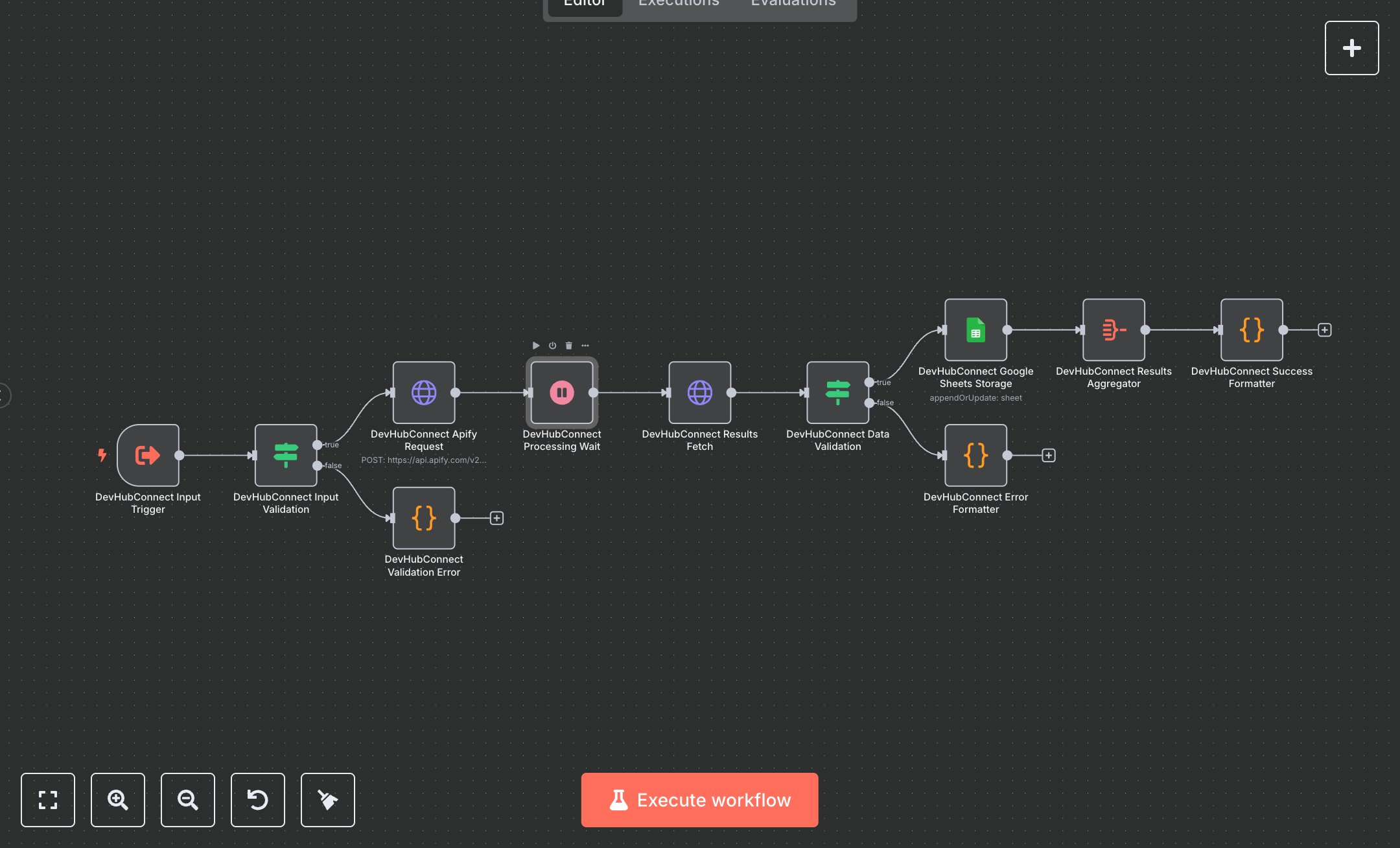
Google Maps Business Scraper
This workflow scrapes Google Maps for business data using Apify’s API, storing results in Google Sheets. Key nodes include Execute Workflow Trigger for input, Condition for validation, HTTP Request for Apify scraping, Wait for processing, Google Sheets for storage, Aggregate for data collection, and Code for formatting responses. To set up, install n8n from n8n.io for self-hosting or sign up at cloud.n8n.io for cloud hosting. Obtain an Apify API key from apify.com under account settings. Create a Google Sheets OAuth2 credential via console.cloud.google.com. In n8n, import the workflow JSON. Replace “apify_api_YOUR_KEY_HERE” in HTTP Request nodes (Apify Request, Results Fetch) with your Apify API key. Configure the Google Sheets node with your OAuth2 credentials and specify a target spreadsheet ID and sheet name (e.g., “GoogleMaps”). Set the Execute Workflow Trigger’s JSON input template (e.g., {search: 'landscaping', location: 'New York', state: 'NY', country: 'us'}). Ensure the Condition node validates search, location, and country fields. No webhook setup is required as the workflow uses a trigger node. Test by manually triggering the workflow in n8n with a valid JSON input via the Execute Workflow Trigger. Verify the Code node (Success Formatter) outputs a JSON response with status: “success”, total_found, and business details (e.g., name, phone, address). Check Google Sheets for appended data (e.g., Name, Address, Rating). Handle errors like HTTP 401 (invalid Apify API key), validation errors (missing search term), or empty results (no businesses found). Regenerate API keys if authentication fails. Deploy by activating the workflow in n8n, ensuring valid inputs (e.g., lowercase country code). Monitor logs for Apify rate limits or data retrieval issues. Validate the Success Formatter output for structured data with a timestamp, source: “Google Maps”, and metadata. Confirm that Google Sheets contains accurate business data with no duplicates.
$5.49
Workflow steps: 11
Integrated apps: executeWorkflowTrigger, if, httpRequest