LLM Data Scraping: Google Maps, Yellow Pages, Instagram, and TikTok
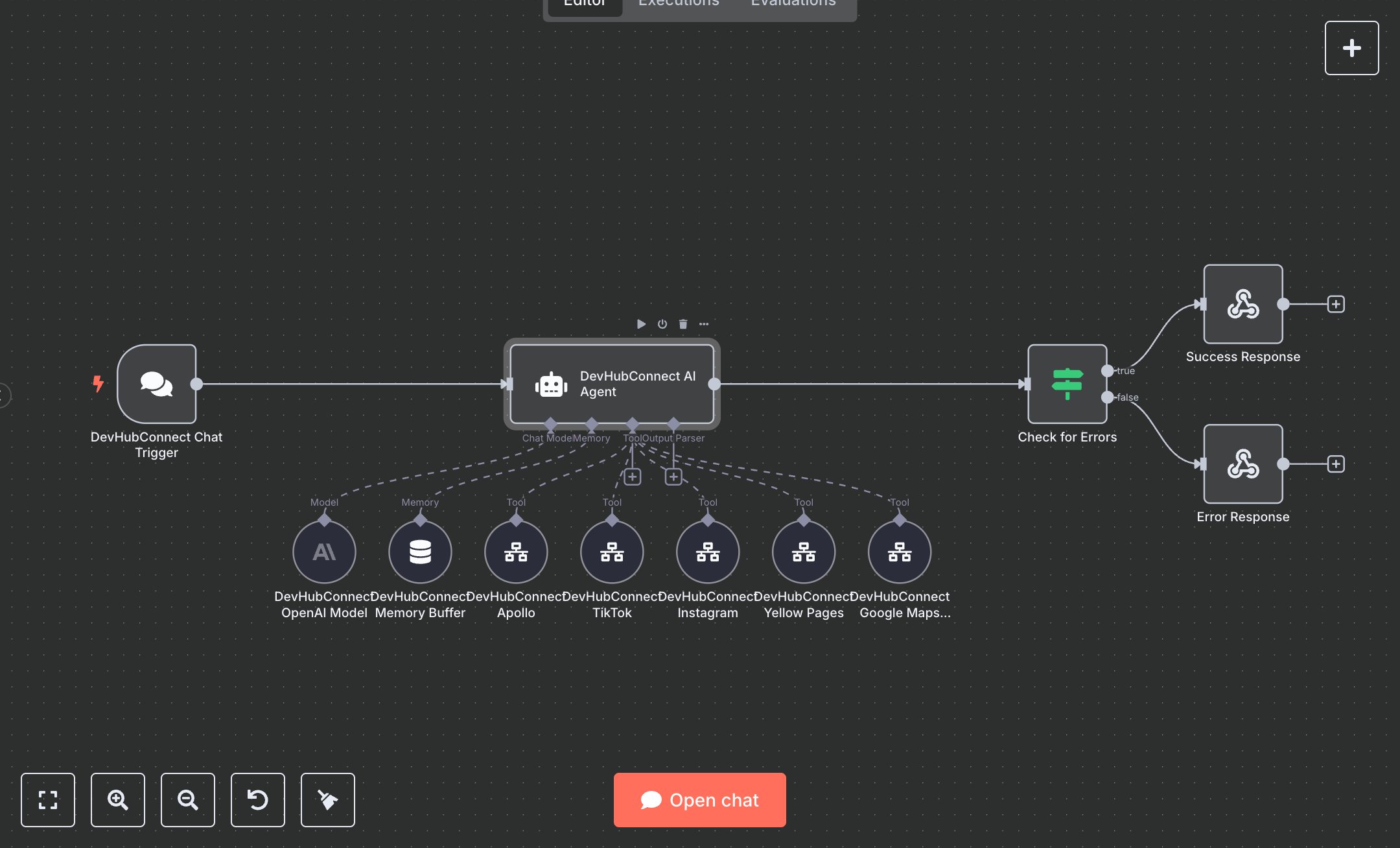
This workflow automates web scraping across Google Maps, Yellow Pages, Apollo, Instagram, and TikTok using OpenAI’s GPT-4o-mini for business data aggregation. Key nodes include Chat Trigger for user input, Agent for query routing, Tool Workflow for scraping, Condition for error detection, and Webhook Response for output. To set up, install n8n from n8n.io for self-hosting or sign up at cloud.n8n.io for cloud hosting. Obtain an OpenAI API key from openai.com under account settings. In n8n, import the workflow JSON. Configure the OpenAI Model node with your API key. Ensure Tool Workflow nodes (Google Maps Scraper, Yellow Pages, Apollo, Instagram, TikTok) reference valid workflow IDs (create separate n8n workflows for each scraper or obtain IDs from your n8n instance). Set up the Chat Trigger node to accept inputs like search (industry), location (city), state (uppercase code), and country (lowercase code). No webhook setup is required as Chat Trigger uses n8n’s chat interface. Verify the Agent node’s system message includes tool descriptions and input parameters. Test by initiating a chat in n8n’s UI with a query (e.g., “Scrape landscaping businesses in Toronto, ON, ca”). Check the Success Response node for a JSON output with status: “success”, data containing aggregated results, and source attribution. Handle errors like missing API keys (OpenAI authentication failure), invalid inputs (empty location), or tool workflow errors (invalid workflow ID). Regenerate API keys if needed. Deploy by activating the workflow in n8n, ensuring all tool workflows are active. Monitor logs for tool execution failures or rate limits. Validate the Webhook Response output for structured data with execution_id, timestamp, and metadata. Confirm data aggregation across multiple sources (e.g., Google Maps and Instagram) for comprehensive results. Ensure error responses provide clear feedback (e.g., “check input parameters”) if scraping fails.
$6.99
Workflow steps: 12
Integrated apps: chatTrigger, agent, lmChatAnthropic