LLM CRM Contact and Opportunity Management with Airtable
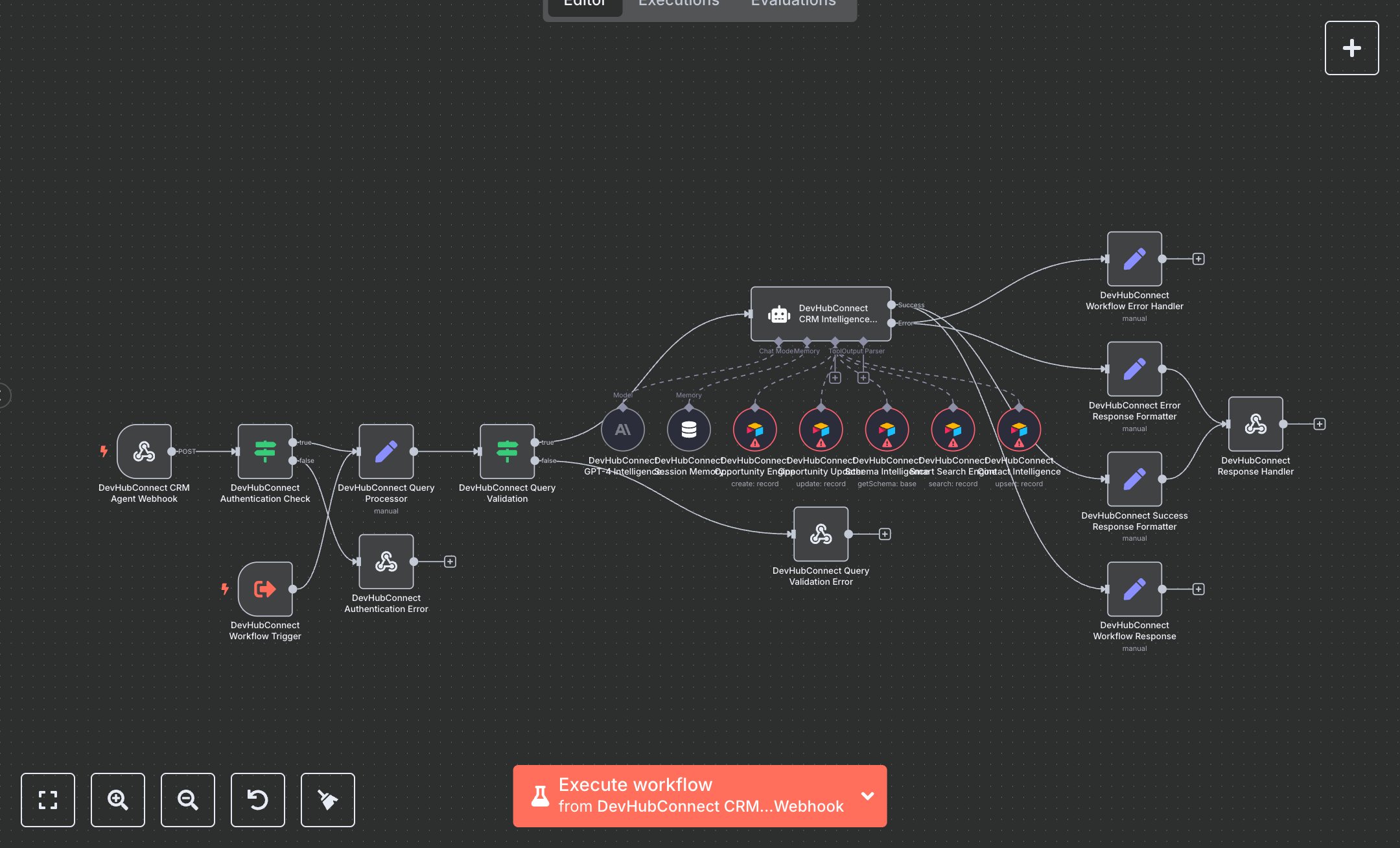
This workflow automates enterprise CRM operations using Airtable and OpenAI's GPT-4. Key nodes include Webhook Trigger (receives CRM queries), Execute Workflow Trigger (handles sub-agent execution), Condition (validates API keys and queries), Set (processes queries), AI Agent (executes CRM operations), Airtable Tool (manages contacts and opportunities), Memory Buffer Window (maintains session context), and Webhook Response (returns results). It uses Airtable for data storage and GPT-4 for intelligent processing. Install n8n from n8n.io for self-hosting or sign up at cloud.n8n.io. Obtain an Airtable API key from airtable.com/account and set it in the Airtable Tool nodes. Get an OpenAI API key from openai.com and configure it in the GPT-4 node ('gpt-4o'). Set DEVHUB_CRM_API_KEY for authentication and DEVHUB_AIRTABLE_BASE_ID, DEVHUB_CONTACTS_TABLE_ID, and DEVHUB_OPPORTUNITIES_TABLE_ID for Airtable access. Configure Webhook Trigger with a POST endpoint at '/crm-agent' and enable CORS headers. Ensure Airtable nodes reference correct base and table IDs for contacts and opportunities. Test by sending a POST request (e.g., {query: 'Create contact John Doe, john@example.com', operation: 'create', sessionId: 'test123'}) with a valid X-API-Key. Verify Condition nodes catch invalid API keys (returns 401) or empty/long queries (returns 400 with examples). Check Webhook Response for structured results with request IDs and operation outcomes. Missing Airtable or OpenAI credentials cause processing failures; invalid table IDs return errors. Deploy by activating the workflow and setting environment variables. Validate outputs for accurate contact creation, opportunity updates, and deduplication, ensuring results align with query intent and include performance metrics.
$6.99
Workflow steps: 20
Integrated apps: webhook, executeWorkflowTrigger, if