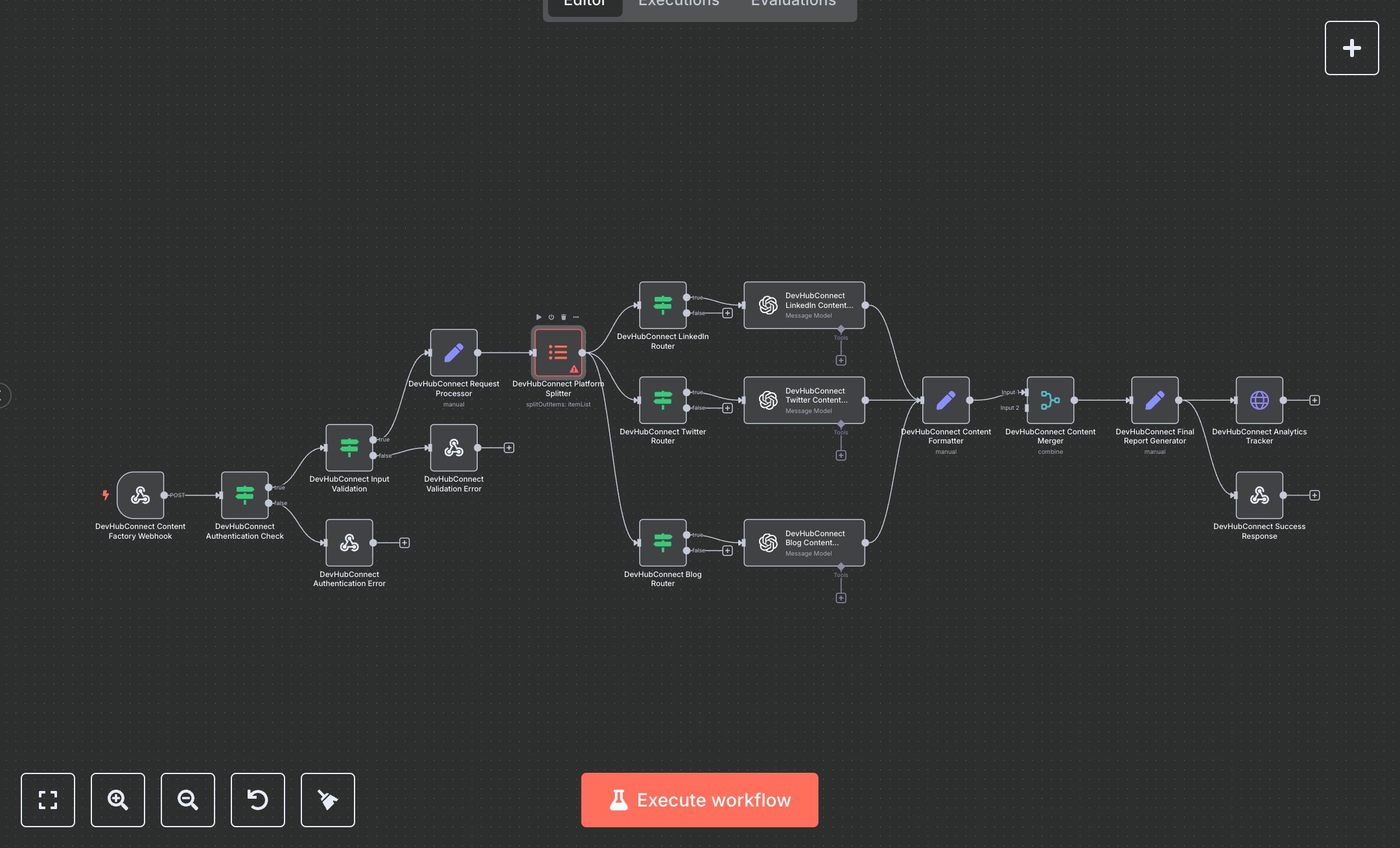
LLM Content Factory: Generate Tailored Posts for Social Media & Blogs with AI
This workflow automates content creation for multiple platforms like LinkedIn, Twitter, and blogs using OpenAI. Key nodes include Webhook Trigger (receives content requests), Condition (validates API key and inputs), Set (sanitizes data), Item Lists (splits platforms), OpenAI (generates platform-specific content), Merge (combines results), HTTP Request (sends analytics), and Webhook Response (returns results). It uses OpenAI API for tailored content generation. Install n8n from n8n.io for self-hosting or sign up at cloud.n8n.io. Obtain an OpenAI API key from openai.com and set it in the OpenAI nodes ('gpt-4o' for Twitter and blogs, fine-tuned 'ft:gpt-4o-2024-08-06' for LinkedIn). Set DEVHUB_CONTENT_API_KEY in n8n environment variables for authentication. Optionally, configure an analytics webhook URL and token as DEVHUB_ANALYTICS_WEBHOOK and DEVHUB_ANALYTICS_TOKEN. Set up Webhook Trigger with a POST endpoint at '/content-factory' and enable CORS headers. Configure OpenAI nodes with appropriate models and max token limits (e.g., 2000 for blogs). Test by sending a POST request with JSON (e.g., {ideas: 'AI in business', platforms: ['linkedin', 'twitter', 'blog'], category: 'tech'}) and a valid X-API-Key header. Verify Condition nodes catch invalid API keys (returns 401) or missing ideas/platforms (returns 400 with example format). Check Webhook Response for JSON with platform-specific content, batch ID, and success metrics. Missing OpenAI credentials cause generation failures; invalid platforms are filtered out. Deploy by activating the workflow and setting credentials. Monitor analytics webhook for batch completion and validate output for content relevance and platform-specific formatting.
$6.99
Workflow steps: 18
Integrated apps: webhook, if, respondToWebhook