N8N Intelligent Research Agent
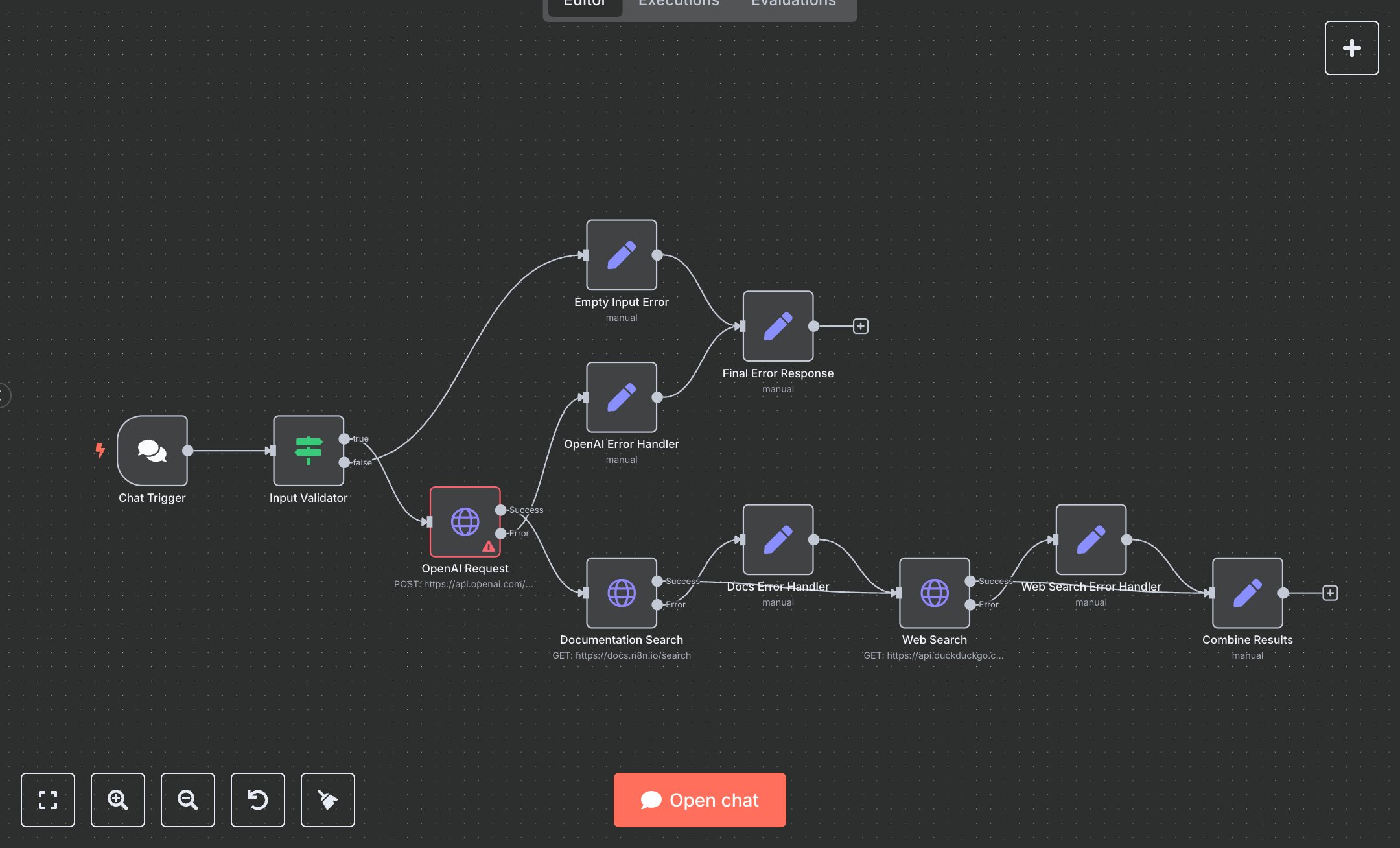
This workflow automates research queries using OpenAI and external search APIs. Key nodes include Chat Trigger (receives chat inputs), Input Validator (checks for non-empty input), OpenAI Request (processes queries via OpenAI), Documentation Search (searches n8n docs), Web Search (queries DuckDuckGo), Combine Results (aggregates responses), Empty Input Error (handles missing input), OpenAI Error Handler, Docs Error Handler, Web Search Error Handler (manage API errors), and Final Error Response (returns errors).\n\nSetup Requirements: Install n8n from n8n.io for local setup or sign up at cloud.n8n.io. Configure the Chat Trigger node with path research-agent and HTTP method POST. Obtain an OpenAI API key from platform.openai.com (API Keys). In n8n’s Credentials, add OpenAI API with the key. Set up OpenAI Request (https://api.openai.com/v1/chat/completions, model: gpt-4o-mini). Configure Documentation Search (https://docs.n8n.io/search) and Web Search (https://api.duckduckgo.com/) without authentication. Ensure Input Validator checks for non-empty chatInput, message, or input. Connect nodes in the editor. Handle errors like invalid OpenAI API keys (401) or empty inputs ({"error": "No input provided"}).\n\nTesting and Deployment: Import the JSON into n8n’s workflow editor. Test with curl -X POST http://your-n8n-instance/research-agent -d '{"chatInput":"n8n webhook setup"}'. Verify Combine Results outputs status: "success", aiResponse, documentation, webResults, and userQuery. Check Final Error Response for errors like {"errorType": "validation_error"} (empty input) or {"errorType": "openai_error"} (invalid API key). Ensure Documentation Search and Web Search return relevant results. Activate the workflow in n8n and integrate the webhook URL into your app (e.g., chat interface). Monitor logs for issues like API timeouts or rate limits, ensuring reliable research responses.
$6.99
Workflow steps: 11
Integrated apps: chatTrigger, if, set