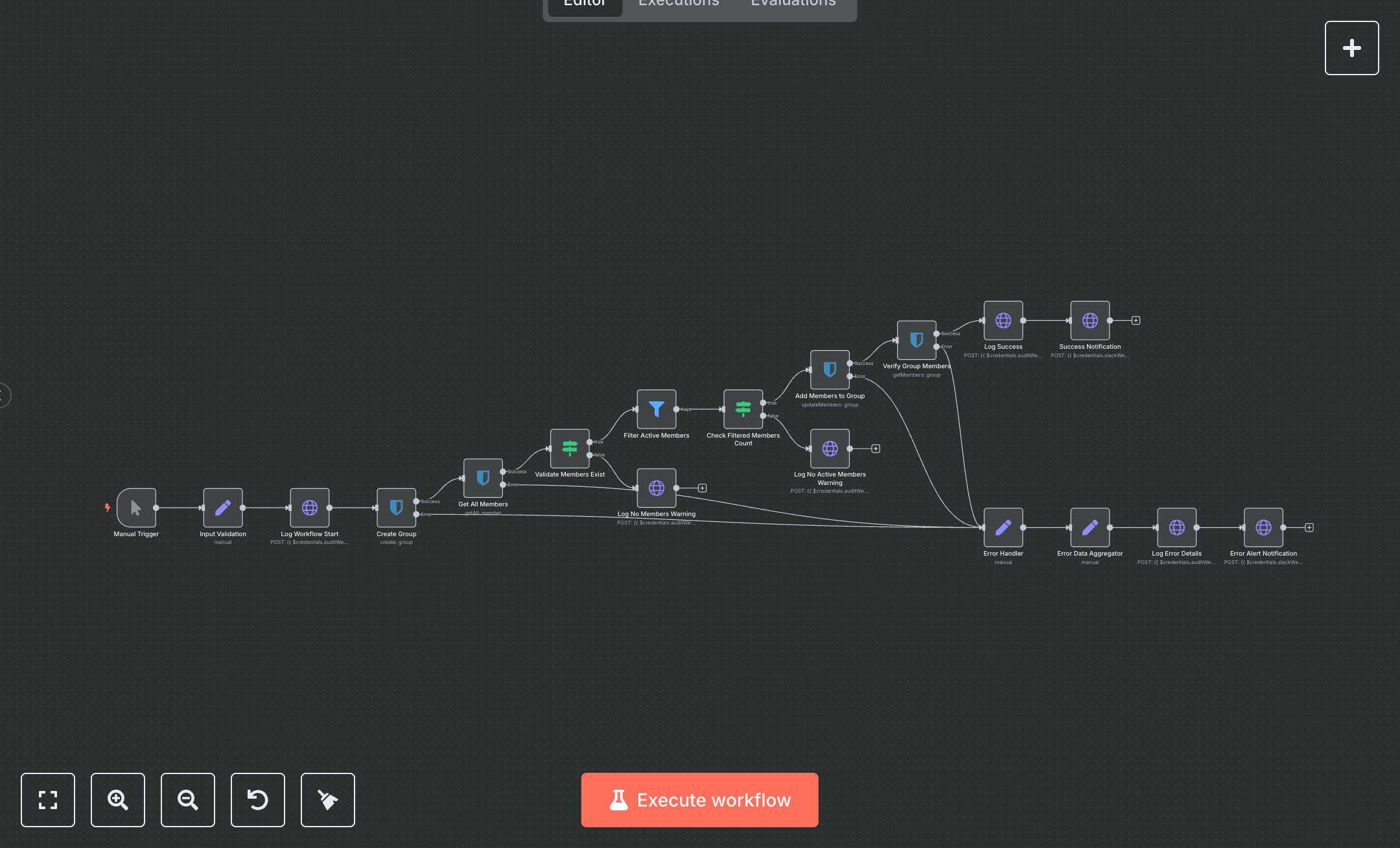
Bitwarden Group Management
This workflow automates Bitwarden group creation, adding active members, with logging and Slack notifications. Key nodes include Manual Trigger (starts workflow), Input Validation (sets group name, external ID), Log Workflow Start (logs initiation), Create Group (creates Bitwarden group), Get All Members (fetches members), Validate Members Exist (checks member count), Filter Active Members (selects active members), Check Filtered Members Count (verifies active members), Add Members to Group (assigns members), Verify Group Members (confirms assignments), Log Success (logs completion), Success Notification (sends Slack alert), and error-handling nodes (Error Handler, Error Data Aggregator, Log Error Details, Error Alert Notification). It uses Bitwarden and Slack APIs.\n\nSetup Requirements: Install n8n from n8n.io or sign up at cloud.n8n.io. Import the JSON into n8n’s workflow editor. Get a Bitwarden API key from bitwarden.com (Organization > Settings > API Keys, create Client ID and Secret). Set up a Slack webhook at api.slack.com (Apps > Incoming Webhooks, create webhook for #security-alerts). In n8n, configure credentials: Bitwarden (Client ID/Secret), Slack (Webhook URL). Optionally, set an audit webhook URL for logging (e.g., https://your-logging-endpoint.com/api/logs). No webhook trigger is used, so no external POST requests are needed. Handle errors like invalid API keys (401: Unauthorized) or empty group name (400: Invalid input).\n\nTesting and Deployment: Import the JSON into n8n. Run via Manual Trigger with input JSON: {"groupName": "Test Group", "externalId": "EXT123"}. Verify Input Validation sets parameters, and Log Workflow Start sends a log. Confirm Create Group returns a group ID, Get All Members fetches members, and Filter Active Members selects active ones. Check Add Members to Group assigns members, and Verify Group Members confirms them. Ensure Success Notification posts to Slack. Test with an invalid Bitwarden API key to trigger Error Handler and Error Alert Notification (error: node_execution_error). Monitor logs for rate limits (429: Too many requests) or no active members (warning: no_active_members_found). If group creation fails, verify Bitwarden credentials and organization access. Activate the workflow in n8n for manual executions. Deploy for automated group management with robust error logging.
$6.99
Workflow steps: 18
Integrated apps: manualTrigger, set, httpRequest