Cloud Infrastructure Management: Provisioning, CI/CD, Monitoring & Scaling with DigitalOcean, GitHub, Datadog, and Cloudflare
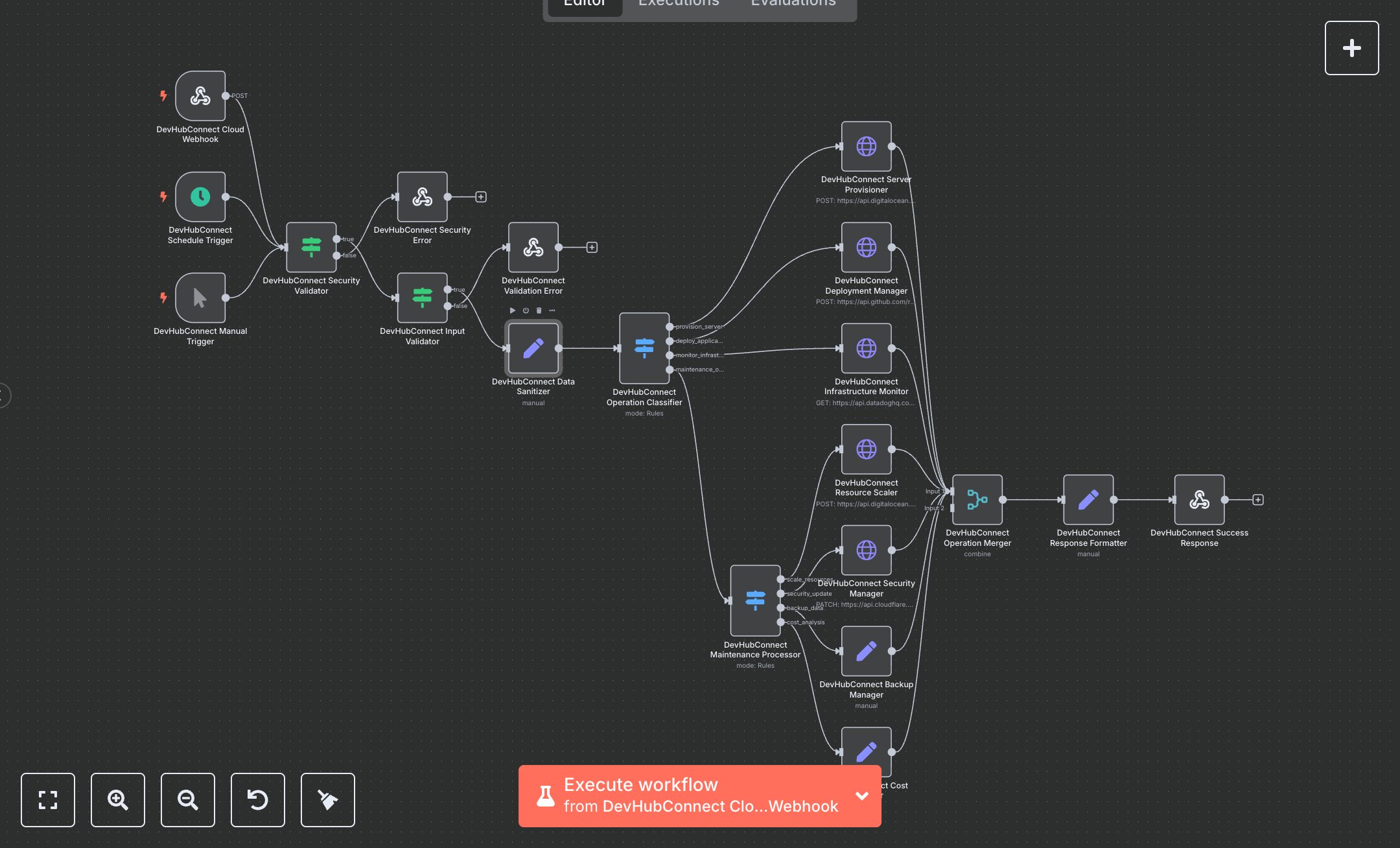
This workflow automates cloud infrastructure tasks like server provisioning, CI/CD deployment, monitoring, scaling, security patching, backups, and cost analysis using DigitalOcean, GitHub, Datadog, and Cloudflare APIs. Key nodes include Webhook for API triggers, Schedule Trigger for daily maintenance, Condition for security and input validation, Set for data sanitization, Switch for operation routing, HTTP Request for API integrations, Merge for result consolidation, and Webhook Response for output. It ensures secure, automated DevOps operations. To set up, download n8n from n8n.io for self-hosting or sign up at cloud.n8n.io. Obtain a DigitalOcean API token from cloud.digitalocean.com under API > Tokens. Get a GitHub personal access token from github.com under Settings > Developer settings > Personal access tokens, enabling workflow scope. Acquire the Datadog API key from datadoghq.com under Integrations > APIs. Get Cloudflare API token from dash.cloudflare.com under My Profile > API Tokens, selecting Zone: Edit. In n8n, add these under Credentials > Add Credential > HTTP Header Auth for each service. Import the workflow JSON via Workflows > Import. Configure the Webhook node (path: /cloud-infrastructure-automation, method: POST) with CORS headers (Access-Control-Allow-Origin: *). Use ngrok for local webhook testing. Set the Schedule Trigger to a cron expression (e.g., 0 0 * * * for daily). Ensure HTTPS for secure data transmission. Test by sending a POST request to the webhook with JSON (e.g., {operationType: 'provision_server', serverName: 'test-server', region: 'nyc3', size: 's-1vcpu-1gb'}). Include headers (x-api-key, x-cloud-auth). Validate outputs in the Set node for cloudResponse (e.g., success: true, operationResults.serverConfig.serverName = 'test-server'). Handle errors like invalid API tokens (401 response with 'SECURITY_VALIDATION_FAILED') or missing operationType (400 response with 'INVALID_INPUT'). For issues, verify HTTPS, credential accuracy, and API URLs. Deploy by saving and enabling the workflow, ensuring triggers are active. Test with a sample provisioning request to confirm DigitalOcean server creation. Check Webhook Response for operationResults (e.g., serverConfig.region = 'nyc3'). If integrations fail, verify node connections and API tokens in n8n’s editor.
$6.99
Workflow steps: 20
Integrated apps: webhook, scheduleTrigger, manualTrigger