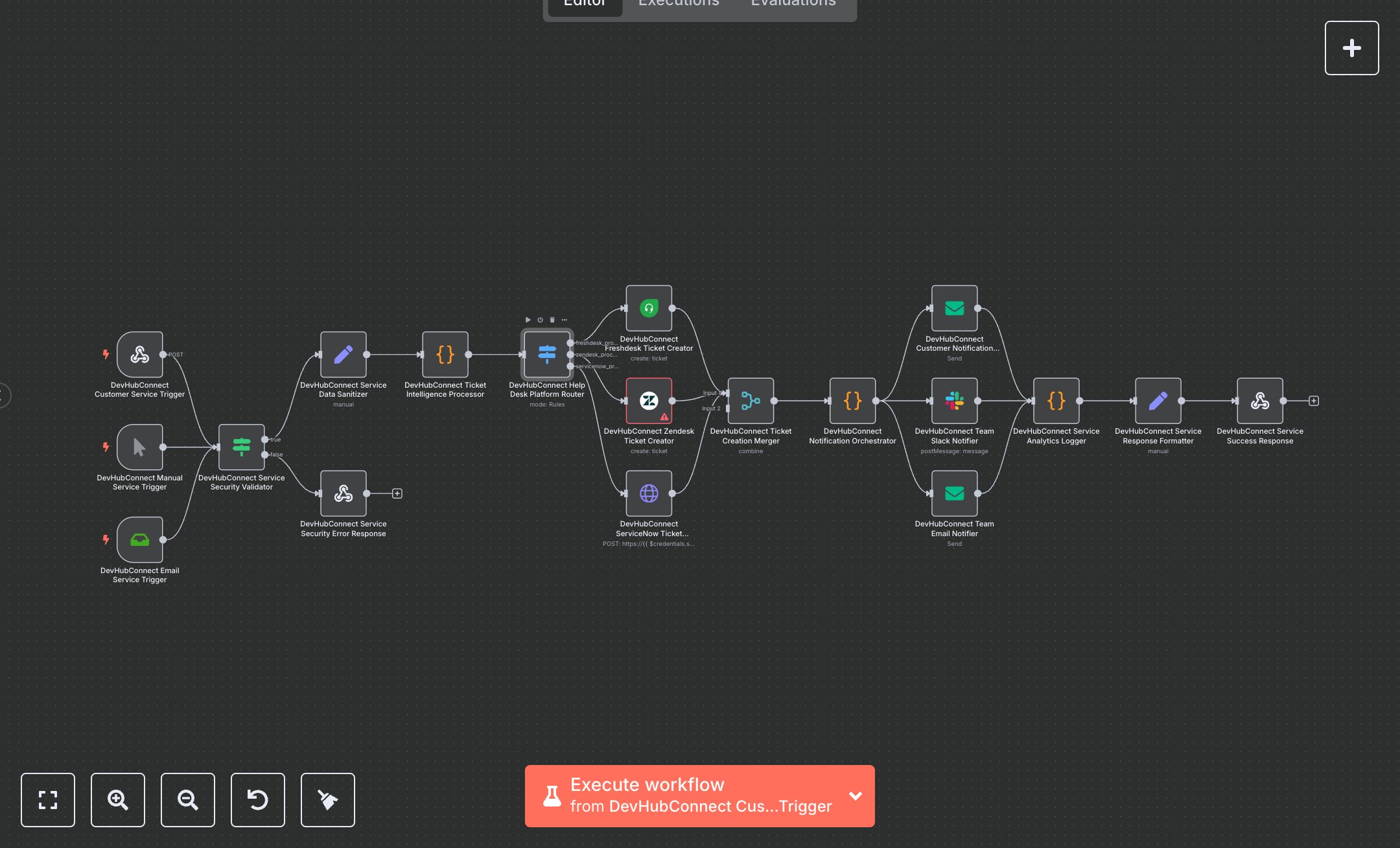
Customer Service Ticketing with Freshdesk, Email, and Slack
This workflow automates customer service ticket creation and management in Freshdesk, with email and Slack notifications. Key nodes include Webhook for API triggers, Email Trigger for incoming requests, Condition for security checks, Set for data sanitization, Function for ticket processing, Switch for platform routing, Freshdesk for ticket creation, Email and Slack for notifications, Merge for result consolidation, and Webhook Response for output. It ensures intelligent ticket categorization and SLA tracking. To set up, download n8n from n8n.io for self-hosting or sign up at cloud.n8n.io. Obtain Freshdesk API credentials (API Key, Domain) from your Freshdesk account under Profile Settings > API Key. Get SMTP credentials from your email provider (e.g., Gmail SMTP settings) and Slack API credentials from api.slack.com/apps under Create New App > Bot Token Scopes. In n8n, add these under Credentials > Add Credential > Freshdesk API, SMTP, and Slack API. Import the workflow JSON via Workflows > Import. Configure the Webhook node (path: /customer-service-automation, method: POST) with CORS headers (Access-Control-Allow-Origin: *). Use ngrok for local webhook testing. Set the Email Trigger to monitor INBOX with TLS enabled. Ensure HTTPS for secure data transmission. Test by sending an email to the configured inbox or a POST request to the webhook with JSON (e.g., {subject: 'Test Ticket', email: 'test@example.com', description: 'Help needed'}). Include headers (x-api-key, x-service-authorization). Validate outputs in the Set node for devHubConnectServiceResponse (e.g., success: true, customerExperience.satisfactionScore = 'neutral'). Handle errors like invalid Freshdesk credentials (401 response with 'SERVICE_SECURITY_VALIDATION_FAILED') or incorrect email setup (verify SMTP settings). For issues, confirm HTTPS, credential accuracy, and Slack channel settings. Deploy by saving and enabling the workflow, ensuring triggers are active. Test with a customer email to verify Freshdesk ticket creation and notifications. Check Webhook Response for operationalMetrics (e.g., automationEfficiency = '99%'). If notifications fail, verify node connections and credentials in n8n’s editor.
$5.49
Workflow steps: 19
Integrated apps: webhook, manualTrigger, emailReadImap