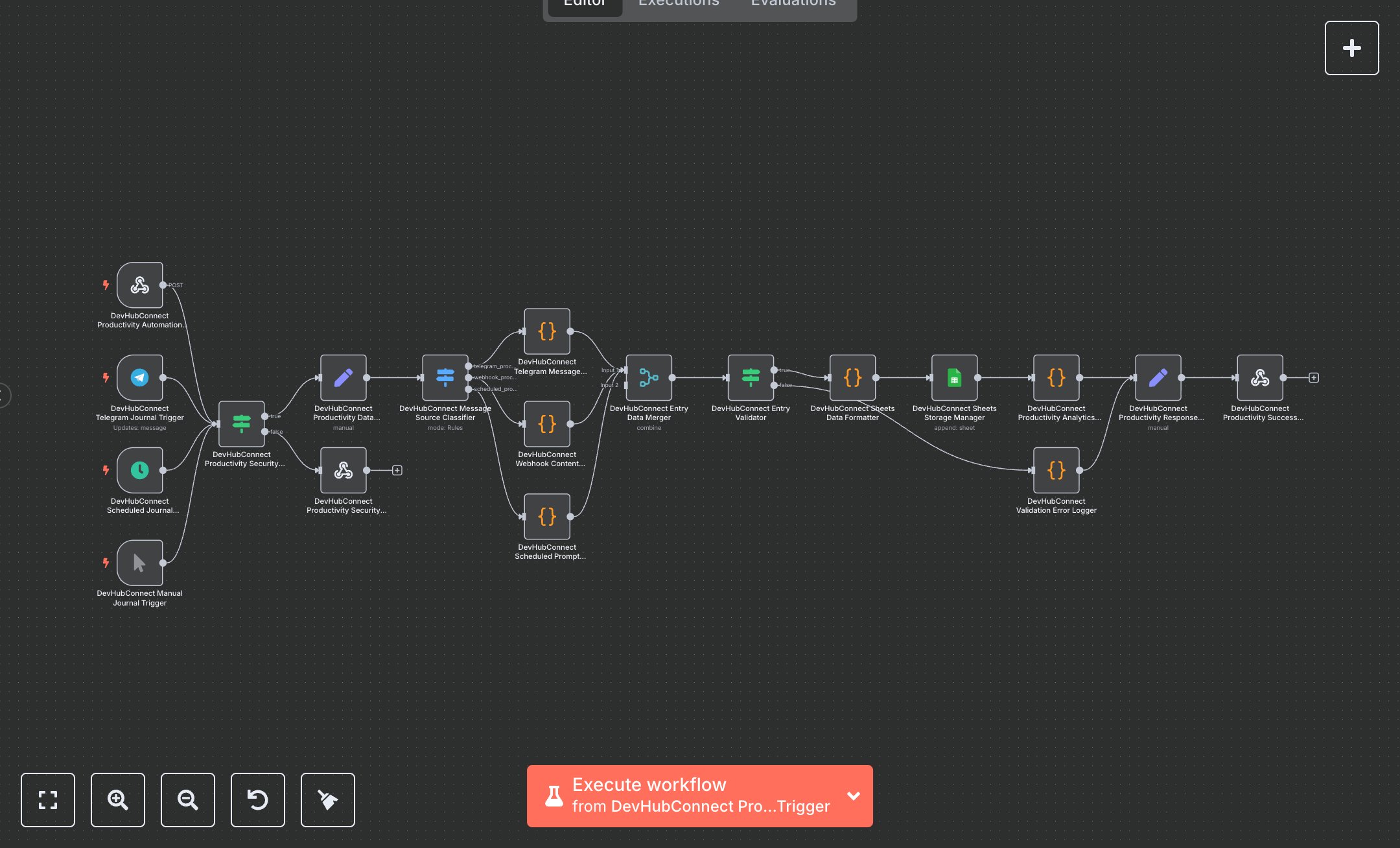
Personal Productivity: Capture Telegram Messages and Log to Google Sheets
This workflow automates journaling via Telegram and Google Sheets, enhancing personal productivity. Key nodes include Webhook for API entries, Telegram Trigger for message capture, Schedule Trigger for daily prompts, Condition for security validation, Set for data sanitization, Switch for source routing, Function for entry processing, Merge for data consolidation, Google Sheets for storage, and Webhook Response for results. To set up, download n8n from n8n.io for self-hosting or sign up at cloud.n8n.io. Create a Telegram bot via BotFather to get an API token. Obtain Google Sheets OAuth2 credentials from console.developers.google.com by enabling the Sheets API. In n8n, add credentials under Credentials > Add Credential > Telegram API and Google Sheets OAuth2. Import the workflow JSON via Workflows > Import. Configure the Webhook node (path: /personal-productivity-journaling, method: POST) with CORS headers (Access-Control-Allow-Origin: *). Use ngrok for local webhook testing. Set the Telegram Trigger to capture messages and the Schedule Trigger for daily prompts at 6:00 PM (cron: 0 20 18 * * 1-7). Ensure the Google Sheets node targets a spreadsheet with a 'Journal Entries' sheet. Verify HTTPS for secure data transmission. Test by sending a Telegram message to your bot or a POST request to the webhook with JSON (e.g., {content: 'Today was productive', category: 'reflection'}). Include headers (x-api-key, x-productivity-authorization). Validate outputs in the Set node for devHubConnectProductivityResponse (e.g., success: true, productivityResults.wordCount > 0). Handle errors like missing Telegram token (check BotFather settings) or invalid sheet ID (400 response with 'Empty journal entry'). For issues, confirm HTTPS, correct credentials, and spreadsheet permissions. Deploy by saving and enabling the workflow, ensuring triggers are active. Test with sample Telegram entries or scheduled prompts to verify storage in Google Sheets. Check the Webhook Response for wellness metrics (e.g., mindfulnessScore > 0). If storage fails, verify Google Sheets node connections and OAuth credentials in n8n’s editor.
$6.99
Workflow steps: 19
Integrated apps: webhook, telegramTrigger, scheduleTrigger