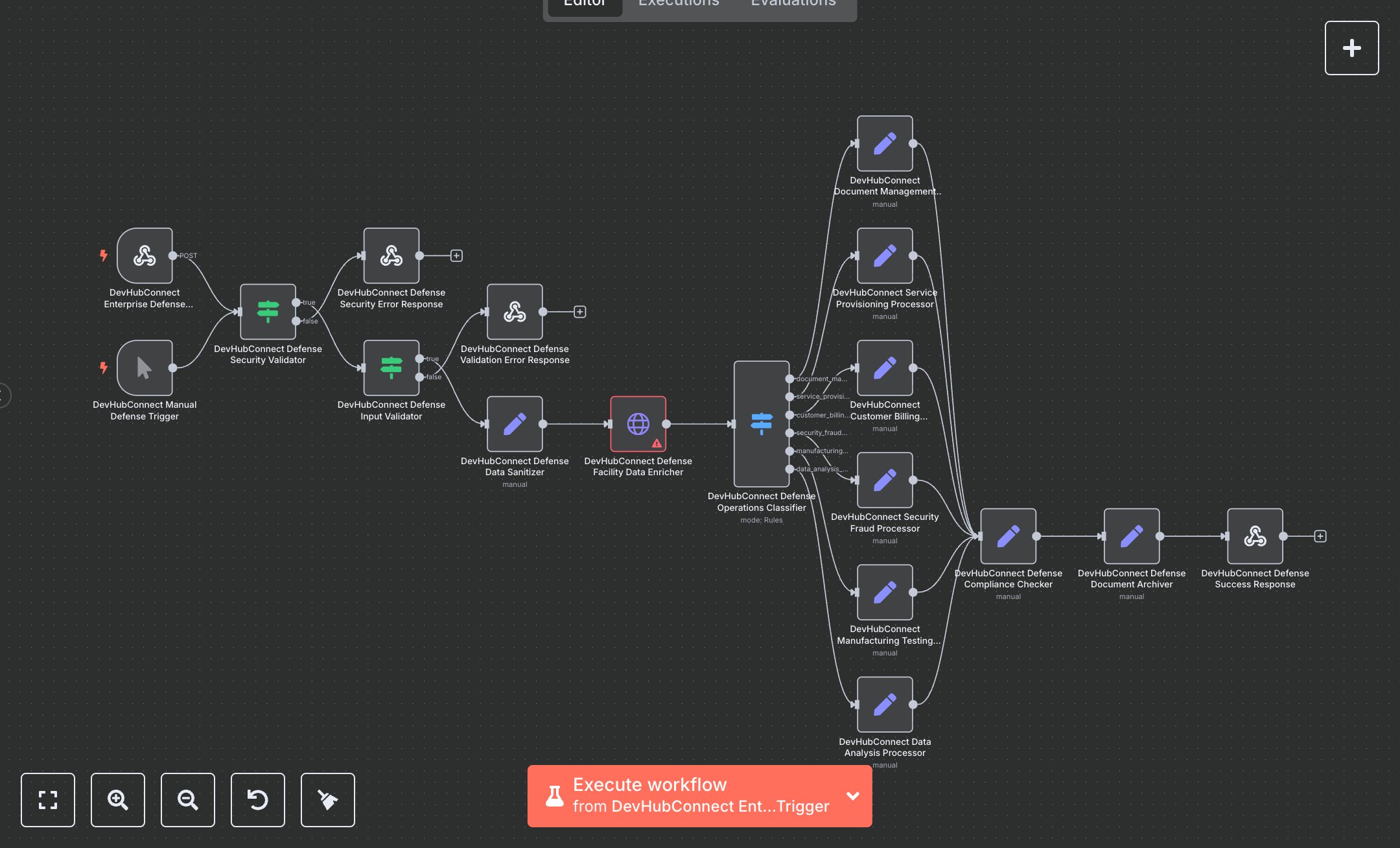
Defense Operations Management, Billing, Manufacturing, and Fraud Detection for ITAR, CMMC, and FISMA Compliance
This workflow automates enterprise defense operations, including document management, service provisioning, billing, fraud detection, manufacturing, and data analysis, ensuring ITAR, EAR, CMMC, and FISMA compliance. Key nodes include Webhook for secure data input, Condition for security and input validation, HTTP Request for facility data enrichment, Switch for operation classification, Set for data sanitization and compliance checks, and Webhook Response for structured outputs. To set up, download n8n from n8n.io for self-hosting or sign up at cloud.n8n.io. Obtain API credentials from your defense facility system’s developer portal (e.g., https://api.defense-system.example.com). Add credentials under Credentials > Add Credential > HTTP Header Auth in n8n. Import the workflow JSON via Workflows > Import. Configure the Webhook node with path /enterprise-defense-processing, set to POST, and include CORS headers (Access-Control-Allow-Origin: *). Use ngrok for local webhook testing to expose the URL. Ensure HTTPS for secure data transmission. Verify the HTTP Request node uses the facility API URL and includes Authorization and X-Defense-Auth headers. Test by sending a POST request to the webhook with JSON containing defenseData, operationId (e.g., DEF123), operationType (e.g., document_management), and facilityId (3-20 alphanumeric characters). Include x-api-key, x-security-clearance, and x-defense-auth headers. The workflow sanitizes data, enriches facility details, and processes compliance. Validate outputs in the Set node for regulatoryCompliance (ITAR, CMMC) and processingMetrics (e.g., complianceScore: 98%). Handle errors like missing x-api-key or x-security-clearance (401 response with 'DEFENSE_SECURITY_VALIDATION_FAILED') or invalid facilityId (400 response with 'INVALID_DEFENSE_INPUT'). For issues, confirm HTTPS, valid credentials, and correct JSON format. Deploy by saving and enabling the workflow, ensuring the webhook is active. Test with sample data (e.g., document with facilityId 'DEF001') to verify analysis includes compliance details and action items. Check Webhook Response for success flag, processing time, and archive metadata. If outputs are missing, verify API credentials and node connections in n8n’s editor.
$6.99
Workflow steps: 18
Integrated apps: webhook, manualTrigger, if