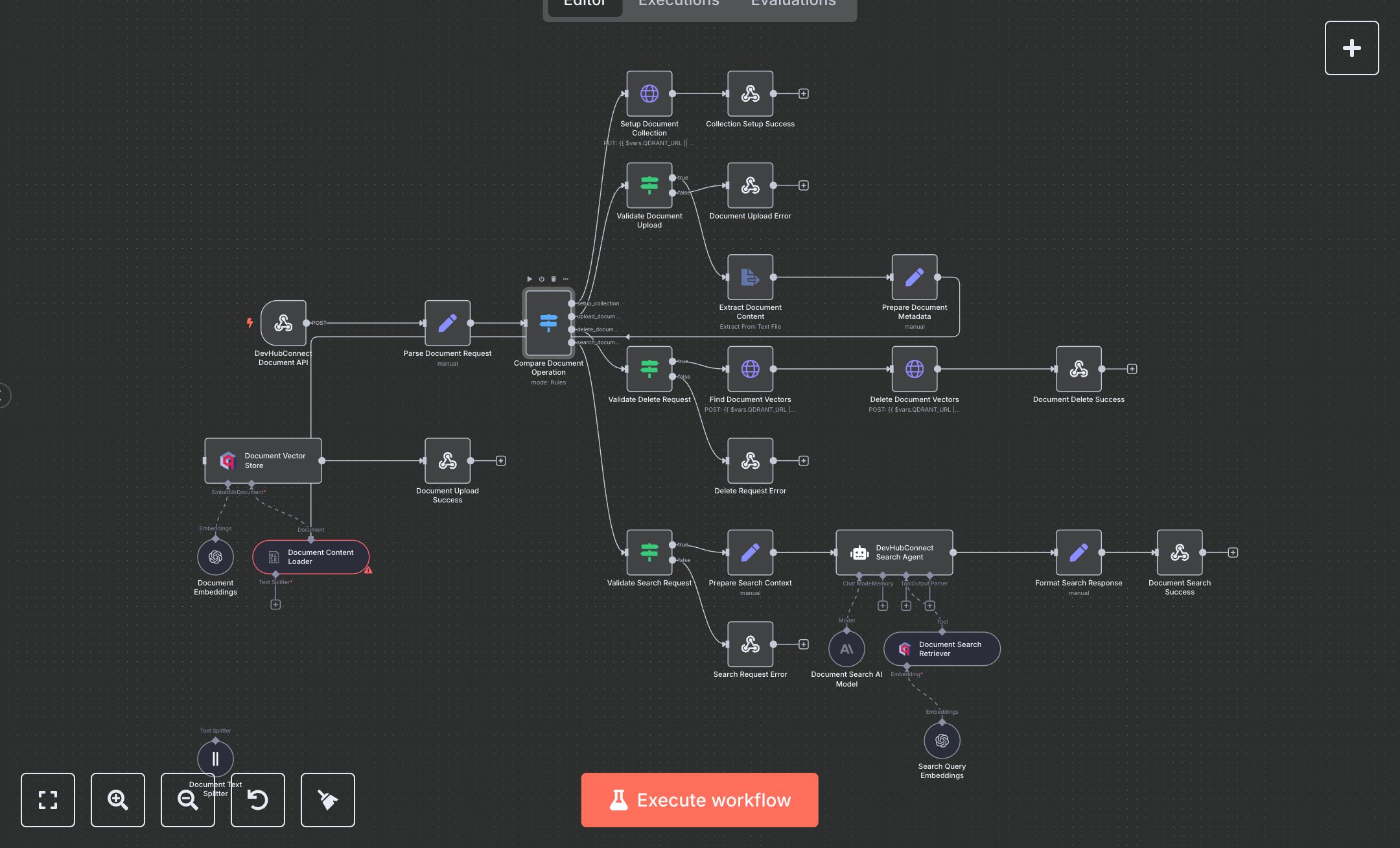
LLM Document Search with Qdrant Vector Store and Mistral Cloud
This workflow automates document management and intelligent search, replacing manual file searches or basic keyword tools. It handles document uploads, deletions, and semantic searches via a secure webhook, extracting text, generating embeddings with OpenAI, and storing them in a Qdrant vector database for AI-driven query responses. Key nodes include Webhook for request intake, Switch for operation routing, HTTP Request for Qdrant collection setup and deletion, Extract From File for text extraction, Langchain Document Loader and Text Splitter for chunking, OpenAI Embeddings and Qdrant for storage, and Langchain Agent for search responses. It benefits teams in small to mid-size organizations (10-100 employees) handling 50+ document queries daily, reducing search time from 10-15 minutes to seconds per query, improving data retrieval accuracy.\n\nThe ROI saves 8-12 hours weekly for teams processing 100+ queries, enhancing productivity for research or knowledge management. Use cases include HR teams searching policies, R&D teams accessing reports, or customer support retrieving manuals. Requirements: OpenAI API key (~$0.01/1K tokens for embeddings, ~$0.02/1K tokens for chat), Qdrant instance (free community edition or cloud ~$30/month), n8n instance (free or cloud.n8n.io, ~$20/month), DEVHUB_DOCUMENT_API_KEY for webhook authentication. Scalability supports thousands of documents; limited by Qdrant storage (~1M vectors free tier) and OpenAI API rate limits (~1,000 requests/minute). Environment variables: DEVHUB_DOCUMENT_API_KEY, QDRANT_URL.\n\nInstall n8n from n8n.io or cloud.n8n.io. Set up Qdrant (local or qdrant.cloud) and obtain API key. Get OpenAI API key from platform.openai.com. Configure n8n credentials: HTTP Header Auth (X-API-Key), OpenAI API, Qdrant API. Set nodes: Webhook (POST, path: 'document-search-system', header auth), HTTP Request for Qdrant collection setup (Cosine distance, 1024 vector size), Langchain nodes (Document Loader, Text Splitter with 1000 chunk size), Qdrant (collection: devhubconnect_docs), Search Agent (GPT-4o-mini). Expose webhook via ngrok.\n\nTest with POST requests (e.g., multipart/form-data with file for upload; {operation: 'search_documents', query: 'employee benefits'} for search; {operation: 'delete_document', document_id: 'doc_20250827_abc123'} for deletion) using Postman; verify document indexing or search results with metadata. Common errors: Invalid API key (401—check credentials), missing file/ID (400—verify request), rate limits (429—add retry logic). Deploy by activating workflow and sharing webhook URL. Maintenance: Monitor logs, rotate API keys quarterly, check Qdrant storage limits. Optimize by adjusting chunk size (500-1500), topK retrieval (3-10), or caching frequent searches.", "businessValue": "Saves 8-12 hours/week automating 100+ document searches for HR, R&D, or support teams", "setupTime": "30-45 minutes", "difficulty": "Advanced", "requirements": ["OpenAI API key", "Qdrant instance with API key", "DEVHUB_DOCUMENT_API_KEY", "QDRANT_URL", "n8n installation, webhook and AI knowledge"], "useCase": "Automating document management and intelligent search for knowledge-intensive teams"
$6.99
Workflow steps: 28
Integrated apps: webhook, set, switch