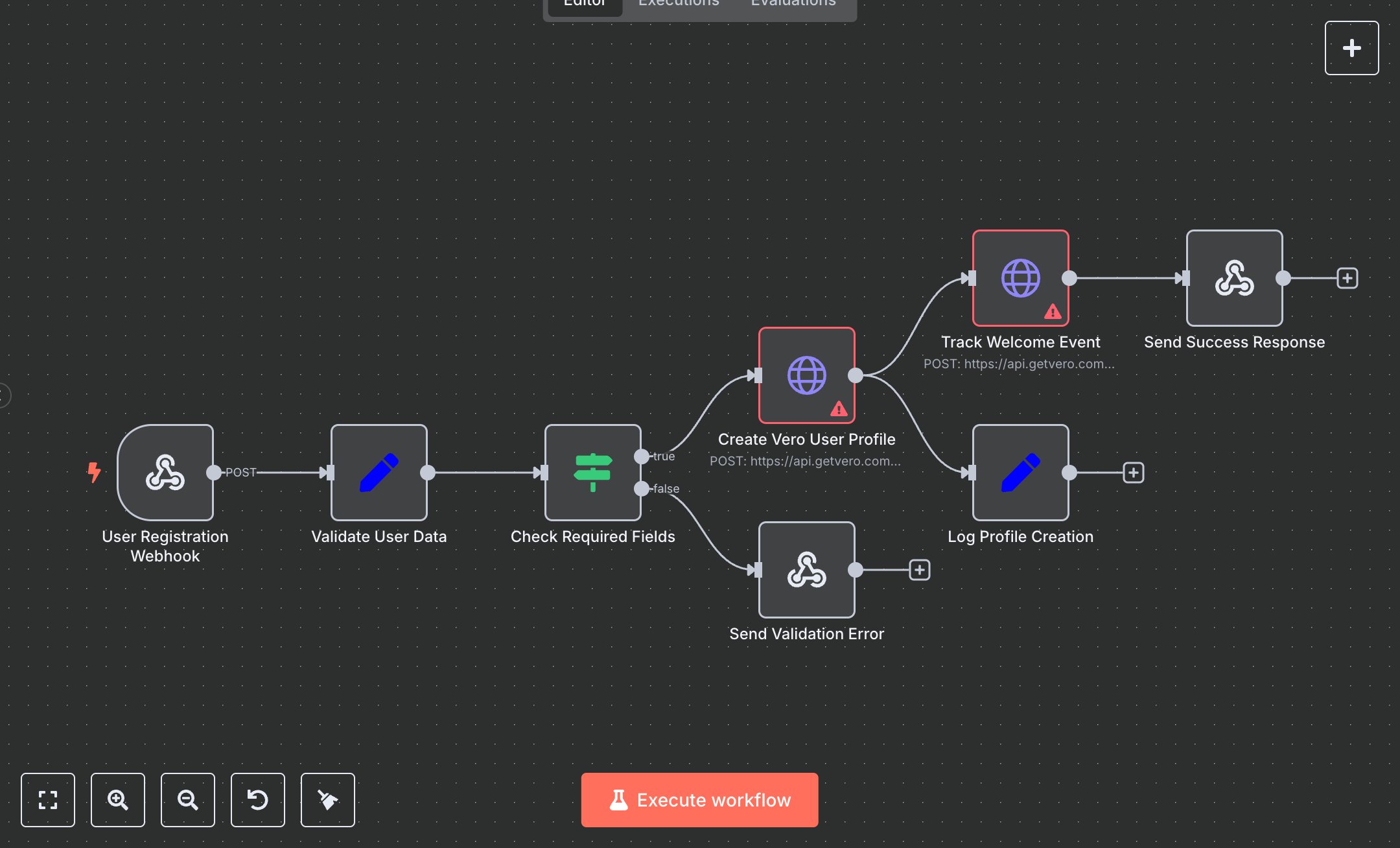
Vero User Profile Creator
This workflow automates user profile creation in Vero using the Vero API. Key nodes include User Registration Webhook (receives POST requests), Validate User Data (extracts user details), Check Required Fields (validates user_id and email), Create Vero User Profile (adds user via API), Track Welcome Event (logs registration event), Log Profile Creation (logs details), Send Success Response (returns success), and Send Validation Error (handles invalid inputs).\n\nSetup Requirements: Install n8n from n8n.io for local setup or sign up at cloud.n8n.io. Create a Webhook node (User Registration Webhook) with path create-vero-profile and HTTP method POST. Obtain a Vero API token from your Vero account (Settings > API Keys). In n8n’s Credentials, add Vero API with the token. Configure Create Vero User Profile (https://api.getvero.com/api/v2/users/track) and Track Welcome Event (https://api.getvero.com/api/v2/events/track) with the Vero API credential. Ensure Validate User Data extracts user_id, email, first_name, last_name, phone, company, signup_date, and source. The Check Required Fields node verifies non-empty user_id and email; if invalid, Send Validation Error returns a 400 status with {"status": "error", "message": "Missing required fields: user_id and email are required"}. Connect nodes in the editor. Handle errors like invalid API tokens (401).\n\nTesting and Deployment: Import the JSON into n8n’s workflow editor. Test with curl -X POST http://your-n8n-instance/create-vero-profile -d '{"user_id":"12345","email":"test@example.com","first_name":"John","last_name":"Doe"}'. Verify Send Success Response outputs status: "success", user_id, and email. Check Log Profile Creation for action: "vero_profile_created". Handle errors like missing user_id or email (400) or invalid token (401). Activate the workflow in n8n and integrate the webhook URL into your app (e.g., signup form). Monitor logs for issues like duplicate user IDs or API rate limits, ensuring reliable user profile creation and event tracking in Vero.
$5.49
Workflow steps: 8
Integrated apps: webhook, set, if