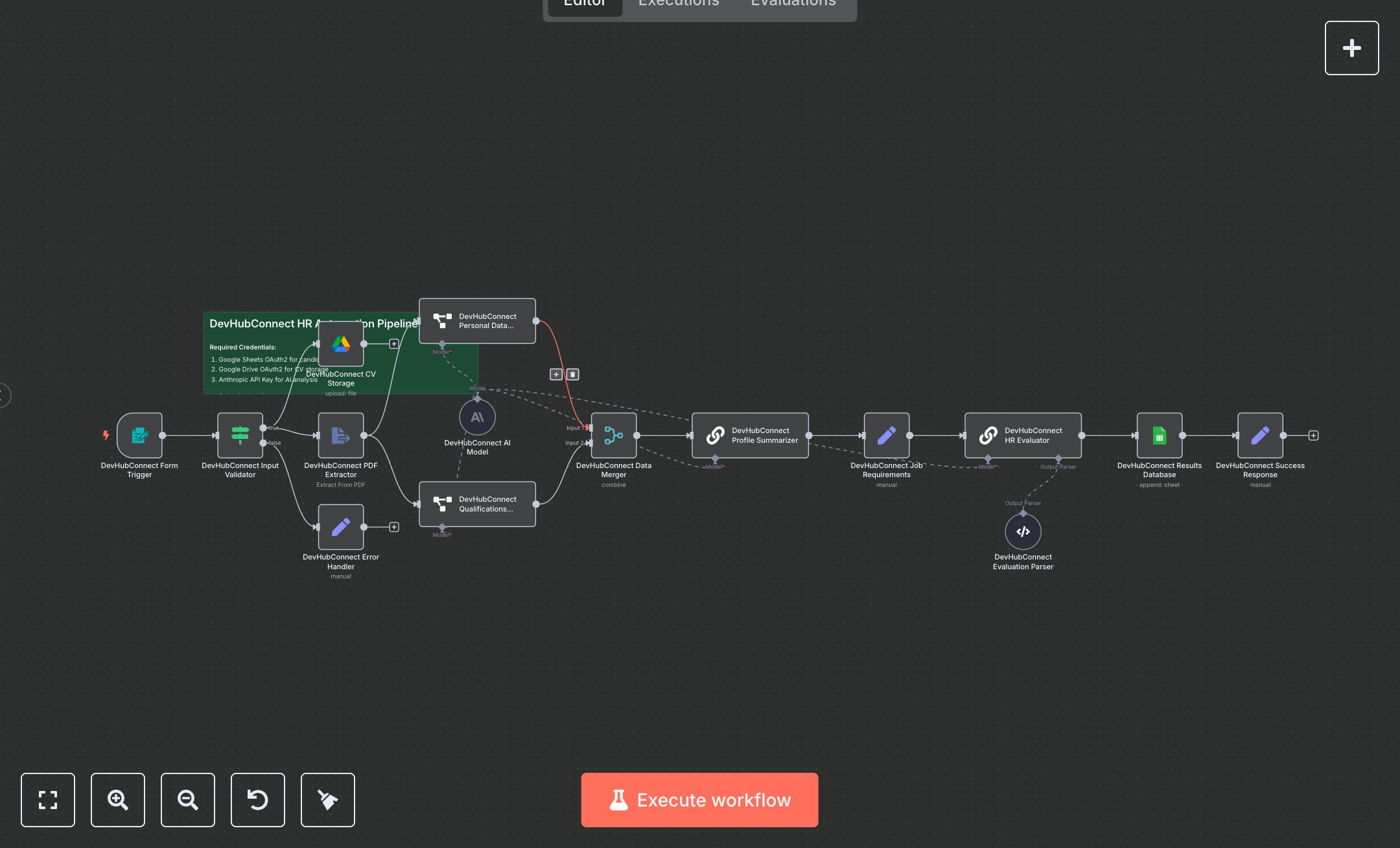
LLM Powered HR Workflow for CV Analysis and Candidate Evaluation
This workflow automates AI-driven job candidate screening by analyzing CVs. Key nodes include Form Trigger (collects candidate data and PDF CVs), Condition (validates inputs), Google Drive (stores CVs), Extract From File (extracts PDF text), Information Extractor (pulls personal and qualification data), Merge (combines data), Chain Summarization (creates candidate summaries), Set (defines job requirements and responses), Chain LLM (evaluates candidates using OpenAI), Output Parser Structured (formats evaluations), and Google Sheets (stores results). It uses OpenAI, Google Drive, and Google Sheets APIs for processing and storage.\n\nSetup requirements and configuration: Install n8n from n8n.io (self-hosted) or sign up at cloud.n8n.io. Obtain API credentials: OpenAI key from platform.openai.com, Google Sheets and Drive OAuth2 from console.developers.google.com. Create a Google Sheet with columns: DATE, NAME, EMAIL, CITY, PHONE, BIRTHDATE, EDUCATION, EXPERIENCE, SKILLS, SUMMARY, SCORE, EVALUATION, STATUS. Set up a Google Drive folder for CV storage. Import the JSON workflow in n8n. Configure Form Trigger with a webhook URL, Google Sheets and Drive nodes with credentials, and Chain LLM with OpenAI credentials in ‘Credentials.’ Set environment variables OPENAI_API_KEY, GOOGLE_SHEETS_OAUTH2_TOKEN, and GOOGLE_DRIVE_OAUTH2_TOKEN. Update job requirements in the Set node. Ensure internet access for API calls. In n8n settings, configure the Form Trigger webhook URL, ensuring public accessibility (e.g., via ngrok for local setups). Testing and deployment steps: Activate the workflow to generate the Form Trigger webhook URL. Test by submitting a form with a name, email, and a sample PDF CV. Verify CV storage in Google Drive and data in Google Sheets, including AI score (1-10) and evaluation. Check success response (“Application processed successfully”). Test invalid inputs (e.g., missing CV or invalid email) to trigger the error response (“Application submission failed”). Monitor logs for errors like ‘Invalid OpenAI key,’ ‘Google Drive access denied,’ or ‘PDF extraction failed.’ Validate extracted data (e.g., skills, education) and ensure the summary is concise and the score aligns with job requirements.
$6.99
Workflow steps: 16
Integrated apps: formTrigger, if, set