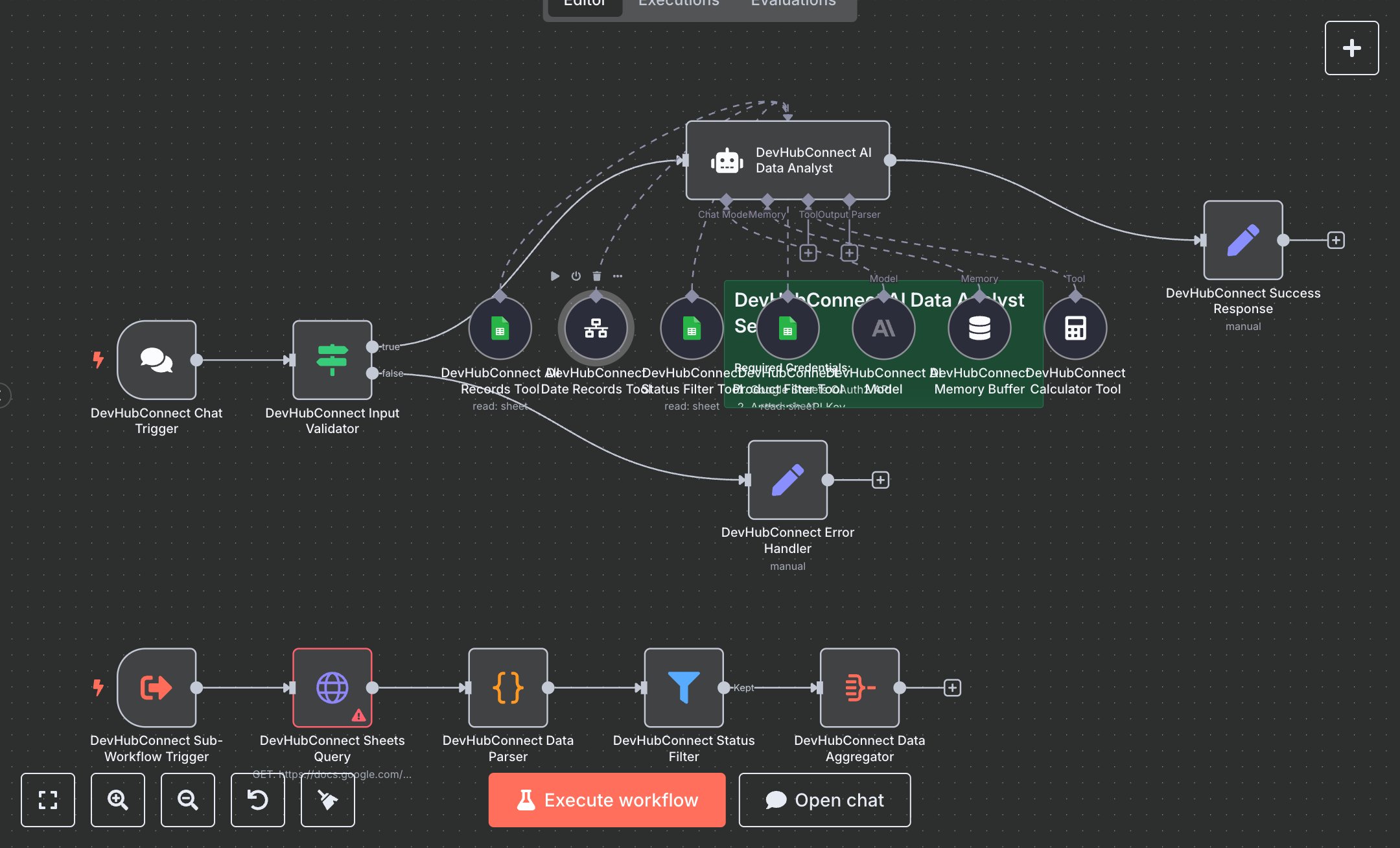
LLM Transaction Reporting: Analysis of Transaction Data in Google Sheets
This workflow automates transaction data analysis using natural language queries on Google Sheets data. Key nodes include Chat Trigger (receives user queries), Condition (validates input), Agent (processes queries with OpenAI GPT-4o), Memory Buffer Window (maintains context), Google Sheets Tool (filters by status/product), HTTP Request (queries Google Sheets via Visualization API), Code (parses JSONP responses), Filter (applies status filtering), and Aggregate (compiles results). It uses OpenAI and Google Sheets APIs for AI-driven insights.\n\nSetup requirements and configuration: Install n8n from n8n.io (self-hosted) or sign up at cloud.n8n.io. Obtain API credentials: OpenAI key from platform.openai.com and Google Sheets OAuth2 from console.developers.google.com. Create a Google Sheet with columns: Date, Product, Status, Amount. Import the JSON workflow in n8n. Configure Chat Trigger with a webhook URL, Google Sheets Tool, and HTTP Request nodes with Google Sheets credentials, and Agent with OpenAI credentials in ‘Credentials.’ Set environment variables OPENAI_API_KEY and GOOGLE_SHEETS_OAUTH2_TOKEN. Ensure internet access for API calls. In n8n settings, configure the Chat Trigger webhook URL, ensuring public accessibility (e.g., via ngrok for local setups). Verify the Google Sheet URL in HTTP Request and Google Sheets Tool nodes matches your sheet.\n\nTesting and deployment steps: Activate the workflow to generate the Chat Trigger webhook URL. Test by sending queries like “Total refunds in January 2025” or “Best-selling product in Q1” via the chat interface. Verify responses include specific numbers and insights (e.g., “$500 in refunds”). Check aggregated data for accuracy against the Google Sheet. Test invalid inputs (e.g., queries under 3 characters) to trigger the error response (“Please provide a valid question”). Monitor logs for errors like ‘Invalid OpenAI key,’ ‘Google Sheets access denied,’ or ‘Invalid date format.’ Validate outputs for correct filtering (e.g., status or product matches query) and ensure dates are formatted as YYYY-MM-DD. Confirm the Memory Buffer retains context for follow-up questions.
$6.99
Workflow steps: 18
Integrated apps: chatTrigger, if, set