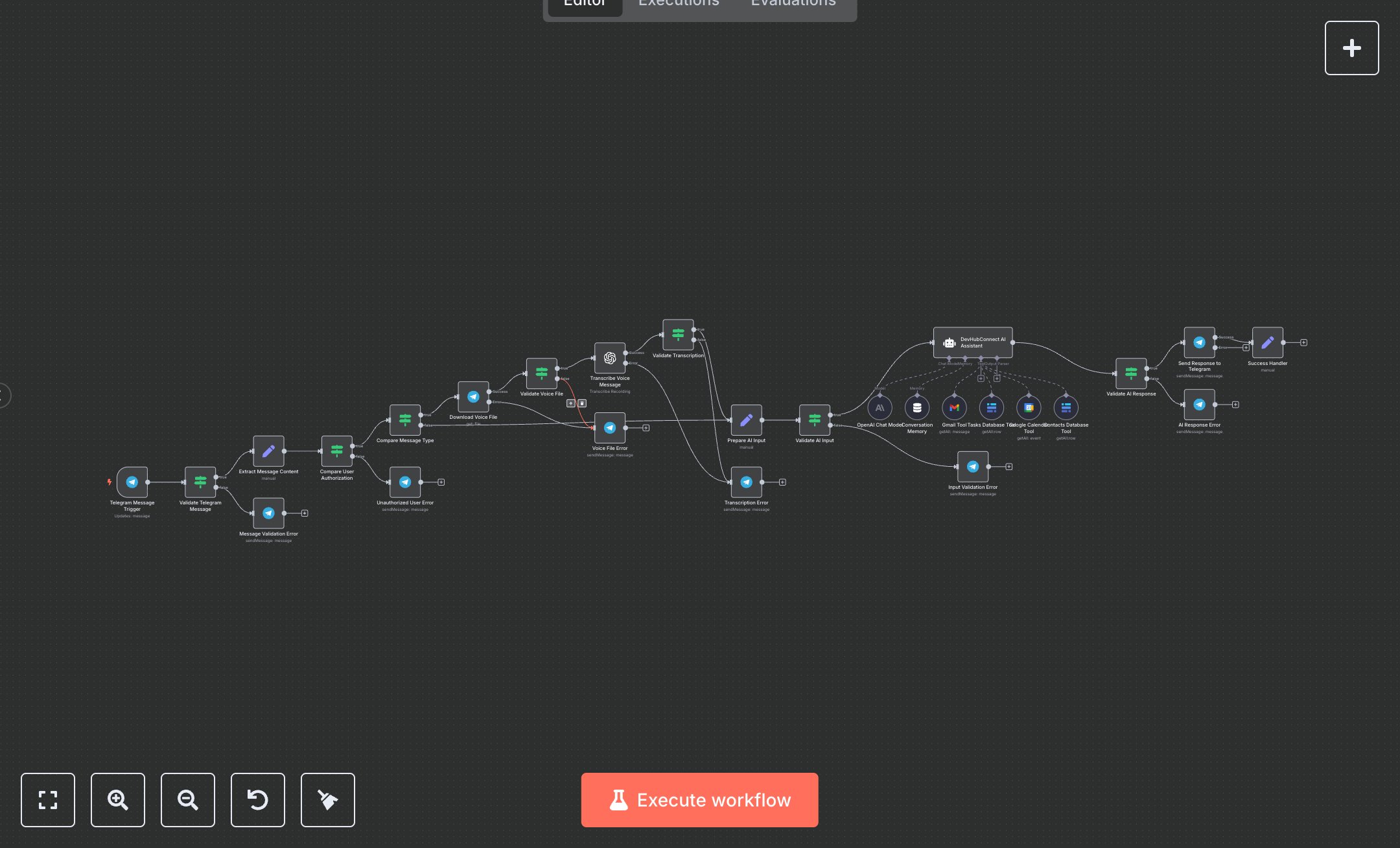
LLM Telegram DevHubConnect Agent: Integration with Gmail, Google Calendar, and Baserow
This workflow automates personal productivity tasks via Telegram, replacing manual app-switching for emails, calendars, tasks, and contacts that consume 1-2 hours daily. The Telegram Message Trigger node receives voice/text inputs, the Validate Telegram Message If node checks validity, the Extract Message Content Set node prepares data, the Compare User Authorization If node secures access, the Compare Message Type If node handles voice (Download Voice File Telegram, Validate Voice File If, Transcribe Voice Message OpenAI, Validate Transcription If), the Prepare AI Input Set node formats for AI, the Validate AI Input If node ensures quality, the OpenAI Chat Model LangChain LM Chat OpenAI node powers reasoning, the Conversation Memory LangChain Memory Buffer Window node retains context, the DevHubConnect AI Assistant LangChain Agent node processes queries using Gmail Tool, Google Calendar Tool, Tasks Database Tool (Baserow), and Contacts Database Tool (Baserow), the Validate AI Response If node verifies outputs, the Send Response to Telegram Telegram node replies, and Success Handler Set node logs success. Error paths (If/Telegram nodes) provide friendly fallbacks. It helps remote workers or small teams (1-10 staff) managing 50+ daily tasks, enabling seamless automation without leaving Telegram, boosting efficiency for freelancers or executives.\n\nThis workflow saves 7-10 hours weekly on 50 tasks, enhancing productivity by 75%. Use cases include email summaries, calendar checks for freelancers; suitable for individuals or micro-teams. Requires OpenAI ($0.03/1k tokens), Telegram Bot (free), Gmail/Google Calendar (free with Workspace), Baserow ($5/month starter). Scalable to 200 tasks/day with paid OpenAI.\n\nInstall n8n via n8n.io or cloud.n8n.io. Get OpenAI API key at platform.openai.com (enable billing). Create Telegram bot at t.me/botfather (get token). Enable Gmail API at console.cloud.google.com (OAuth credentials). For Google Calendar, enable API and create OAuth. Set up Baserow at baserow.io (free tier, get API key; create database/tables for tasks/contacts). Set env vars: OPENAI_API_KEY, TELEGRAM_BOT_TOKEN, GMAIL_CREDENTIALS, GOOGLE_CALENDAR_CREDENTIALS, BASEROW_API_KEY. Import JSON; no webhook—use Telegram Trigger. Configure tools with credentials.\n\nTest: Send Telegram message 'What's my calendar today?'. Verify reply. Errors: Invalid OpenAI key (regenerate), unauthorized user (update TELEGRAM_AUTHORIZED_USERS), voice transcription fail (retry). Deploy by activating workflow. Monitor dashboard weekly. Optimize: Adjust memory window; refresh OAuth quarterly.", "businessValue": "Saves 7-10 hours/week on 50 productivity tasks", "setupTime": "30-45 minutes", "difficulty": "Intermediate", "requirements": ["OpenAI API ($0.03/1k tokens)", "Telegram Bot (free), Gmail/Google Calendar (free), Baserow ($5/month)", "n8n instance with env vars and OAuth"], "useCase": "Automated task/email/calendar management via Telegram"
$6.99
Workflow steps: 27
Integrated apps: telegramTrigger, if, telegram