Customer Service Workload with Smart Document Search and Instant FAQ Responses
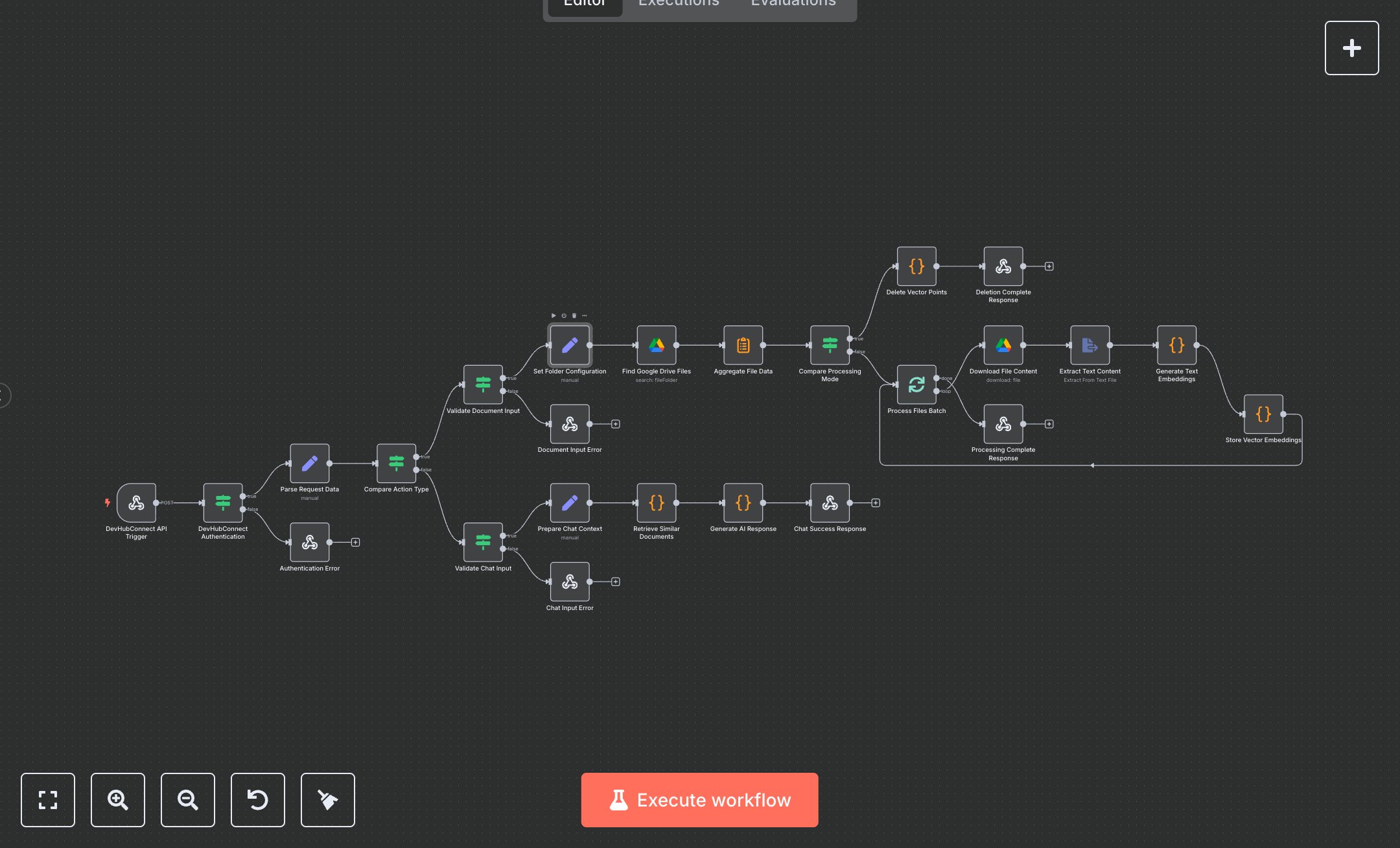
This workflow automates AI-powered document management and querying, replacing manual searches through Google Drive folders for relevant information in business knowledge bases. It eliminates hours spent downloading, reading, and cross-referencing files by ingesting documents into a vector store for semantic retrieval and generating context-aware responses. Key nodes include Webhook for API triggers with authentication, IF nodes for validation and routing between document processing and chat modes, Google Drive for file discovery and download, Extract From File for text extraction, Code nodes for embedding generation and vector storage (simulated), and Respond To Webhook for structured API responses. This benefits support teams or knowledge managers handling 200+ documents weekly, enabling instant answers to queries like policy details or procedure lookups, reducing resolution time from 30 minutes to seconds per request.\n\nROI delivers 8-12 hours weekly savings per user on document handling for 50-300 employee firms, automating ingestion of 100+ files. Use cases include HR teams in mid-size companies querying employee handbooks, sales teams retrieving product specs, or legal departments reviewing contracts. Required subscriptions: Google Workspace ($6/user/month), n8n Cloud (free tier for basics). Scalability handles up to 1,000 documents; limits from Google Drive API rates (1,000 requests/minute).\n\nInstall n8n from n8n.io or use cloud.n8n.io. Set up credentials: Google Drive OAuth2 via Google Cloud Console (enable Drive API, create OAuth app with scopes for file access). Configure DEVHUB_API_KEY environment variable for auth. No real webhook URL needed initially; test locally. Node setup: Use standard Webhook node with POST method, path 'ai-rag-chatbot'; Code nodes handle embeddings with simulated vectors—replace with actual OpenAI/Qdrant integration for production.\n\nTest by sending POST requests with JSON body (e.g., {action: 'process_documents', folder_id: 'xyz'}) using tools like Postman; verify responses and simulated storage. Common errors: Invalid API key (401 response—check env var), empty folder (handle in validation). Deploy by activating workflow, expose webhook via ngrok for external APIs. Maintenance: Monitor execution logs, update Code nodes for real vector DB. Optimize by adjusting batch sizes in Split In Batches for larger folders.", "businessValue": "Saves 8-12 hours/week automating document queries for teams with 200+ files", "setupTime": "30-45 minutes", "difficulty": "Intermediate", "requirements": ["Google Workspace subscription", "OAuth2 access for Google Drive API", "n8n installation with basic API knowledge"], "useCase": "Knowledge retrieval automation for HR/support teams in mid-size businesses"
$6.99
Workflow steps: 25
Integrated apps: webhook, if, respondToWebhook